| Bookmark Name | Actions |
|---|
Installing and Deploying JBoss server
This section helps you to install and deploy the Traceability microservice in the JBoss server.
Procedure:
- Download the latest jboss server or acquire the latest UTP pack from the temenos site, which is jboss server.
- Install the jboss server in your system with the support of installation documents.
- Go to jboss > standalone > deployments and place the ms-traceability-j2ee.war.
- In setEnv.bat, set the environment variables (shown below) needed to execute callbackregistry in jboss server.
- Now launch the jboss.bat and make sure you have installed h2 database and kafka in your system and it is up and running and connect with kafka and h2 through the appropriate environment variables.
- H2 database will be available in UTP pack, if so launch the launch-h2.bat and check whether all the tables are created in h2 bat using select queries.
- once the deployment is successful. using the port 9089 which is the default port of jboss, access the business apis of callbackregistry microservices.
- Note: The supported databases are Oracle and H2.
- Make sure that the correct connection url, username, passoword are used based on the database.
Corner Case for Traceability
While deploying Traceability in UTP enclosed JBoss server, the war displays Class not found exception while accessing the getSignature api due to the TemenosSecurity.jar file, which already lies inside the UTP jboss module. This file is also available in Traceability but the jar file present in the JBOSS server has precedence over the jar file present in the application path. The Jboss server forces you to deploy all the dependencies related to temenosSecurity.jar in server rather than pointing from application classpath.
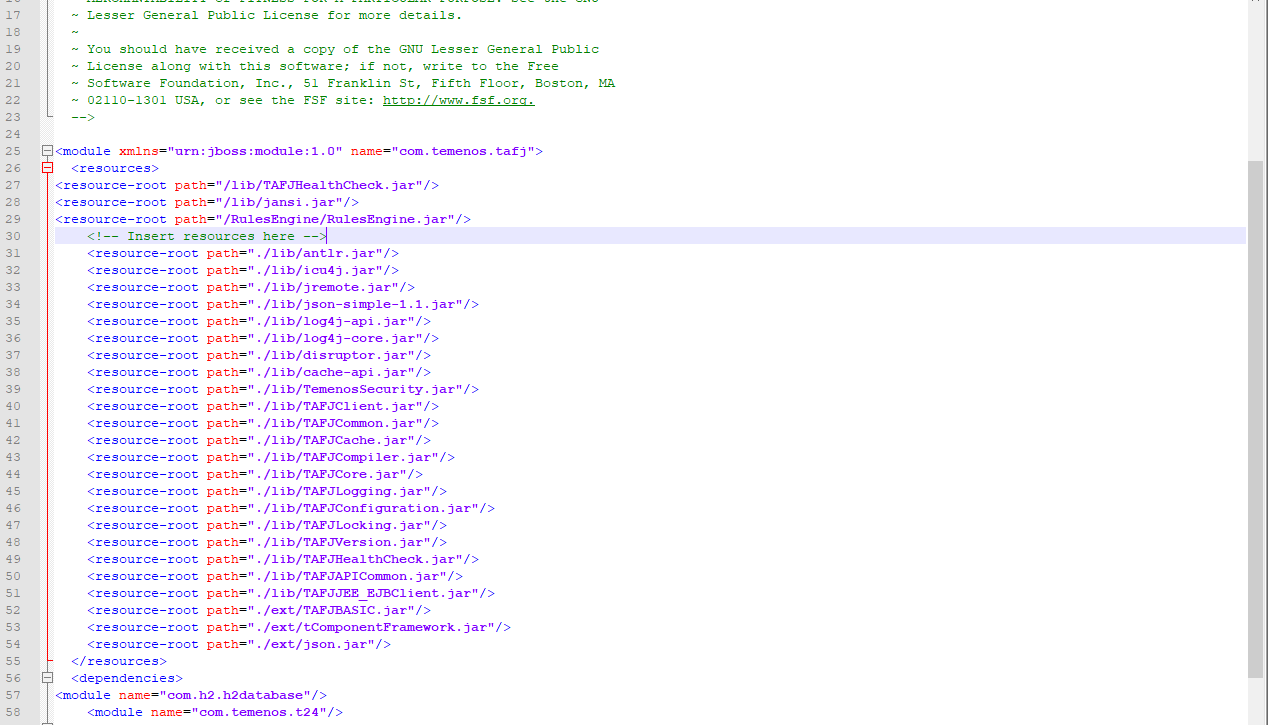
In the resource root available, you should remove the TemenosSecurity.jar file so that the server points to the jar and class files available in the application's classpath and for the traceability to work properly in JBoss server if it is running inside UTP
module.xml available in the C:\Temenos\jboss\modules\com\temenos\tafj\main path (This path may vary in your system).
NOTE: This corner case is not applicable to JBoss server deployed in standalone environment as it does not have any jars in the servers classpath.
Add Bookmark
save your best linksView Bookmarks
Visit your best links BACK
BACK


Are you sure you want to log-off?