| Bookmark Name | Actions |
|---|
Microservice Architecture
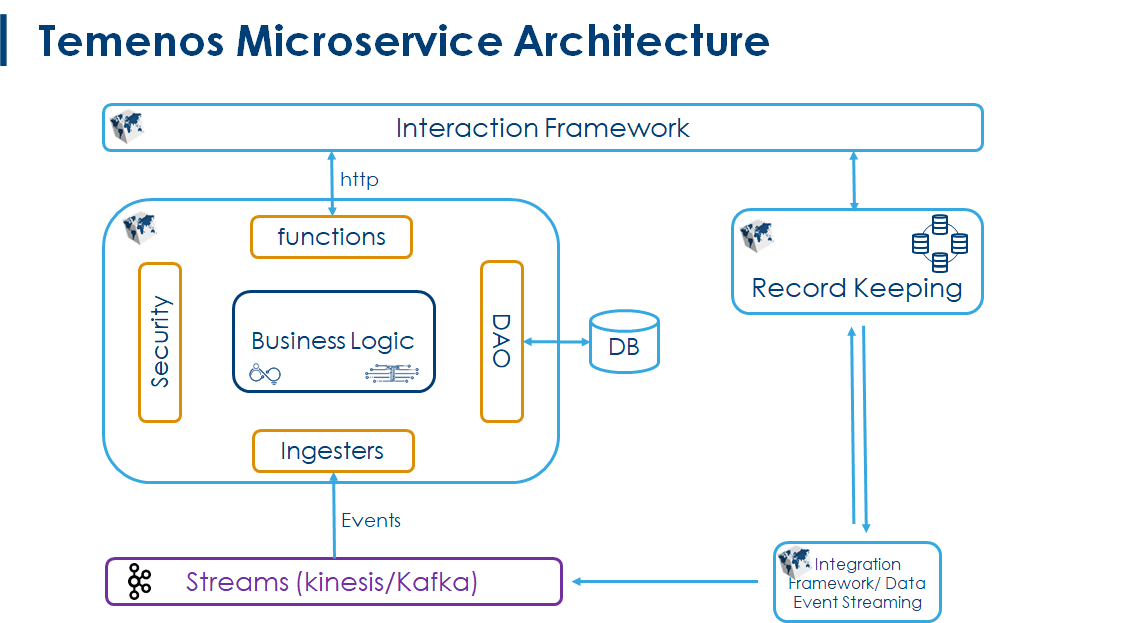
This section helps you to understand the microservices architecture of Temenos.
Interaction Framework receives requests from a variety of channels. It analyses if the request has to be processed in microservice or Temenos Transact.
- If the Interaction Framework sends the request to Temenos Transact, the request will be processed in Temenos Transact, sent to Ingesters (which is in microservices) and then it will be saved in database.
- If the Interaction Framework sends the request to microservices, the request will be processed in microservices and gets saved in database.
Temenos microservices architecture is given below.
Event Driven Architecture
It supports implementing an Inbox or Outbox pattern in the microservice framework to ensure messages are processed and the state changed appropriately within the underlying transaction. It is required to implement as a library, which can be re-used across microservices and Temenos products. This library standardizes the Inbox and Outbox implementations in the respective product solutions to support commands.
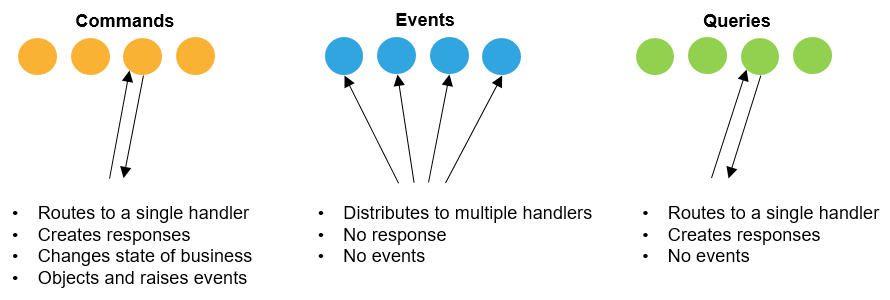
Where, Commands and Events are first-class entities in the applications and each command or event should be unique across the applications.
 Features
The Event Driven architecture features are:
At-least-once Delivery
The outbox infrastructure guarantees At-least-once Delivery of the events generated from the application. Outbox also provides the capability for the application to raise events to the Target Topic in Streaming platform based on the configuration in the Application.
Idempotency
Messages need a unique message reference, if not supplied this is created - identify messages uniquely and then retry or de-duplicate as appropriate.
Event Atomicity
Events must be atomic with business transactions.
Inbox or Outbox pattern ensures messages are processed and the state changed appropriately with the underlying transaction. Inbox Outbox functionality has been implemented as a generic infrastructure java library that is re-used across micro-services.
Event-Based Interactions - Scale
- Asynchronous – Event-based architectures are asynchronous without blocking. This allows resources to move freely to the next task once their unit of work is complete, without worrying about what happened before or will happen next. They also allow events to be queued or buffered which prevents consumers from putting back pressure on producers or blocking them.
- Loose Coupling – Services do not need knowledge of (or dependencies) on other services. When using events, services operate independently, without knowledge of other services, including their implementation details and transport protocol. Services under an event model can be updated, tested, and deployed independently and more easily.
- Easy Scaling – As the services are decoupled under an event-driven architecture and they perform only one task, it is easy to track down bottlenecks to a specific service and scale the service.
- Recovery Support – An event-driven architecture with a queue can recover lost work by replaying events from the past to prevent data loss when a consumer needs to recover.
Design
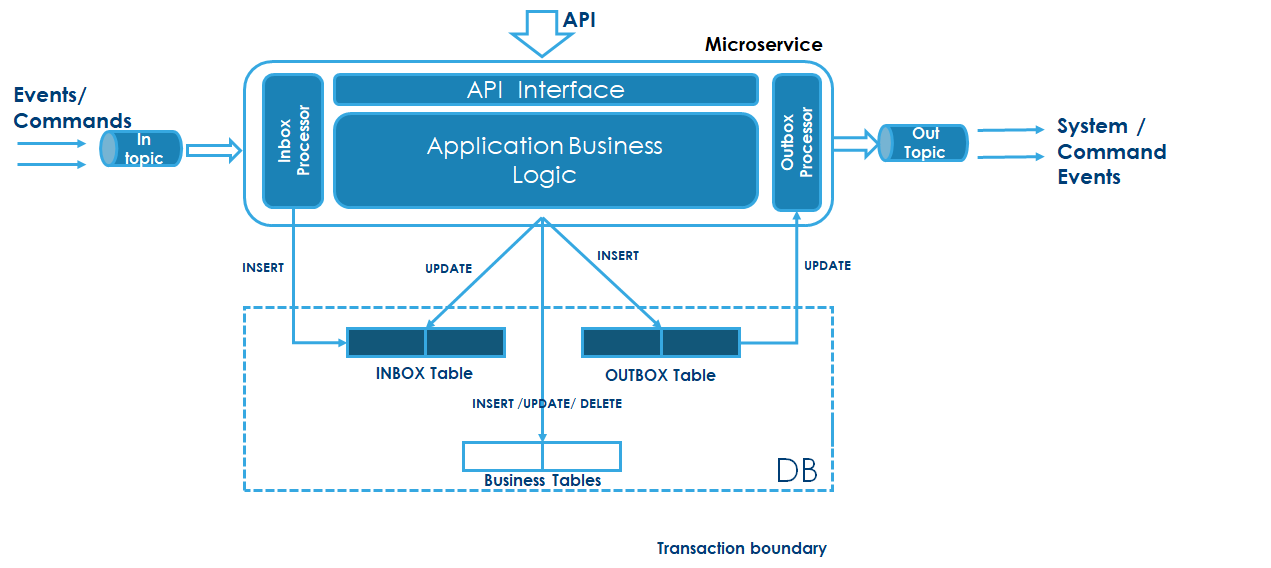
The below diagram highlights the components of Inbox and outbox components used to support Event-based architecture. The Inbox processor helps the application to receive commands/Events and invoke appropriate business implementation.
Inbox
It helps application to guarantee idempotency by identifying command or event uniquely and handle duplicates using Inbox infrastructure.
- Pulling from a queue or invoked directly from HTTP as a Lambda function, etc.
- Write to the inbox table and commit to the queue with the unique message reference, handle de-duplication check here.
- The long-running thread takes un-processed messages and invokes micro-service logic
- When the micro-service logic completes AND as part of the same database transaction, flag the message as processed. Some sort of locking/status updates to show the message is being processed. Also, dead letter queue processing to pick up messages flagged as being processed but timed out, e.g. the processing thread has died.
- Clean up a process to purge messages that have been processed
The event store guarantees event ordering and non-duplication of events in a single place. History/audit log and allows replay and catch-up.
Outbox
Outbox component helps application to raise business events and System Events for any API or command executed in the Microservice application. The Outbox design guarantees "Atleast Once delivery " of the Event messages from the application. Each of the Events raised from the application adheres the business Event or System Events Schema.
Business Events
Business events are raised by individual microservices and subscribers consume & handle the events. For example, if Payment service raises the PaymentCompleted business event, the Booking service consumes this event and updates the booking status as Confirmed.
Sample Business Event Message of FundsReserved
{
   "eventId":"23d57fd3-e1a6-4f87-88d2-6e4480cf662c",
   "dateTime":1576565314761,
   "organizationId":null,
   "correlationId":"14c26d2c-1385-4642-be5d-1a6c12481b5a",
   "tenantId":null,
   "userId":null,
   "priority":0,
   "status":"new",
   "businessObjects":null,
   "eventType":"FundsReserved",
   "operationInstanceId":null,
   "payload":{
      "transactionId":"8cf531d8-23ac-44da-a8fc-fa32990b5558",
      "accountId":"1111",
      "amount":100,
      "processedDateTime":1576565314726,
      "status":"RESERVED"
   },
   "sequenceInstanceId":null
}
System Events
System events are the generic events produced by the individual microservice, to notify it receives and process the Command/Event. The sequence of service execution gets trigger based on system events.
Sample System Event Messages
CommandReceived Event (Configurable)
{
   "eventId":"18b22bb1-dcb9-4d3d-9c6d-bf60dcc6070d",
   "dateTime":1576569008553,
   "organizationId":null,
   "correlationId":"1a316d88-3c17-4b59-ad7e-77a3961ac232",
   "tenantId":null,
   "userId":null,
   "priority":0,
   "status":"new",
   "eventType":"CommandReceived",
   "payload":{
      "eventId":"1a316d88-3c17-4b59-ad7e-77a3961ac232",
      "dateTime":1571618975000,
      "organizationId":null,
      "correlationId":null,
      "tenantId":null,
      "userId":null,
      "priority":0,
      "status":"new",
      "businessObjects":null,
      "eventType":"ms-paymentorder.CreatePayment",
      "operationInstanceId":null,
      "payload":{
         "body":{
            "debitAccountId":"1111",
            "amount":"100",
            "creditAccountId":"1115"
         }
      },
      "sequenceInstanceId":null
   }
}
CommandPocessed Event
{
   "eventId":"3e75a007-e3ba-4b05-aa74-03d8819392eb",
   "dateTime":1576565317024,
   "organizationId":null,
   "correlationId":"98b94723-bbb1-4e88-a32b-f1de4329ea30",
   "tenantId":null,
   "userId":null,
   "priority":0,
   "status":"new",
   "businessObjects":null,
   "eventType":"CommandProcessed",
   "operationInstanceId":null,
   "payload":{
      "commandId":"98b94723-bbb1-4e88-a32b-f1de4329ea30",
      "operationInstanceId":"2",
      "sequenceInstanceId":"2977491d-0bba-4f77-8899-b3d1ece8ab9c",
      "eventType":"ms-accounting.MoveMoney",
      "status":"NEW",
      "businessObject":{
         "status":200,
         "failureMessages":[

         ],
         "body":{
            "id":"d3645932-57e4-4d6a-a8cd-45ce123a8a4c",
            "debitAccountId":"1111",
            "amount":100,
            "creditAccountId":"1112",
            "fundsRersavationId":null,
            "paymentorderRequestId":null
         },
         "success":true
      }
   },
   "sequenceInstanceId":null
}
CommandFailed Event
{
   "eventId":"c16758e0-f3e2-49a5-b3a3-eb060d0f3b70",
   "dateTime":1576566836866,
   "organizationId":null,
   "correlationId":"c9aa9fce-72ae-455a-8da4-085141cb2870",
   "tenantId":null,
   "userId":null,
   "priority":0,
   "status":"new",
   "eventType":"CommandFailed",
   "payload":{
      "commandId":"c9aa9fce-72ae-455a-8da4-085141cb2870",
      "operationInstanceId":"1",
      "sequenceInstanceId":"614387f9-7145-4a8e-97d1-8b82f3dd4641",
      "eventType":"ms-fundsreserve.ReserveFunds",
      "status":"NEW",
      "businessObject":{
         "status":500,
         "failureMessages":[
            {
               "message":"Invocation of function implementation 'com.temenos.microservice.fundsreserve.function.ReserveFundsImpl' failed",
               "code":""
            }
         ],
         "body":null,
         "success":false
      }
   }
}
Configurations
This section provides implementation details on the inbox and outbox component in Microservices
Packaged Libraries
Following are the java libraries provides inbox and outbox implementation for the applications
ms-commons-connect.jar
Commons Connect library helps to deliver the outbox messages to the queue/topic. Kafka and Kinesis producers are used to deliver the messages to Kafka/Kinesis topic.
ms-commons-connect depends on DES library to instantiate kafka/kinesis producer.
ms-inbox-outbox.jar
Inbox outbox library helps to implement the Inbox/Outbox pattern in the application. It defines the standard set of interfaces to implement and configure the
ms-inbox-outbox depends on ms-commons-connect to deliver the messages.
Using Inbox Outbox library
Procedure:
- Create inbox and outbox table (refer database schema below)
- Create inbox and outbox entity java which should implement the interface com.temenos.inboxoutbox.data.InboxEvent/OutboxEvent.
- Implement the interface InboxDao and OutboxDao
- Configure the implementation class in the environment properties class.inbox.dao and class.outbox.dao (refer below)
- Instantiate an entity and call InboxFunction/OutboxFunction to save the inbox/outbox
Event Schema
The events which are supported inbox & outbox needs to adhere to the following schema
Business Events
Business events are raised from the microservices to notify about the state change happened inside business transactions. Subscribers get notification for these business events and handle them. Example events: PaymentOrderCreated, FundsReserved, MoneyMoved, etc...
FundsReserved_Schema.txt
{
  "$schema": "http://json-schema.org/draft-04/schema#",
  "type": "object",
  "properties": {
    "eventId": {
      "type": "string"
    },
    "dateTime": {
      "type": "integer"
    },
    "organizationId": {
      "type": "null"
    },
    "correlationId": {
      "type": "string"
    },
    "tenantId": {
      "type": "null"
    },
    "userId": {
      "type": "null"
    },
    "priority": {
      "type": "integer"
    },
    "status": {
      "type": "string"
    },
    "businessObjects": {
      "type": "null"
    },
    "eventType": {
      "type": "string"
    },
    "operationInstanceId": {
      "type": "null"
    },
    "payload": {
      "type": "object",
      "properties": {
        "transactionId": {
          "type": "string"
        },
        "accountId": {
          "type": "string"
        },
        "amount": {
          "type": "integer"
        },
        "processedDateTime": {
          "type": "integer"
        },
        "status": {
          "type": "string"
        }
      },
      "required": [
        "transactionId",
        "accountId",
        "amount",
        "processedDateTime",
        "status"
      ]
    },
    "sequenceInstanceId": {
      "type": "null"
    }
  },
  "required": [
    "eventId",
    "dateTime",
    "correlationId",
    "eventType",
    "payload"
  ]
}
Command Events
Command events are the system events produced by the individual microservice to notify it receives and process the Command/Event.
CommandReceived_schema.txt
{
  "$schema": "http://json-schema.org/draft-04/schema#",
  "type": "object",
  "properties": {
    "eventId": {
      "type": "string"
    },
    "dateTime": {
      "type": "integer"
    },
    "organizationId": {
      "type": "string"
    },
    "correlationId": {
      "type": "string"
    },
    "tenantId": {
      "type": "string"
    },
    "userId": {
      "type": "string"
    },
    "priority": {
      "type": "integer"
    },
    "status": {
      "type": "string"
    },
    "eventType": {
      "type": "string"
    },
    "payload": {
      "type": "object",
      "properties": {
        "eventId": {
          "type": "string"
        },
        "dateTime": {
          "type": "integer"
        },
        "organizationId": {
          "type": "string"
        },
        "correlationId": {
          "type": "string"
        },
        "tenantId": {
          "type": "string"
        },
        "userId": {
          "type": "string"
        },
        "priority": {
          "type": "integer"
        },
        "status": {
          "type": "string"
        },
        "businessObjects": {
          "type": "string"
        },
        "eventType": {
          "type": "string"
        },
        "operationInstanceId": {
          "type": "string"
        },
        "payload": {
          "type": "object",
          "properties": {
            "body": {
              "type": "object",
              "properties": {
                "debitAccountId": {
                  "type": "string"
                },
                "amount": {
                  "type": "string"
                },
                "creditAccountId": {
                  "type": "string"
                }
              },
              "required": [
                "debitAccountId",
                "amount",
                "creditAccountId"
              ]
            }
          },
          "required": [
            "body"
          ]
        },
        "sequenceInstanceId": {
          "type": "string"
        }
      },
      "required": [
        "eventId",
        "dateTime",
        "organizationId",
        "correlationId",
        "tenantId",
        "userId",
        "priority",
        "status",
        "businessObjects",
        "eventType",
        "operationInstanceId",
        "payload",
        "sequenceInstanceId"
      ]
    }
  },
  "required": [
    "eventId",
    "dateTime",
    "correlationId",
    "eventType",
    "payload"
  ]
}
CommandProcessed_Schema.txt
{
  "$schema": "http://json-schema.org/draft-04/schema#",
  "type": "object",
  "properties": {
    "eventId": {
      "type": "string"
    },
    "dateTime": {
      "type": "integer"
    },
    "organizationId": {
      "type": "string"
    },
    "correlationId": {
      "type": "string"
    },
    "tenantId": {
      "type": "string"
    },
    "userId": {
      "type": "string"
    },
    "priority": {
      "type": "integer"
    },
    "status": {
      "type": "string"
    },
    "businessObjects": {
      "type": "string"
    },
    "eventType": {
      "type": "string"
    },
    "operationInstanceId": {
      "type": "string"
    },
    "payload": {
      "type": "object",
      "properties": {
        "commandId": {
          "type": "string"
        },
        "operationInstanceId": {
          "type": "string"
        },
        "sequenceInstanceId": {
          "type": "string"
        },
        "eventType": {
          "type": "string"
        },
        "status": {
          "type": "string"
        },
        "businessObject": {
          "type": "object",
          "properties": {
            "status": {
              "type": "integer"
            },
            "failureMessages": {
              "type": "array",
              "items": {}
            },
            "body": {
              "type": "object",
              "properties": {
                "id": {
                  "type": "string"
                },
                "debitAccountId": {
                  "type": "string"
                },
                "amount": {
                  "type": "integer"
                },
                "creditAccountId": {
                  "type": "string"
                },
                "fundsRersavationId": {
                  "type": "string"
                },
                "paymentorderRequestId": {
                  "type": "string"
                }
              },
              "required": [
                "id",
                "debitAccountId",
                "amount",
                "creditAccountId",
                "fundsRersavationId",
                "paymentorderRequestId"
              ]
            },
            "success": {
              "type": "boolean"
            }
          },
          "required": [
            "status",
            "failureMessages",
            "body",
            "success"
          ]
        }
      },
      "required": [
        "commandId",
        "operationInstanceId",
        "sequenceInstanceId",
        "eventType",
        "status",
        "businessObject"
      ]
    },
    "sequenceInstanceId": {
      "type": "string"
    }
  },
  "required": [
    "eventId",
    "dateTime",
    "correlationId",
    "eventType",
    "payload"
  ]
}
CommandFailed_Schema.txt
{
  "$schema": "http://json-schema.org/draft-04/schema#",
  "type": "object",
  "properties": {
    "eventId": {
      "type": "string"
    },
    "dateTime": {
      "type": "integer"
    },
    "organizationId": {
      "type": "string"
    },
    "correlationId": {
      "type": "string"
    },
    "tenantId": {
      "type": "string"
    },
    "userId": {
      "type": "string"
    },
    "priority": {
      "type": "integer"
    },
    "status": {
      "type": "string"
    },
    "eventType": {
      "type": "string"
    },
    "payload": {
      "type": "object",
      "properties": {
        "commandId": {
          "type": "string"
        },
        "operationInstanceId": {
          "type": "string"
        },
        "sequenceInstanceId": {
          "type": "string"
        },
        "eventType": {
          "type": "string"
        },
        "status": {
          "type": "string"
        },
        "businessObject": {
          "type": "object",
          "properties": {
            "status": {
              "type": "integer"
            },
            "failureMessages": {
              "type": "array",
              "items": [
                {
                  "type": "object",
                  "properties": {
                    "message": {
                      "type": "string"
                    },
                    "code": {
                      "type": "string"
                    }
                  },
                  "required": [
                    "message",
                    "code"
                  ]
                }
              ]
            },
            "body": {
              "type": "string"
            },
            "success": {
              "type": "boolean"
            }
          },
          "required": [
            "status",
            "failureMessages",
            "body",
            "success"
          ]
        }
      },
      "required": [
        "commandId",
        "operationInstanceId",
        "sequenceInstanceId",
        "eventType",
        "status",
        "businessObject"
      ]
    }
  },
  "required": [
    "eventId",
    "dateTime",
    "correlationId",
    "eventType",
    "payload"
  ]
}
|
Command |
Description |
|---|---|
|
correlationId |
Unique identifier (UUID) holds the incoming message identifier. |
|
dateTime |
Stores the event creation date time |
|
eventId |
Unique identifier (UUID) |
|
eventType |
Event Type – <MS_NAME>.<Operation> |
|
operationInstanceId |
Operation ID of the sequence |
|
organizationId |
Organization Id |
|
payload |
Event data payload |
|
priority |
Event Priority for delivery |
|
SequenceInstanceId |
Sequence id of this event belongs to |
|
tenantId |
Tenant Id |
|
userId |
User Id |
Environmental Parameters
Inbox Outbox:
- class.inbox.dao - Implementation of InboxDao interface.
- class.outbox.dao - Implementation of OutboxDao interface.
MS Framework:
- temn.msf.raise.received.event: "false"/"true" (whether to raise commandReceived event)
- temn.msf.exec.env: server/serverless (onPremise/cloud deployment)
Database Schema
The following are the database tables to be created and made available in the application schema. The database can be SQL or NOSQL.
Inbox Schema
|
Column |
Data Type |
Description |
Mandatory (M)/ Optional (O) |
|---|---|---|---|
|
tenantId |
Text |
Tenant Id |
O |
|
organizationId |
Text |
Organization Id |
M |
|
eventId |
Text |
Unique identifier (UUID) |
M |
|
userId |
Text |
User Id |
M |
|
priority |
integer |
Event Priority for delivery |
O |
|
eventType |
Text |
Event Type – used to identify the event type |
M |
|
eventDetails |
Text |
Additional Event metadata (as name-value pair) |
O |
|
payload |
Text |
Event data payload |
M |
|
status |
Text |
Possible Values “NEW”, PROCESSED”, “FAILED” |
M |
|
creationTime |
TimeStamp |
Stores the event creation date-time |
M |
|
procesSedTime |
TimeStamp |
Event processed date time <yet to be implemented> |
M |
Outbox Schema
|
Column |
Data Type |
Description |
Mandatory (M)/ Optional (O) |
|---|---|---|---|
|
tenantId |
Text |
Tenant Id of optional |
O |
|
organizationId |
Text |
Organization Id |
M |
|
eventId |
Text |
Unique identifier (UUID) |
M |
|
correlationId |
Text |
Unique identifier (UUID) |
O |
|
userId |
Text |
User Id |
M |
|
priority |
integer |
Event Priority for delivery |
O |
|
eventType |
Text |
Event Type – used to identify the event type |
M |
|
eventDetails |
Text |
Additional Event metadata (as name-value pair) |
O |
|
payload |
Text |
Event data payload |
M |
|
status |
Text |
Possible Values “NEW”, DELIVERED”, “FAILED” |
M |
|
creationTime |
TimeStamp |
Stores the event creation date-time |
M |
|
processedTime |
TimeStamp |
Event processed date time <yet to be implemented> |
M |
Add Bookmark
save your best linksView Bookmarks
Visit your best links BACK
BACK


Are you sure you want to log-off?