| Bookmark Name | Actions |
|---|
NuoDB Support
NuoDB is an elastic SQL database for hybrid cloud applications that scales-out on-demand and ensures continuous availability of services. It provides standard database interfaces, operations and guarantees consistency and durability. The database is accessed by users through an ANSI SQL interface as a single logical database, even across data centers or Amazon availability zones.
For more information, see the page NuoDB At a Glance.
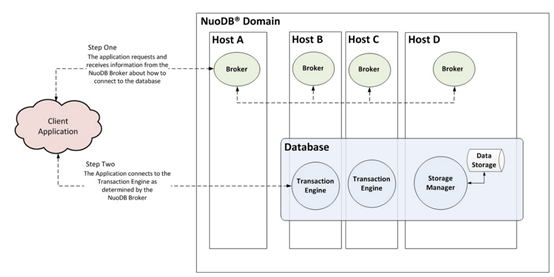
It consists of three separate layers:
- Admin for operational tasks
- TE for (ACID) SQL and caching
- SM for storage
Temenos - Micro Services Framework (MSF) inherently supports all SQL databases, owing to the use of JPA/Hibernate libraries. However, due to the distributed architecture of NuoDB, you must keep in mind certain considerations while designing or developing microservice applications using Temenos MSF.
NuoDB Architecture
Design Considerations
NuoDB is the distributed SQL database designed for
- Today’s modern deployment environments such as cloud and container based environments.
- Building new or transition existing mission-critical SQL applications.
- Scaling out on demand to meet the needs of high-frequency OLTP workloads.
Development Considerations
Owing to the unique architecture of NuoDB, some considerations should be made, while using it for development purposes.
Below are the observations made from NuoDB analysis after using it in a sample project.
 Supported Datatypes
NuoDB has its own data types like every other database and it must be considered while designing or developing applications. For starters, Temenos MSF uses the following Java datatypes and JPA or Hibernate has handled their conversion to database specific types without any error.
- Integer
- String
- Big Decimal
- Long
- Timestamp
- Date
- Boolean
Supported Annotations
It also supports most of the JPA annotations like any other database. However, the following annotations are tested and are working as expected with NuoDB.
- @Id
- @Entity
- @Column
- @GeneratedValue
- @SequenceGenerator
- @Lob
- @EmbeddedId
- @Embeddable
- @CollectionTable
- @ElementCollection
- FetchType
- CascadeType
- @MapKeyColumn
- @OneToOne
- @OneToMany
- @ManyToOne
- @ManyToMany
- @Table
- @JoinColumn
- @Enumerated(EnumType.STRING)
- @MapsId
- @Index
To know the complete list of data types in NuoDB, see the SQL Data Types page.
NOTE: For testing consideration, NuoDB cannot be run as in-memory and a running instance of the database is required for an end-to-end testing.
NuoDB Deployment in Docker
Running NuoDB in docker requires a minimum of three containers that is 1 Admin agent/Broker, 1 Storage Manager (SM) and 1 Transaction Engine (TE). However, there can be multiple TEs and SMs. And, they should be started in the following order:
Admin/Broker → Storage Manager → Transaction Engine
Frequently used commands
DB status: To check the status of NuoDB in docker environment.
docker exec -it <admin-container> bash

nuocmd show domain
Connect to Nuo SQL client: To access database using Nuo SQL CLI.
docker exec -it <admin-container> bash

nuosql <database>@<host> --user <user> --password <password>
Sample Implementation
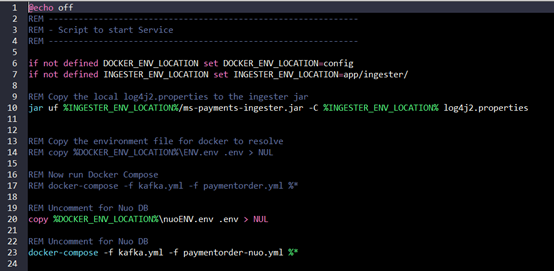
Payment order SQL microservice is configured to support NuoDB in its docker implementation. To verify the same, you need to extract the generated zip package in ms-payments-package-docker module and modify the paymentorder.bat file to use NuoDB as the database and execute it.
Below is the sample screen capture for paymentorder.bat.
References
To learn about Hibernate dialect considerations for NuoDB, see the following links:
- https://doc.nuodb.com/nuodb/latest/client-development/using-the-nuodb-java-hibernate-driver/hibernate-dialect-considerations/
- https://support.nuodb.com/hc/en-us/articles/115000810023-The-NuoDB-Sequence-Generator-GENERATED-ALWAYS-BY-DEFAULT-AS-IDENTITY-and-the-UNIQUE-constraint
You can also see the following references for more information:
- https://nuodb.com/blog
- https://doc.nuodb.com/nuodb/latest/deprecated-documentation/deployment-models/physical-or-vmware-environments-nuoagent/installing-nuodb/installing-nuodb-on-linux/notes-on-using-transparent-huge-pages/
- https://doc.nuodb.com/nuodb/4.0.x/reference-information/sql-reference-information/sql-data-types/
Add Bookmark
save your best linksView Bookmarks
Visit your best links BACK
BACK


Are you sure you want to log-off?