| Bookmark Name | Actions |
|---|
Step 1: Upgrading Temenos Transact Libraries
This section shows you the procedure of upgrading the Temenos Transact libraries and data to higher release by using TEMP.RELEASE (TAFJ.R12_201214 or later).
Procedure
- Place the existing precompiled JAR files in your chosen folder and reference this folder in the precompiled path of tafj.properties. The tafj.properties file can be found under the TAFJ_HOME/conf folder.
temn.tafj.directory.precompile = C:\LocalArea\201806\precompiled
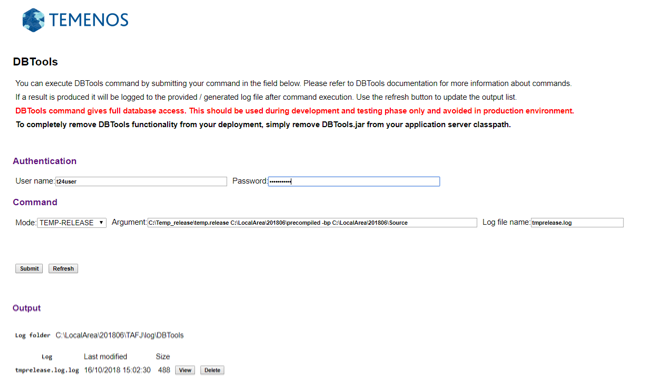
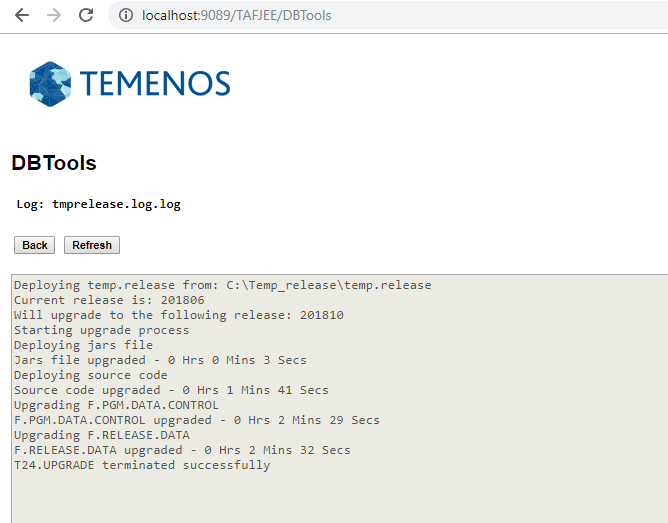
NOTE: The precompiled folder contains all the precompiled JAR files including the Enterprise JARs. - To start the upgrade process, launch the following command from the DBTools Servlet page:
DBtools -cf tafj.properties -log tmprelease.log TEMP-RELEASE C:\Temp_release\temp.release C:\LocalArea\201806\precompiled -bp C:\LocalArea\201806\Source
Where,
- tafj.properties - Configuration file
- tmprelease.log - The name of the log file to be generated in TAFJ_HOME/log folder.
- C:\Temp_release\temp.release - The path where your temp.release folder is present.
- C:\LocalArea\201806\precompiled - The path where your precompiled JARs are present.


Syntax
TEMP-RELEASE [options] path_To_TempRelease path_To_LibDestinationFolder [-i path_To_InsertDestinationFolder] [-bp path_To_SrcDestinationFolder] [-module T24_moduleName]
Where options can be,
- –s - Script mode
- -log - Name of the log to be generated under TAFJ_HOME/log.
- -cf - Configuration file
NOTE: For module specific upgrade [-module T24_moduleName] when passed to TEMP.RELEASE, only the relative artifacts (JARs and data records) are replaced inside the precompiled folder and database.
Difference between Full and Module Upgrade
| Full Upgrade | Module Upgrade |
|---|---|
|
Releases all the library files from temp.release /t24lib. |
Releases only the module specific library files from temp.release/t24lib. |
|
Clears the F.PGM.DATA.CONTROL table and populate it from the TEMP.RELEASE J4 file. |
Deletes all existing records related to the module from F.PGM.DATA.CONTROL in database and populate records specific to the module from the TEMP.RELEASE J4 file. |
|
Clears the F.RELEASE.DATA table and populate it from the TEMP.RELEASE J4 file. |
Releases all the records into F.RELEASE.DATA based on the ID’s matching from step 2. |
|
Copies the BP/INSERT files if specified into the folder. |
Copies the BP/INSERT files if specified into the folder. |
Add Bookmark
save your best linksView Bookmarks
Visit your best links BACK
BACK


Are you sure you want to log-off?