

| Bookmark Name | Actions |
|---|
Creating an Inflow Designer project
Inflow Designer is used to publish inflows to Transact. Inflow Designer and the Event Designer are now available as a single product, but with different product codes in Transact to enable the functionality of the specific designer.
This plugin is available as part of Design Studio and as a standalone plugin that can be installed in Eclipse.
NOTE:
See the Appendix for details of schemas used by various types of request.
Procedure
-
In either Design Studio or the Elipse, switch to Integration Studio Perspective.
-
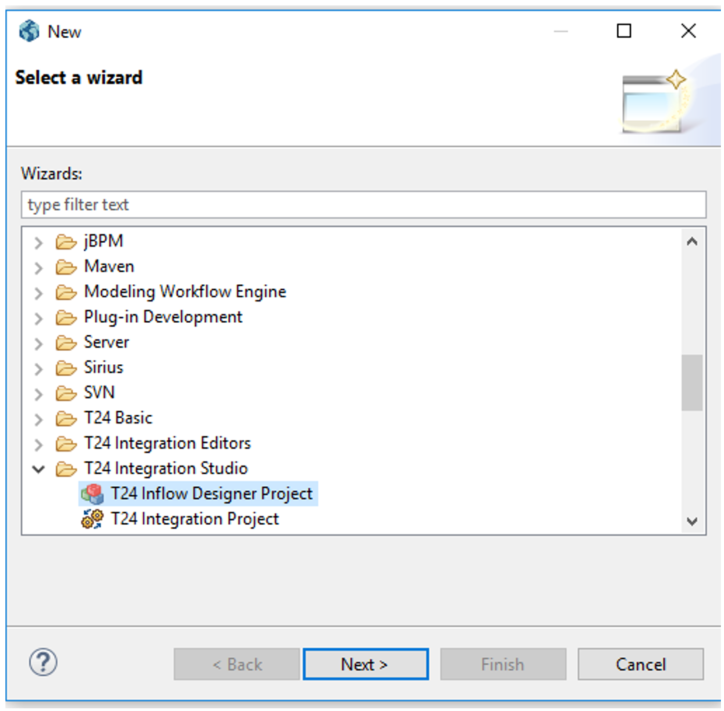
From the File menu, select New and then Other.
-
In the pop-up window, select Inflow Designer-Project and click Next.

-
Specify the Project Name, Axis URL and login credentials.
 NOTE:
NOTE:t24-IF_InflowService-tafj-jws.aar needs to be packaged in axis2.war and deployed in the application server. Refer to the Component Service User Guide for more information.
-
Click Finish to create the project.
-
The inflow project contains by default three folders: designs, schemas and logs. These are used to store the designed inflows, the published schemas and the published logs.
Add Bookmark
save your best linksView Bookmarks
Visit your best links BACK
BACK


Are you sure you want to log-off?