| Bookmark Name | Actions |
|---|
Delivering events in TAFC
You can do event delivery in TAFC through JRemote inbound resource adapter. You can configure and use DeliveryMDB, which is shipped as part of the standard TOCF(EE) release.
Procedure
- Define your queues.
The events in Java platform get delivered to a queue. In JBoss 7, you need to define the required queues in the t24DestinationService.xml file.
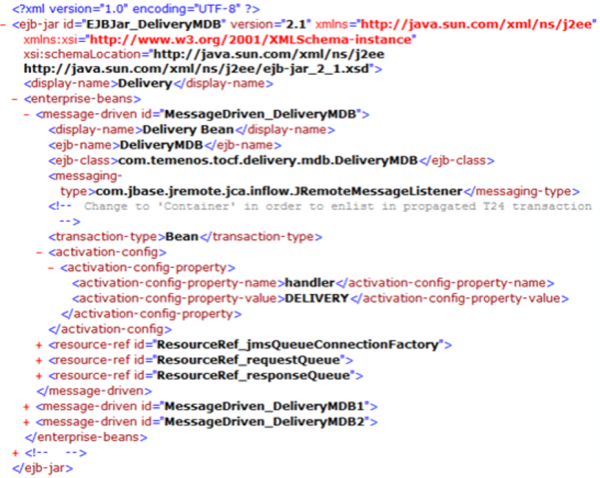
- Configure DeliveryMDB.Activate MDB: Configure the standard deployment descriptor of the DeliveryMDB with the appropriate activation configuration string. Example:
 NOTE:
NOTE:- The activation string provided at the activation-config-property-value tag (DELIVERY in this example) should match the DESTINATION.STATIC field in the IF.INTEGRATION.SERVICE.PARAM record.
- There could be more than one message-driven bean activation based on the requirement to deliver an event to different queues, when DESTINATION.PROP or EVENT.TYPE.DEST and EVENT.DEST are configured. The EVENT.DEST in TAFC holds the activation string, not the queue name. In case of the parameter record shown in this document, the DESTINATION.PROP field holds the value application, therefore there should be one activation per application that can trigger Integration Framework event with the activation-config-property-value to be the exact application name.
- More queues can be defined based on the delivery mode.
- Configure an INBOUND resource adapter.
You must configure your inbound resource adapter to listen for connections on a host and port. Perform the configuration in the ra.xml file under the META-INF directory in tocfT24ra ra.rar.
<config-property>
   <config-property-name>ListenHost</config-property-name>
   <config-property-type>java.lang.String</config-property-type>
   <config-property-value>10.92.5.173</config-property-value>
</config-property>
<config-property>
   <config-property-name>ListenPort</config-property-name>
   <config-property-type>java.lang.Integer</config-property-type>
   <config-property-value>9000</config-property-value>
</config-property>
- Deploy DeliveryMDB in an application server such as JBoss. This is a standard TOCF(EE) delivered component and you can deploy it by following the TOCF(EE) User Guide in Temenos online help. Set the following environment variables in the environment where the TSA Service will be running.
JEE_HOST={host_name_or_IPAddress_where_the_application_server_is_running}
JEE_PORT={port_number_which_the_app_server_is_using_to_listen_for_inbound_messages}
These environment variables are used by CALLJEE to connect the inbound resource adapter of TOCF (EE) – DeliveryMDB. For more information, see the TOCF(EE) User Guide in Temenos online help.
Add Bookmark
save your best linksView Bookmarks
Visit your best links BACK
BACK


Are you sure you want to log-off?