| Bookmark Name | Actions |
|---|
Enquiries and Reports
This section provides the list of enquiries with which you can monitor the trickle feed data movement.
Compare
The DLM.COMPARE enquiry displays the number of enabled applications in the LIVE and RO databases.
NOTE: DLM table count should be zero before the processing starts.
The following screen captures illustrate the enabled applications in both the databases before the process begins and during the movement data movement using DL.COPY.PROCESS, respectively.
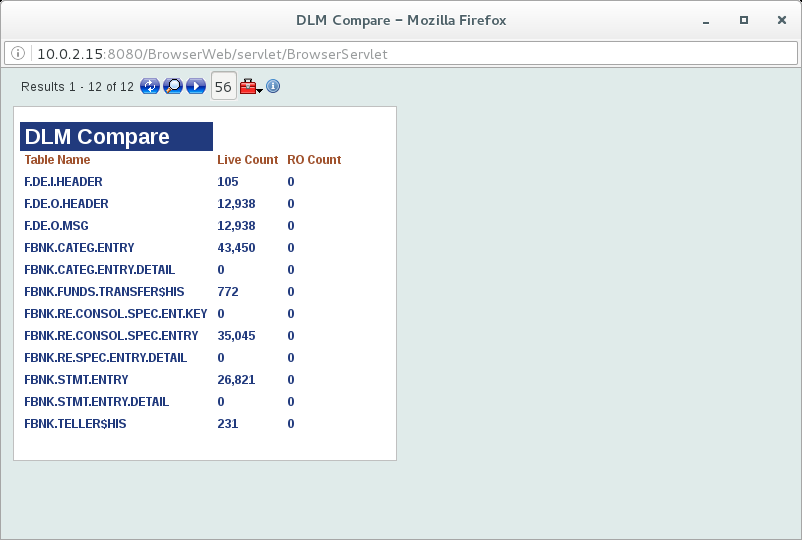

You can again compare the LIVE and RO counts, after the entire process is over. All the records need to be moved except the records which does not have PDATE value and the FORWARD and DUMMY entries in STMT.ENTRY.
Check the DLM.ERROR.MONITOR enquiry to get the error details for other records, which are not moved to the RO database.

Monitor
The DLM.MONITOR enquiry displays the following information.
- DLM database status
- DLM service status
- DLM movement enabled application count
- Error count during the data movement
- Throughput details for the data movement
- Pending IDs for data movement

Error Monitor
The DLM.ERROR.MONITOR enquiry displays the errors during data movement.


Add Bookmark
save your best linksView Bookmarks
Visit your best links BACK
BACK


Are you sure you want to log-off?