| Bookmark Name | Actions |
|---|
Promoted Columns
A single value field (or even a specific value of a multi-valued field), which is a part of XMLRECORD, can be promoted as a computed column of the table and used in relational search conditions. Furthermore, a relational index can be created on the computed column to improve the query performance. This section provides details about the setup and script execution for various databases.
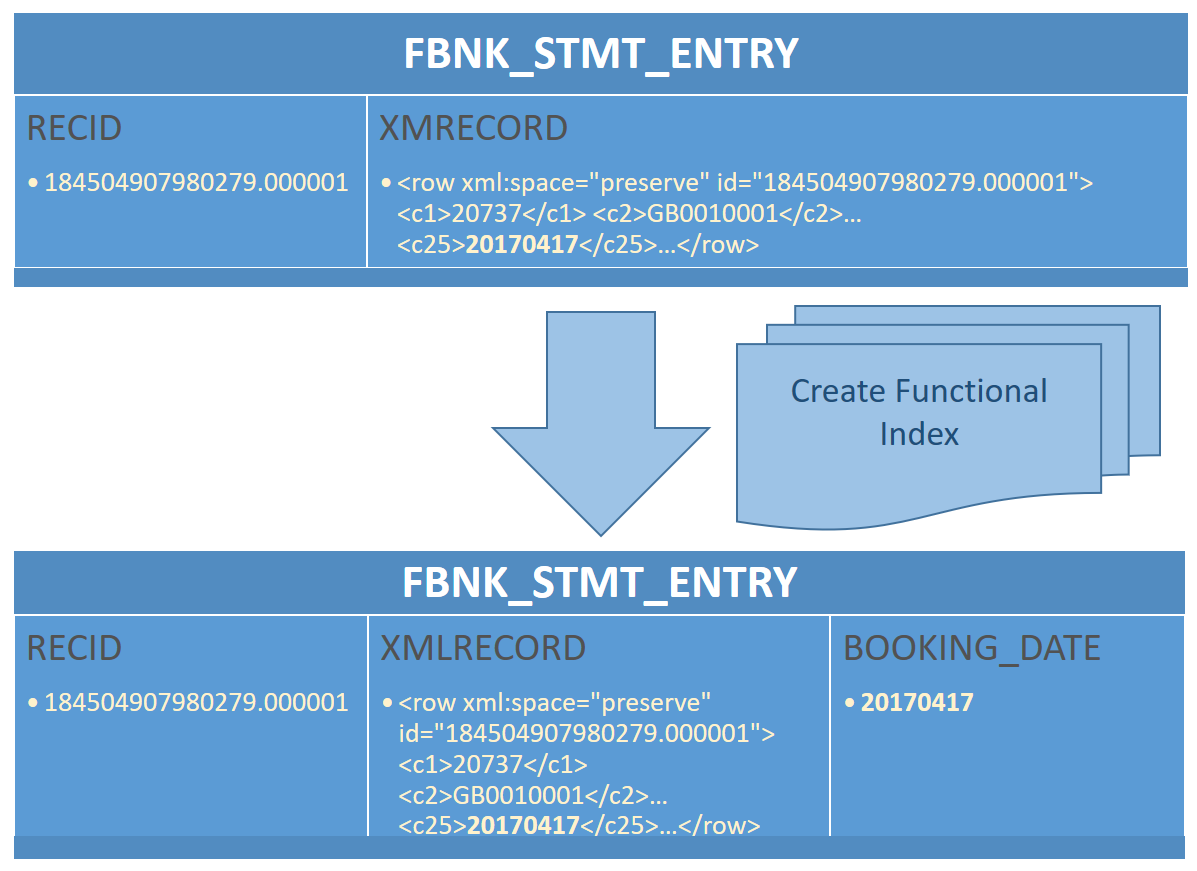
During the initial separation process, all the promoted columns available in the LIVE database are created in the RO database using the utility script.
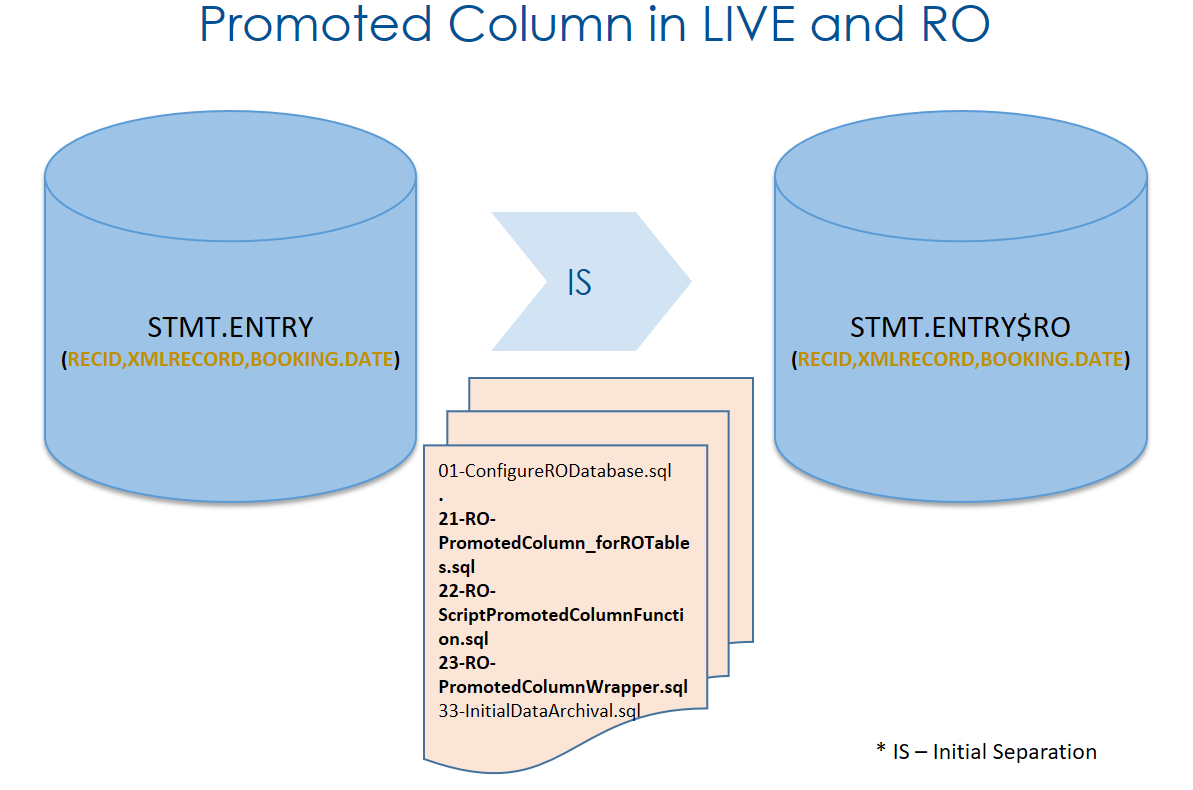
A stored procedure is used to generate and execute the function required for the promoted column, add the promoted column to the table, and create index on the promoted column.
The execution of stored procedure for a particular table checks if the table exists in the DLM database.
- If the table exists already, it compares the promoted columns available in the LIVE table and DLM table
- If not, additional promoted column founds in the LIVE table will be created in the DLM table
NOTE: Any real columns defined in the LIVE database for a given table will not be moved to the DLM database.
Setup
As part of promoted columns setup, you need to create the set of promoted column procedure in DLM database, which is generated as a part of initial separation scripts.
 Script Execution
During the initial separation process, the functional index is created automatically in the RO database, which exists already in the LIVE database. This section provides details about the script execution to be done after the initial separation, to create the functional index in various LIVE databases.
Oracle
This section provides the script execution details for the Oracle database.
Execute the procedure after the initial separation process, if you are required to create any functional index in RO.
Command to invoke SP
EXEC promotedcolumnwrapper(LIVE_SCHEMA_NAME,RO_SCHEMA_NAME,LIVE_TABLE_NAME);
Pre-requisites before SP execution
The following stored procedures should be compiled successfully in the same order in the RO database:
- ScriptPromotedColumnFunction
- PromotedColumn_forROTables
- PromotedColumnWrapper
The stored procedures should be executed only from the RO database. It is sufficient to have select on ALL_DEPENDENCIES,ALL_IND_EXPRSIONS,ALL_IND_COLUMNS,ALL_TAB_COLS,ALL_USERS,ALL_TABLES,ALL_SOURCE data dictionary views.
Create a promoted column in the LIVE database
CREATE FUNCTION FBE1_CATEG_ENTRY_C11(XMLRECORD SYS.XMLTYPE RETURN DATE DETERMINISTIC AS RTNVAL DATE; BEGIN SELECT XMLCAST(XMLQUERY('/row/c11/text()' PASSING XMLRECORD RETURNING CONTENT) AS DATE)INTO RTNVAL FROM DUAL; RETURN RTNVAL; END;
select DISTINCT NAME from all_source where TYPE='FUNCTION' AND OWNER='T24' AND NAME LIKE '%FBNK_CATEG%';

Add a new promoted column in the LIVE database
ALTER TABLE FBNK_CATEG_ENTRY
ADD VALUE_DATE DATE generated always as (cast(FBNK_CATEG_ENTRY_c11 (XMLRECORD) as DATE));

Add a new index in the LIVE database
CREATE INDEX IDX_FBNK_STMT_ENTRY_C11 ON FBNK_STMT_ENTRY(VALUE_DATE);
The following is the RO table schema before the execution of promoted column SP.

Execution of wrapper SP
EXEC promotedcolumnwrapper('T24','RO','FBNK_CATEG_ENTRY');

The schema of the RO table is altered with the newly added promoted column and an index.

You need to run the below query in the RO database to check and confirm the newly added column in the LIVE database. The new column is created in the RO database as a computed column.
SELECT
      DISTINCT C.COLUMN_NAME
    FROM
      ALL_DEPENDENCIES A,
      ALL_IND_EXPRESSIONS B,
      ALL_IND_COLUMNS C,
      ALL_TAB_COLS D
    WHERE
      A.NAME           =B.INDEX_NAME
    AND REFERENCED_TYPE='FUNCTION'
    AND TYPE          <> 'VIEW'
    AND C.INDEX_NAME=B.INDEX_NAME AND D.COLUMN_NAME=C.COLUMN_NAME AND D.VIRTUAL_COLUMN='YES' AND B.TABLE_NAME   = 'FBNK_CATEG_ENTRY#RO';
You need to run the below query in the RO database to check and confirm if the newly added index in the LIVE database is created for that column in the RO database.
SELECT
      C.COLUMN_NAME AS RO_COLUMN_NAME,B.INDEX_NAME AS RO_INDEX_NAME
    FROM
      ALL_DEPENDENCIES A,
      ALL_IND_EXPRESSIONS B,
      ALL_IND_COLUMNS C,
      ALL_TAB_COLS D
    WHERE
      A.NAME           =B.INDEX_NAME
    AND REFERENCED_TYPE='FUNCTION'
    AND TYPE          <> 'VIEW'
    AND B.TABLE_NAME   = 'FBNK_CATEG_ENTRY#RO' AND C.INDEX_NAME=B.INDEX_NAME AND D.COLUMN_NAME=C.COLUMN_NAME AND D.VIRTUAL_COLUMN='YES';
The procedure will refer the dblink, which is available in database for creating the promoted columns in DLM Database.
The current assumption is that RO tables can contain promoted columns in addition to the LIVE promoted columns. The procedure compares the RO table and corresponding LIVE database and ensures all promoted columns in the LIVE database are available in the RO database as well. Any other promoted column(s), which is available already in the RO database, will remain as is.
MSSQL
This section provides the script execution details for the MSSQL database.
Command to invoke Stored Procedure (SP)
EXEC [<<ROSchemaName>>].PromotedColumnWrapper
@LiveDatabaseName,@LiveSchemaName,@LiveTableName,@RODatabaseName,@ROSchemaName
Pre-requisites for SP execution
The following stored procedures should be compiled successfully in the same order in the RO database:
- ScriptPromotedColumnFunction
- PromotedColumn_forROTables
- PromotedColumnWrapper
The stored procedures should be executed only from the RO database. It is sufficient to have a PUBLIC role for the user to execute the PromotedColumnWrapper procedure in the RO database for the following tables.
- sys.sql_expression_dependencies
- INFORMATION_SCHEMA.ROUTINES
- sys.objects
- sys.columns
- sys.tables
- sys.schemas
- sys.computed_columns
- sys.indexes
- sys.index_columns
The various scripts involved in promoted columns feature for this database are as follows.
Create a promoted column in the LIVE database
CREATE FUNCTION dbo.FBNK_STMT_ENTRY_NOILP (@xmlrecord XML)
RETURNS nvarchar(100)
WITH SCHEMABINDING
BEGIN
RETURN @xmlrecord.value('(/row/c12/text())[1]', 'nvarchar(100)')
END;
Add a new promoted column in the LIVE database
ALTER TABLE dbo.FBNK_STMT_ENTRY
ADD Currency AS dbo.FBNK_STMT_ENTRY_NOILP(XMLRECORD) PERSISTED;

Add a new index in the LIVE database
CREATE INDEX IDX_FBNK_STMT_ENTRY_C12 ON FBNK_STMT_ENTRY(Currency);
The following is the RO table schema before the execution of promoted column SP.

Execution of wrapper SP

The schema of the RO table is altered with the newly added promoted column and an index.

You need to run the below query in the RO database to check and confirm the newly added column in the LIVE database. The new column is created in the RO database as a computed column.
SELECT
t.name as ROTableName,c.name as RO_ComputedColumn,COMP.definition as FunctionDefinition
FROM sys.columns AS c
INNER JOIN sys.tables AS t
ON c.[object_id] = t.[object_id]
INNER JOIN sys.schemas AS s
ON t.[schema_id] = s.[schema_id]
INNER JOIN sys.computed_columns COMP
ON COMP. [object_id] = t.[object_id]
AND COMP.column_id = c.column_id AND is_persisted = 1
WHERE COLUMNPROPERTY(t.[object_id], c.name, N'IsIndexable') = 1
AND COLUMNPROPERTY(t.[object_id], c.name, N'IsDeterministic') = 1
AND COLUMNPROPERTY(t. [object_id], c.name, N'IsPrecise') = 1
AND t.uses_ansi_nulls = 1
AND c.is_computed = 1
AND t.name='FBNK_STMT_ENTRY#RO'
You need to run the below query in the RO database to check and confirm if the newly added index in the LIVE database is created for that column in the RO database.
SELECT ind.name as RO_IndexName,col.name as ROIndex_ColumnName
FROM sys.indexes ind
INNER JOIN sys.index_columns ic ON  ind.object_id = ic.object_id and ind.index_id = ic.index_id
INNER JOIN sys.columns col ON ic.object_id = col.object_id and ic.column_id = col.column_id
INNER JOIN sys.tables t ON ind.object_id = t.object_id
And schema_name (t.schema_id) = 'ro' and t.name = 'FBNK_STMT_ENTRY#RO'
The assumption is that, RO tables can contain promoted columns in addition to the LIVE promoted columns. The procedure compares the RO table and corresponding LIVE database and ensures all promoted columns in the LIVE database are available in the RO database as well. Any other promoted column(s), which is available already in the RO database, will remain as is.
You must have SELECT rights on the list of data dictionary tables listed in Oracle databases.
DB2
This section provides the script execution details for the DB2 database.
Execute the procedure after the initial separation process, if you are required to create any functional index in RO.
Command to invoke SP
EXEC promotedcolumnwrapper(LIVE_SCHEMA_NAME,RO_SCHEMA_NAME,LIVE_TABLE_NAME);
Pre-requisites before SP execution
The following stored procedures should be compiled successfully in the same order in the RO database:
- ScriptPromotedColumnFunction
- PromotedColumnForRoTables
- IndexCreationForRoTables
- PromotedColumnWrapper
The stored procedures should be executed only from the RO database. It is sufficient to have select on SYSCAT.SCHEMATA,SYSCAT.TABLES,SYSCAT.COLUMNS,SYSCAT.INDEXES,SYSIBM.ROUTINES data dictionary views.
Create a promoted column in the LIVE database
create function FBNK_FUNDS_TRANSFER001_c1(xmlrecord XML)
returns varchar(100)
language sql contains sql
no external action deterministic
return xmlcast(xmlquery('$t/row/c1' passing xmlrecord as "t") as varchar(100));
set integrity for FBNK_FUNDS_TRANSFER001 off;
ALTER TABLE FBNK_FUNDS_TRANSFER001 ADD TRANSACTION_TYPE varchar(35) generated always as (T24.FBNK_FUNDS_TRANSFER001_c1(XMLRECORD));
SET INTEGRITY FOR FBNK_FUNDS_TRANSFER001 IMMEDIATE CHECKED FORCE GENERATED ;
CREATE INDEX IDX1_FBNK_FUNDS_TRANSFER001 ON FBNK_FUNDS_TRANSFER001 (TRANSACTION_TYPE);

Execution of wrapper SP
EXEC promotedcolumnwrapper('T24','RO','FBNK_FUNDS_TRANSFER001');

The schema of the RO table is altered with the newly added promoted column and an index.

The current assumption is that RO tables can contain promoted columns in addition to the LIVE promoted columns. The procedure compares the RO table and corresponding LIVE database and ensures all promoted columns in the LIVE database are available in the RO database as well. Any other promoted column(s), which is available already in the RO database, will remain as is.
Add Bookmark
save your best linksView Bookmarks
Visit your best links BACK
BACK


Are you sure you want to log-off?