
| Bookmark Name | Actions |
|---|
Full Solution Implementation
This section provides the various aspects like the TAFJ and TAFC runtime, initial separation and its analysis, DLM configuration, separation, data archival, copy and purge processes required for the implementation of Full Solution.
Pre-requisites
To work with Full Solution you need to,
- Know about Temenos Transact commands and ARCHIVE application
- Created a Read-Only Oracle database from a clone of the LIVE database
- Install DL in Temenos Transact.
- Enable databases and TAFJ and TAFC runtime
TAFJ Runtime
To configure the TAFJ runtime, you need to add the following.
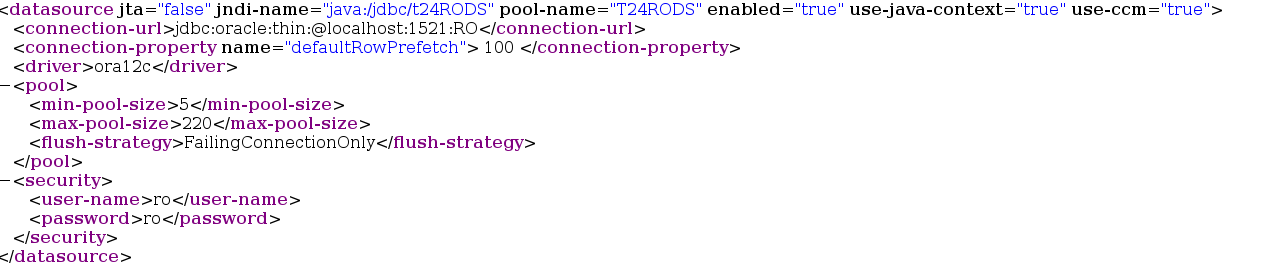
- Connection details (shown in the below screen capture) in the location $TAFJ_HOME/conf amend file tafj.roperties.

- DLM Database Name, Schema User and Schema Password in standalone.xml.
The following screen capture provides sample configuration for JBoss, which differs for other application servers.
TAFC Runtime
To configure the TAFC runtime, you need to set the following environment variables in .profile or remote.cmd.
- SET ORACLE_HOME= D:\app\oracle\product\11.2.0\dbhome_1
- SET LD_LIBRARY_PATH=%ORACLE_HOME%\lib
- SET PATH=%ORACLE_HOME%\bin:%PATH%
- SET TNS_ADMIN=%ORACLE_HOME%\network\admin
- SET NLS_LANG=AMERICAN_AMERICA. AL32UTF8
- SET DRIVER_HOME=%TAFC_HOME%\XMLORACLE
- SET JBCOBJECTLIST=%JBCOBJECTLIST%;%DRIVER_HOME%\lib
- SET PATH=%PATH%;%TAFC_HOME%\bin;%DRIVER_HOME%\bin
You need to add the following details in the config-XMLORACLE file required for the DLM Enquiries to be executed
- DLM Database Name
- DLM Schema User
- DLM Schema Password
- DLM Tablespace Name
- DLM Indexspace Name
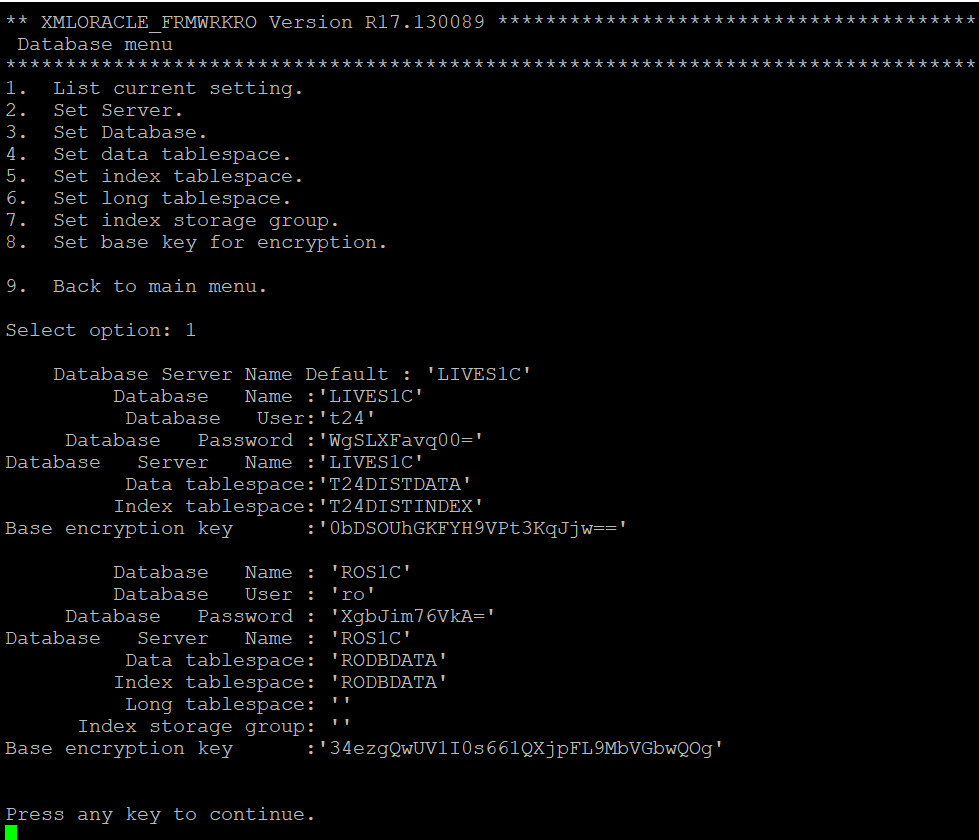
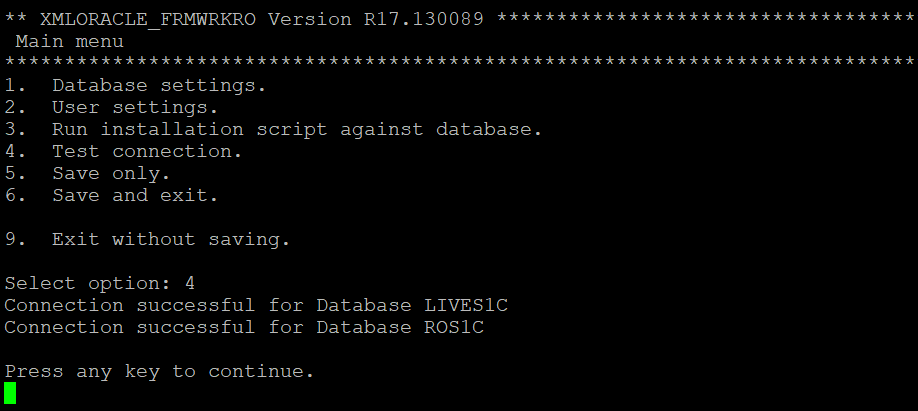
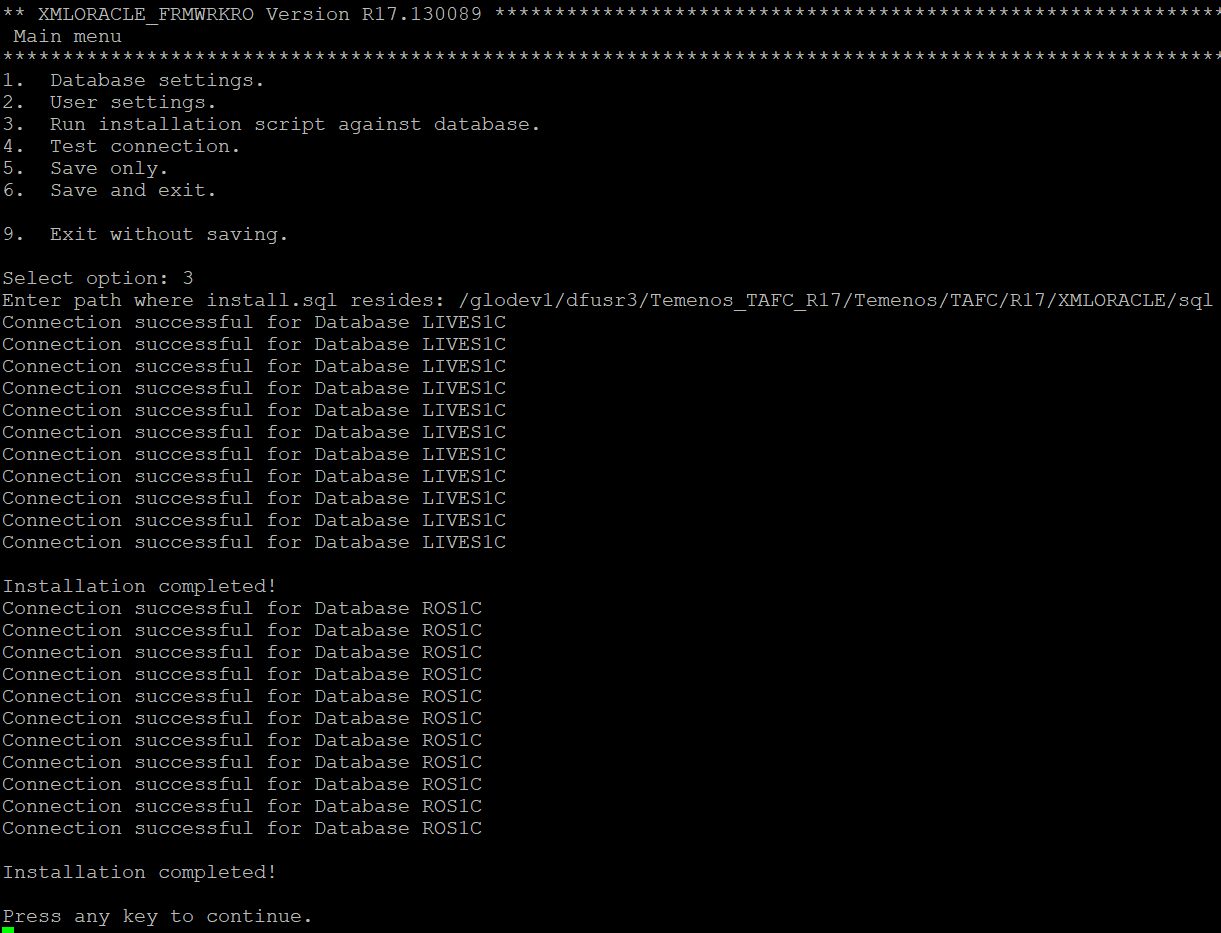
The following screen captures provide samples corresponding to TAFC runtime.
DLM DB details
Test connection verification
Run installation script against the database
Initial Separation
Initial data separation is a one-off exercise involved in the movement of the historical data from the transactional database to new RO database. It is carried out in a staging area and does not affect the performance of the LIVE database. The RO database is created using the clone copy of the LIVE database. On completion, the LIVE copy schema is purged leaving Read-Only schema. After the RO database is created, the copied data is purged from the actual LIVE database and RO database is moved to the LIVE server to be synchronized.
Analysis and Preparation
You need to analyse the system and prepare the configuration file using the analysis results. This configuration file is used to generate the scripts for the initial data separation.
The following table lists the steps you need to perform as part of the analysis.
|
Action |
Steps |
|---|---|
|
Product verification |
You need to verify the following:
|
|
DL_SEPARATION package installation |
You need to do the following:
|
|
Configuration |
You need to do the required configuration for initial separation using the DLM.IS.CONFIG,<Database> version record. |
DLM Configuration
This section provides details about the configuration of DLM.IS.CONFIG for various databases.
 Oracle
For Oracle database, you need to use version DLM.IS.CONFIG, ORACLE and configure the details in ORACLE record. DLM.IS.CONFIG,COMMON and DLM.IS.CONFIG,FILTER versions are added as associate versions to DLM.IS.CONFIG, ORACLE.
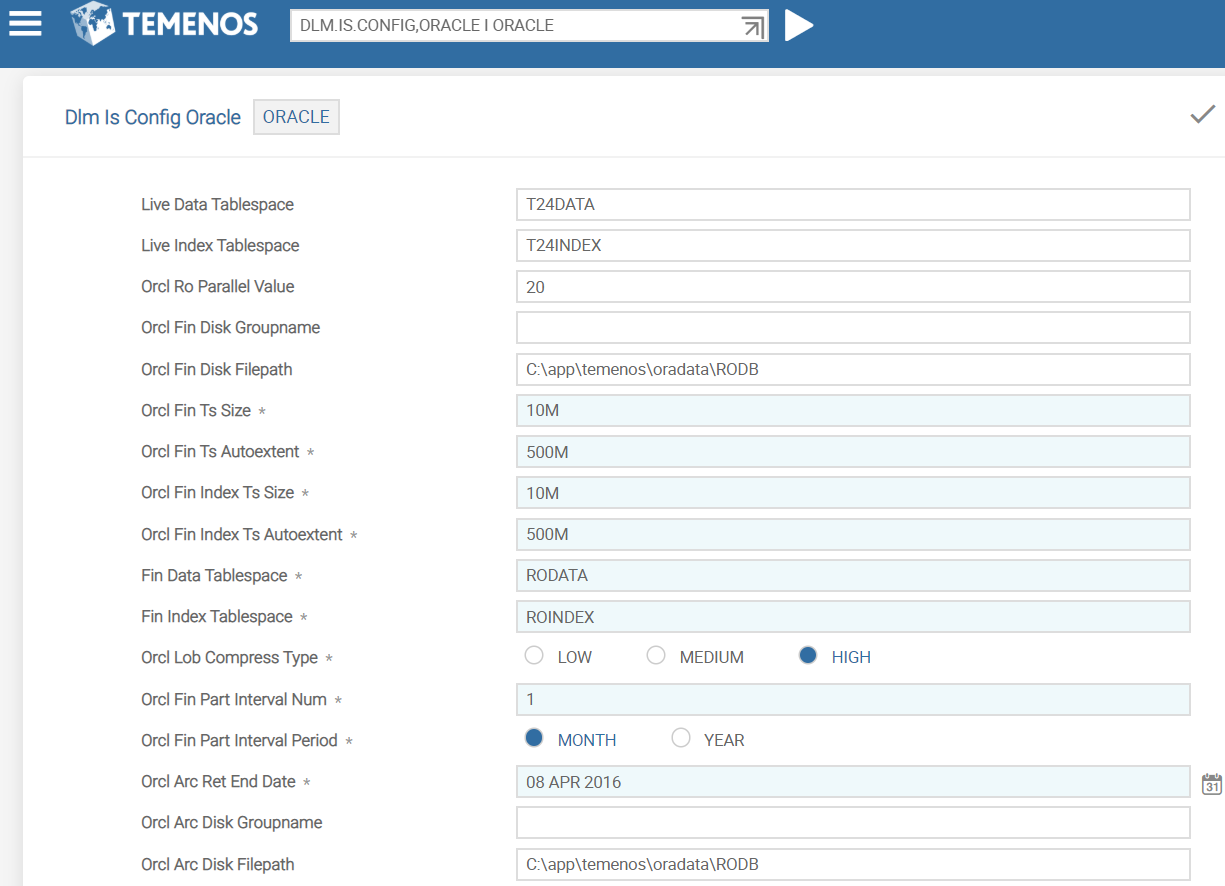
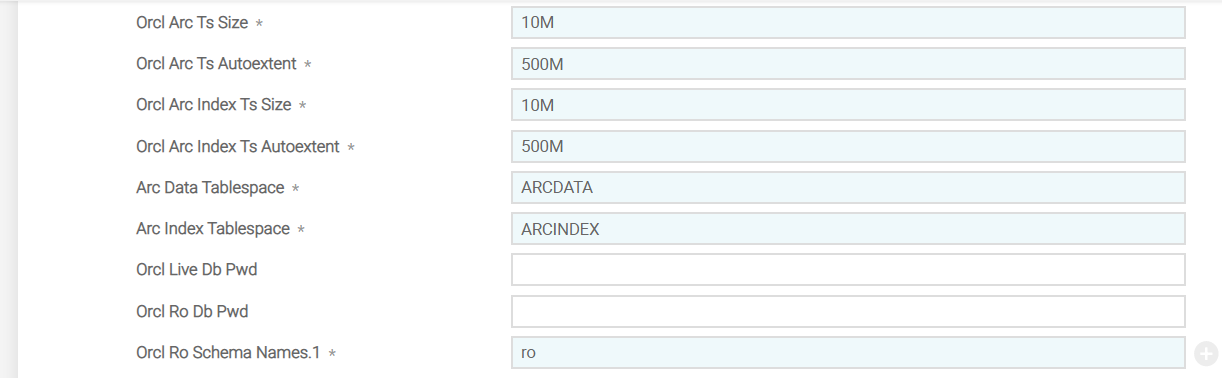
You need to configure the ORACLE database specific details in the fields shown in the following table.
|
Field |
Description |
|---|---|
|
Live Data Tablespace |
Indicates the name of the tablespace in the Temenos Transact database used for Temenos Transact data |
|
Live Index Tablespace |
Indicates the name of the tablespace in the Temenos Transact database used for Temenos Transact indices |
|
Orcl Ro Parallel Value |
Indicates the Oracle parallel script execution value |
|
Orcl Fin Disk Groupname |
Indicates the name of the disk group to be used to store the RO database DATA tablespaces. |
|
Orcl Fin Disk Filepath |
Indicates the disk filepath location to be used to store the RO database DATA tablespaces. Either ORCL.FIN.DISK.GROUPNAME or ORCL.FIN.DISK.FILEPATH should be available. |
|
Orcl Fin Ts Size |
Indicates the initial size of the RO database DATA tablespaces. The value must either be in M (MB) or G (GB). |
|
Orcl Fin Ts Autoextent |
Indicates the size of the DATA tablespace that can be extended using auto extending feature. The value must either be in M (MB) or G (GB). |
|
Orcl Fin Index Ts Size |
Indicates the initial size of the RO database INDEX tablespaces. The value must either be in M (MB) or G (GB). |
|
Orcl Fin Index Ts Autoextent |
Indicates the size of the INDEX tablespace that can be extended using auto extending feature. The value must either be in M (MB) or G (GB). |
|
Fin Data Tablespace |
Indicates the prefix name for the RO database DATA tablespaces, which will be appended to a number. For example, RODATA1, RODATA2. |
|
Fin Index Tablespace |
Indicates the name of the RO database INDEX tablespace. |
|
Orcl Lob Compress Type |
Indicates the Oracle advanced compression option. (LOW, MEDIUM or HIGH). NOTE: Oracle’s advanced compression license is mandatory before implementation, to use this option.
|
|
Orcl Fin Part Interval Num |
Indicates the interval number for the table partitions. For example, 1 for 1 MONTH, 3 for 3 months, and so on. |
|
Orcl Fin Part Interval Period |
Indicates the interval period for the table partitions. For example, MONTH or YEAR. |
|
Orcl Arc Ret End Date |
Indicates the earliest date that the ARCHIVE data is required to be retained. This field value must be less than the RO.COPY.START.DATE. |
|
Orcl Arc Disk Groupname |
Indicates the name of the disk group to be used to store the RO database ARCHIVE tablespaces. |
|
Orcl Arc Disk Filepath |
Indicates the disk filepath location to be used to store the RO database ARCHIVE tablespaces. Either ORCL.ARC.DISK.GROUPNAME or ORCL.ARC.DISK.FILEPATH should be available. |
|
Orcl Arc Ts Size |
Indicates the initial size of the RO database ARCHIVE DATA tablespaces. The value must either be in M (MB) or G (GB). |
|
Orcl Arc Ts Autoextent |
Indicates the how much each ARCHIVE DATA tablespace can extend by when auto extending. The value must either be in M (MB) or G (GB). |
|
Orcl Arc Index Ts Size |
Indicates the initial size of the RO database ARCHIVE INDEX tablespaces. The value must either be in M (MB) or G (GB). |
|
Orcl Arc Index Ts Autoextent |
Indicates the size of the ARCHIVE INDEX tablespace that can be extended using auto extending feature. The value must either be in M (MB) or G (GB). |
|
Arc Data Tablespace |
Indicates the prefix name for the RO database ARCHIVE DATA tablespaces, which will be appended to a number. For example, ARCDATA1, ARCDATA2. |
|
Arc Index Tablespace |
Indicates the name of the RO database ARCHIVE INDEX tablespace |
|
Orcl Live Db Pwd |
Indicates the password of the schema owner for the Temenos Transact database |
|
Orcl Ro Db Pwd |
Indicates the password of the schema owner for the RO database |
|
Orcl Ro Schema Names |
Indicates the RO database schema names. This is a multi-valued field. |
MSSQL
For MSSQL database, you need to use version DLM.IS.CONFIG, MSSQL and configure the details in MSSQL record. DLM.IS.CONFIG,COMMON and DLM.IS.CONFIG,FILTER versions are added as associate versions to DLM.IS.CONFIG,MSSQL.
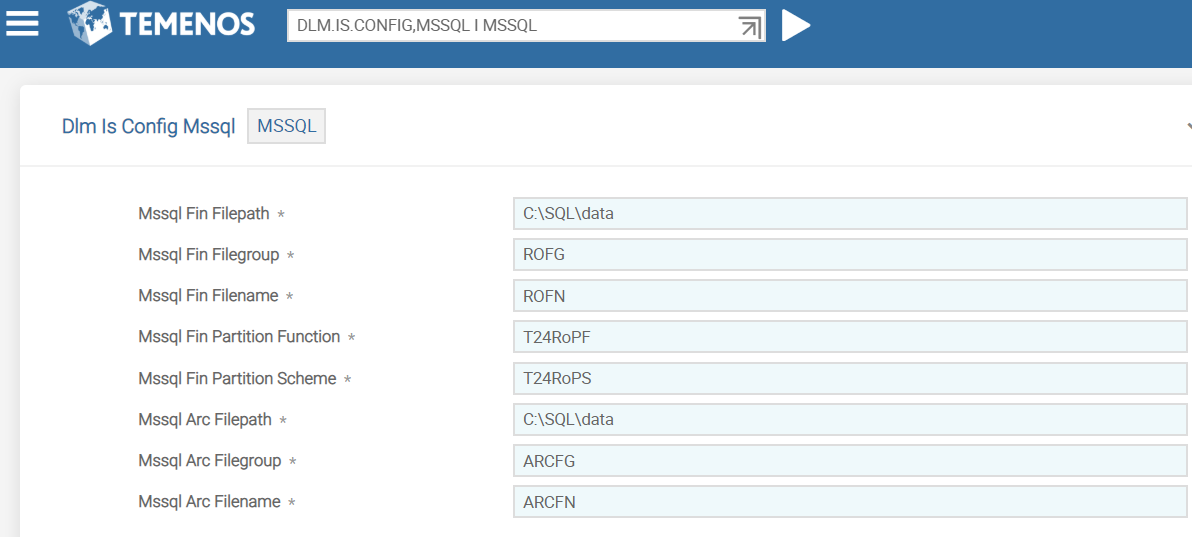
You need to configure the MSSQL database specific details in the fields shown in the following table.
|
Field |
Description |
|---|---|
|
Mssql Fin Filepath |
Indicates the location to hold the physical files for RO data |
|
Mssql Fin Filegroup |
Indicates the prefix name for the RO database FILEGROUP name, which will be appended to a number. For example, ROFG1, ROFG2. |
|
Mssql Fin Filename |
Indicates the prefix name for the RO database FILE name, which will be appended to a number. For example, ROFN1, ROFN2. |
|
Mssql Fin Partition Function |
Indicates the RO database partition function name to be created |
|
Mssql Fin Partition Scheme |
Indicates the RO database partition scheme name to be created |
|
Mssql Arc Filepath |
Indicates the location to hold physical files for RO archive data |
|
Mssql Arc Filegroup |
Indicates the prefix name for the RO database archive FILEGROUP name that will be appended to a number. For example, ARCFG1, ARCFG2. |
|
Mssql Arc Filename |
Indicates the prefix name for the RO database archive FILE name that will be appended to a number. For example, ARCFN1, ARCFN2. |
DB2
For DB2 database, you need to use version DLM.IS.CONFIG, DB2 and configure the details in ORACLE record. DLM.IS.CONFIG,COMMON and DLM.IS.CONFIG,FILTER versions are added as associate versions to DLM.IS.CONFIG, DB2.
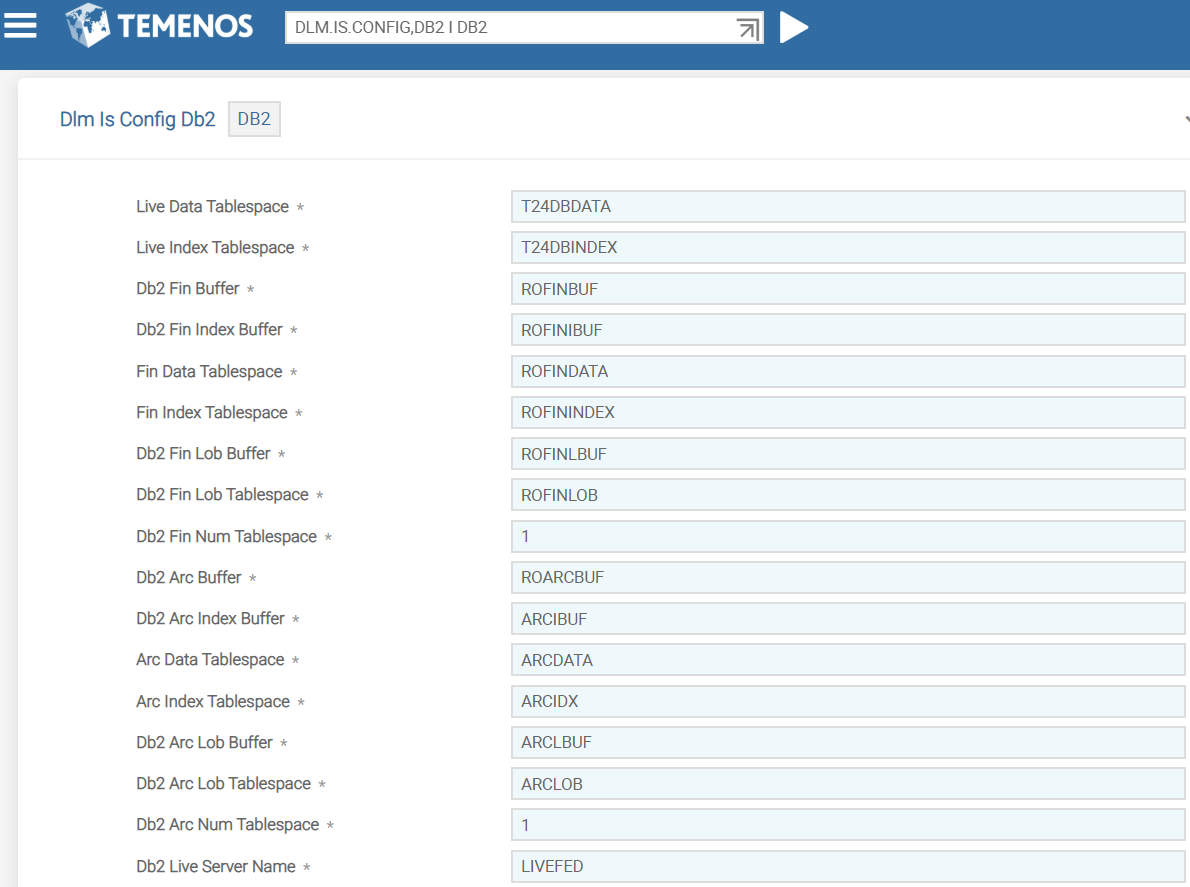
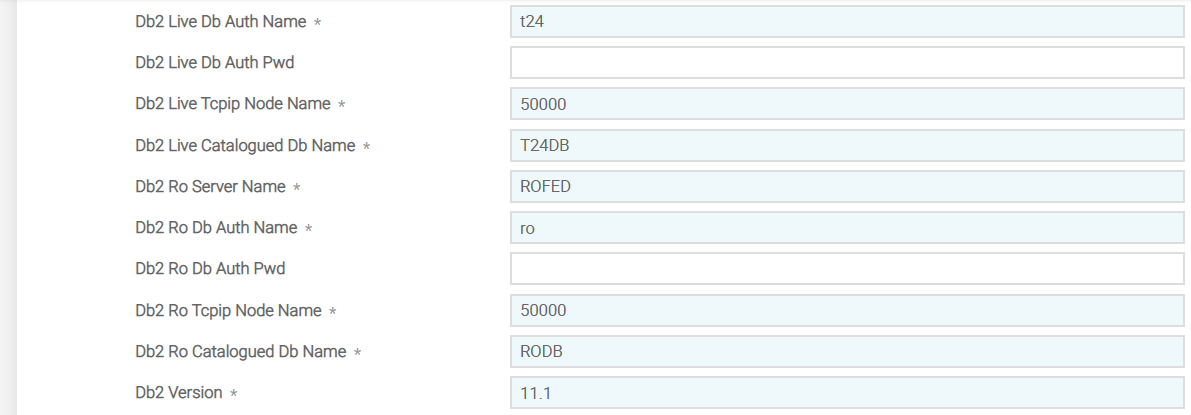
You need to configure the DB2 database specific details in the fields shown in the following table.
|
Field |
Description |
|---|---|
|
Live Data Tablespace |
Indicates the name of the tablespace in Temenos Transact database used for Temenos Transact data. |
|
Live Index Tablespace |
Indicates the name of the tablespace in Temenos Transact database used for Temenos Transact indices |
|
Db2 Fin Buffer |
Indicates the RO database buffer pool name for data |
|
Db2 Fin Index Buffer |
Indicates the RO database buffer pool name for index |
|
Fin Data Tablespace |
Indicates the prefix name for the RO database DATA tablespaces, which will be appended to a number. For example, RODATA1, RODATA2. |
|
Fin Index Tablespace |
Indicates the name of the RO database INDEX tablespace |
|
Db2 Fin Lob Buffer |
Indicates the RO database buffer pool name for LOB data |
|
Db2 Fin Lob Tablespace |
Indicates the prefix name for the RO database LOB DATA tablespaces, which will be appended to a number. For example, ROFINLOB1. |
|
Db2 Fin Num Tablespace |
Indicates the number of RO database INDEX and LOB tablespaces to be created |
|
Db2 Arc Buffer |
Indicates the the RO database buffer pool name for ARCHIVE data |
|
Db2 Arc Index Buffer |
Indicates the the RO database buffer pool name for ARCHIVE index |
|
Arc Data Tablespace |
Indicates the Prefix name for the RO database ARCHIVE DATA tablespaces, which will be appended to a number. Example: ARCDATA1, ARCDATA2. |
|
Arc Index Tablespace |
Indicates the name of the RO database ARCHIVE INDEX tablespace |
|
Db2 Arc Lob Buffer |
Indicates the RO database buffer pool name for ARCHIVE LOB data |
|
Db2 Arc Lob Tablespace |
Indicates the prefix name for the RO database ARCHIVE LOB DATA tablespaces, which will be appended to a number. For example, ARCLOB1. |
|
Db2 Arc Num Tablespace |
Indicates the number of RO database ARCHIVE DATA, INDEX and LOB tablespaces to be created |
|
Db2 Live Server Name |
Indicates the server name of the Temenos Transact database to be created |
|
Db2 Live Db Auth Name |
Indicates the name of the authenticated user to login DB2 for the Temenos Transact database |
|
Db2 Live Db Auth Pwd |
Indicates the password of the authenticated user to login DB2 for the Temenos Transact database |
|
Db2 Live Tcpip Node Name |
Indicates the TCPIP node number to connect with the Temenos Transact database |
|
Db2 Live Catalogued Db Name |
Indicates the Temenos Transact cataloged database name |
|
Db2 Ro Server Name |
Indicates the server name of the RO database to be created. |
|
Db2 Ro Db Auth Name |
Indicates the name of the authenticated user to login DB2 for RO database |
|
Db2 Ro Db Auth Pwd |
Indicates the password of the authenticated user to login DB2 for RO database |
|
Db2 Ro Tcpip Node Name |
Indicates the TCPIP node number to connect with the RO database |
|
Db2 Ro Catalogued Db Name |
Indicates the RO Cataloged database name |
|
Db2 Version |
Indicates the version of DB2 |
NuoDB
For NuoDB database, you need to use version DLM.IS.CONFIG,NUODB and configure the details in NUODB record. DLM.IS.CONFIG,COMMON and DLM.IS.CONFIG,FILTER versions are added as associate versions to DLM.IS.CONFIG,NUODB.
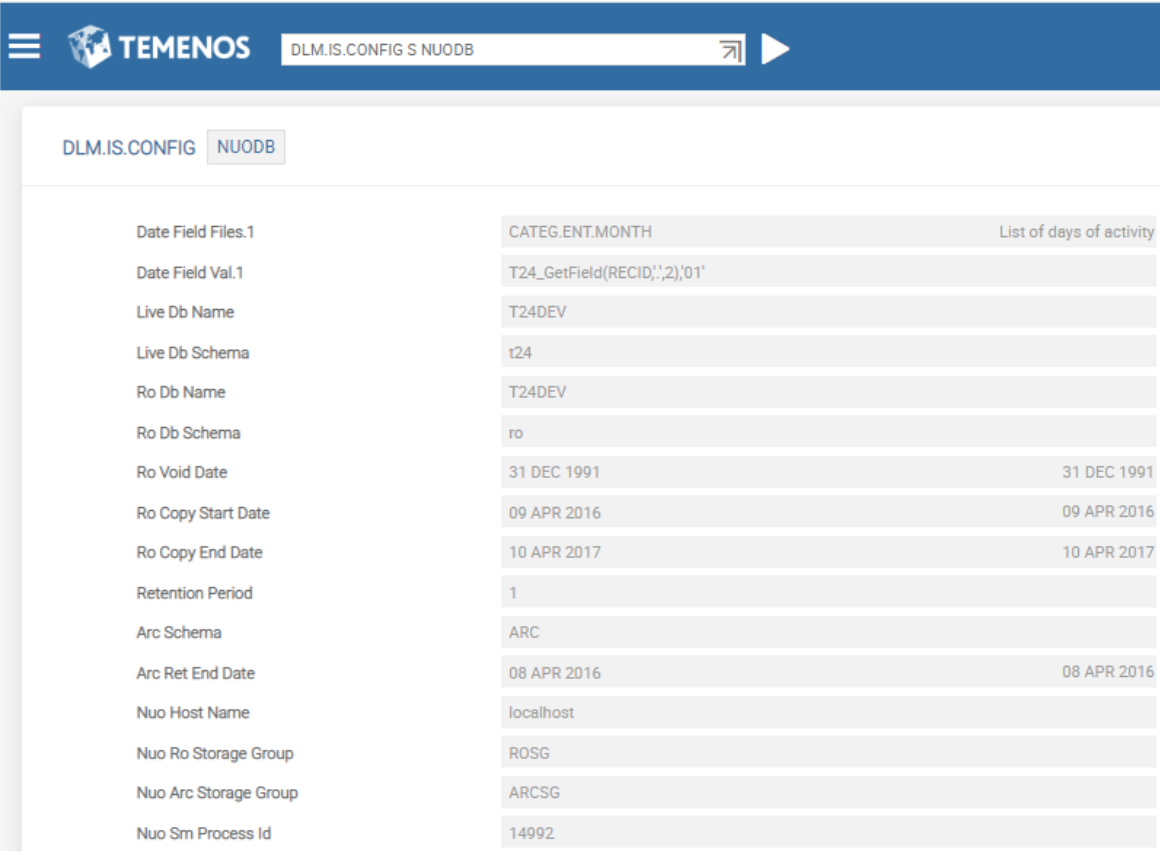
You need to configure the NUODB database specific details in the fields shown in the following table.
|
Field |
Description |
|---|---|
|
Nuo Host Name |
Indicates the NUODB host server, used in the storagegroup scripts |
|
Nuo Ro Storage Group |
Indicates the prefix name for the RO database storagegroup name, which will be appended to a number. For example, ROSG1, ROSG2. |
|
Nuo Arc Storage Group |
Indicates the prefix name for the RO database ARCHIVE DATA storagegroup name, which will be appended to a number. For example, ARCSG1,ARCSG2. |
|
Nuo Sm Process Id |
Indicates the NUODB storage manager process ID used in storagegroup scripts |
Generic Database Details in COMMON Version
This section provides the generic database details in COMMON version, which is common across databases. The following screen capture shows a sample version for MSSQL.
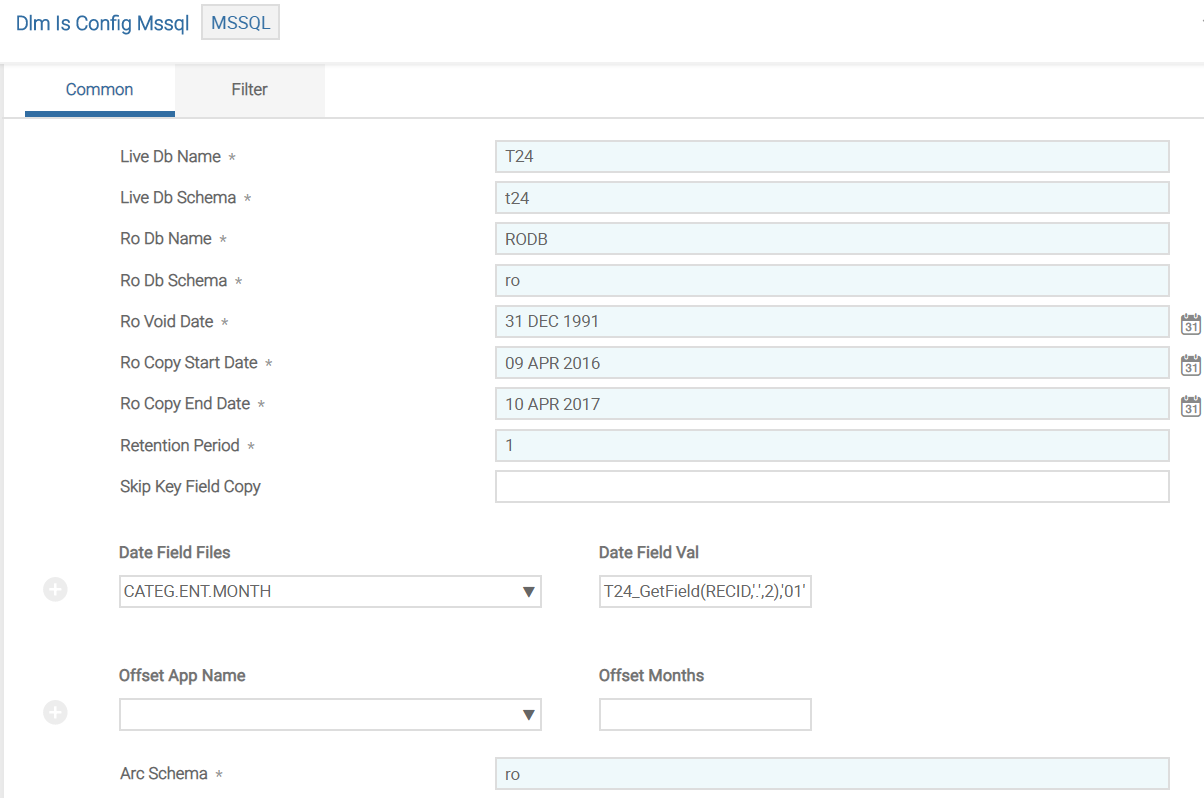
You need to configure the database specific details in the fields shown in the following table.
|
Field |
Description |
|---|---|
|
Live Db Name |
Indicates the name of the Temenos Transact database |
|
Live Db Schema |
Indicates the name of the schema owner in the Temenos Transact database |
|
Ro Db Name |
Indicates the name of the RO database |
|
Ro Db Schema |
Indicates the name of the schema owner in the RO database |
|
Ro Void Date |
Indicates the date to be added as PDATE value for records, which doesn't have value in the actual PDATE field and records will not be copied |
|
Ro Copy Start Date |
Indicates the start date for the RO data retention period. All data greater than or equal to this date will be copied to the RO tables |
|
Ro Copy End Date |
Indicates the end date for the RO data retention period. All data less than this date will be copied to the RO tables. |
|
Retention Period |
Indicates the number of years required to store RO data before it is archived. |
|
Skip Key Field Copy |
Indicates if the copy script generation for tables defined with @ID or @DATE as purge date field, needs to be skipped. |
|
Offset App Name |
Indicates the list of file control records. This dropdown field contains the applications for defining the monthly offset values. |
|
Offset Months |
Indicates the monthly offset value. This field is the associated field of Offset App Name. The RO.COPY.END.DATE will be adjusted by the number of months specified as RO.COPY.END.DATE - n months. |
|
Arc Schema |
Indicates the name of the schema owner in the RO database to hold the ARC tables |
Filter Details in FILTER Version
This section provides the generic filter details in FILTER version, which is common across databases. The following screen capture shows a sample version for MSSQL.
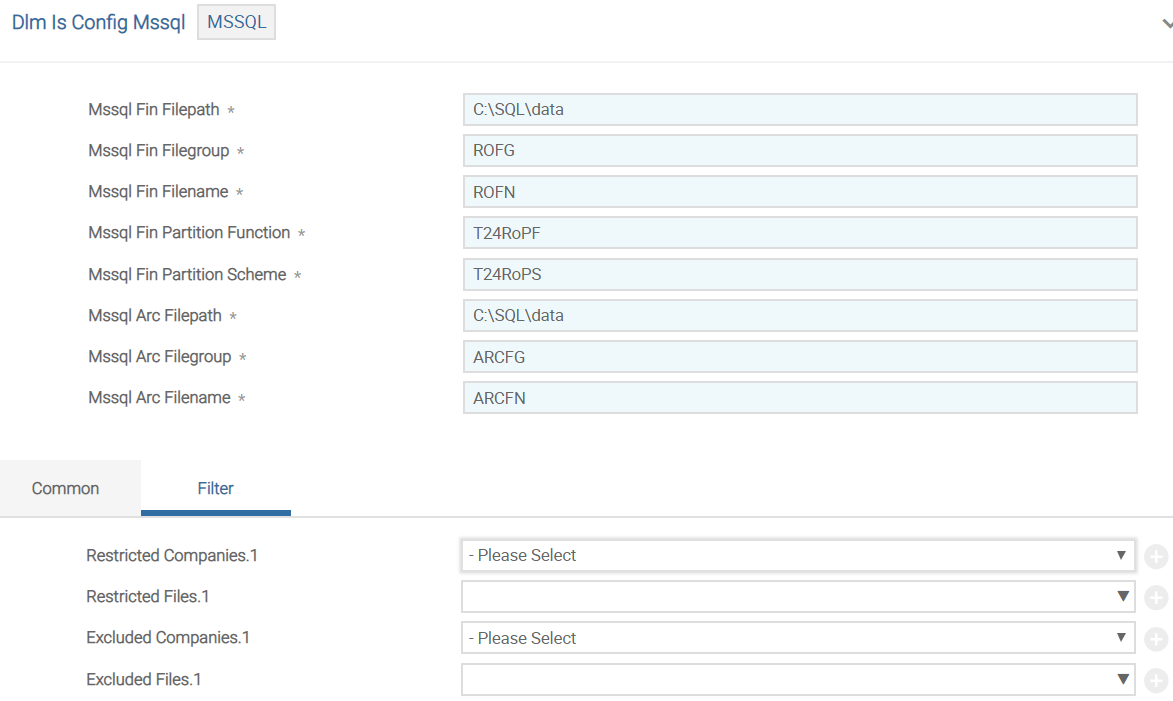
You need to configure the database specific details in the fields shown in the following table.
|
Field |
Description |
|---|---|
|
Restricted Companies |
Indicates the list of company mnemonics prefixed with F. The script generation will be done only for the selected companies. |
|
Restricted Files |
Indicates the list of file control records. The script generation will be done only for the selected files. |
|
Excluded Companies |
Indicates the list of company mnemonics prefixed with F. The script generation will not be done only for the selected companies. Restricted Companies and Excluded Companies are mutually exclusive. |
|
Excluded Files |
Indicates the list of file control records. The script generation will not be done for the selected files. Restricted Files and Excluded Files are mutually exclusive. |
DLM Control Fields
The DLM.IS.CONTROL.FIELDS record configures the purge date field and its extract value by using a valid STANDARD.SELECTION ID. These fields are used for updating the PDATE column value in the RO table.
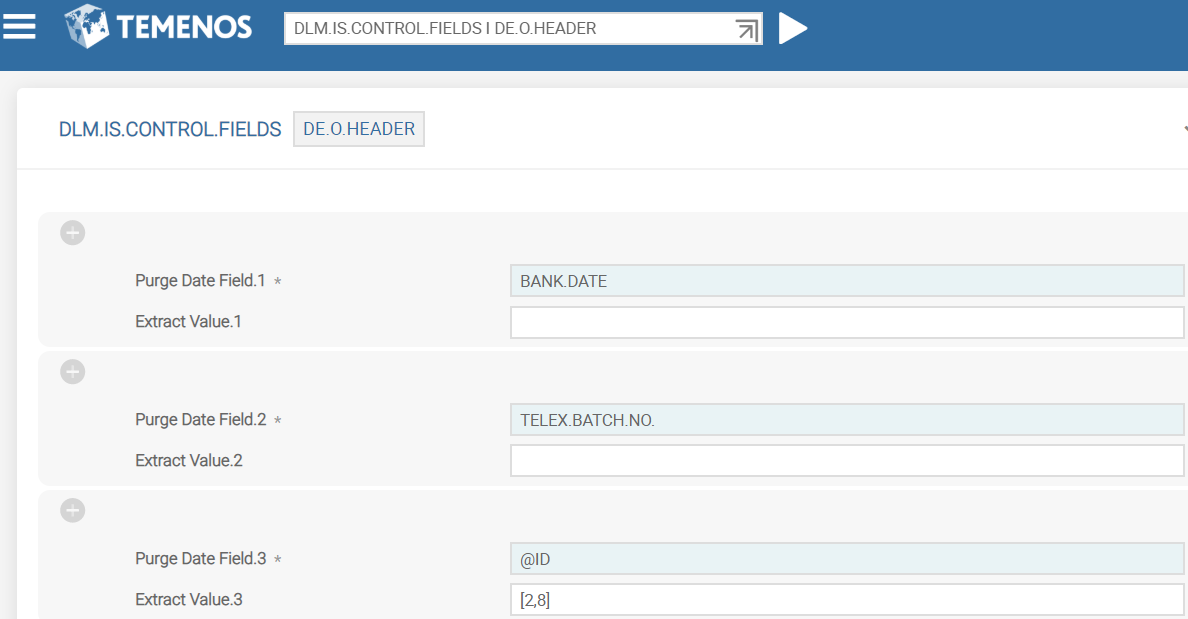
The following table lists the fields in this record and their descriptions.
|
Field |
Description |
|---|---|
|
Purge Date Field |
Indicates a valid STANDARD.SELECTION System field or @DATE. The value of this field corresponds to the Pdate field in the DLM database. |
|
Extract Value |
Indicates the substring values of Purge Date Field from which the Pdate value needs to be retrieved. |
DL Separation Utility
DL.INITIAL.SEPARATION utility comprises the following:
|
Utility |
Functionality |
|---|---|
|
DL.SEPARATION.UPDATE.CONTROL |
Gathers information from the DLM.IS.CONFIG.FILEDS and updates F.FILE.CONTROL with the definitions of fields to be used for archiving of data records. |
|
DL.SEPARATION.LIST.GEN |
Identifies the non-volatile data |
|
DL.SEPARATION.SCRIPT.GEN |
Generates scripts to configure the elements of the RO database. |
|
DL.SEPARATION.VOC.UPDATE |
Updates VOC entries based on the non-volatile associations |
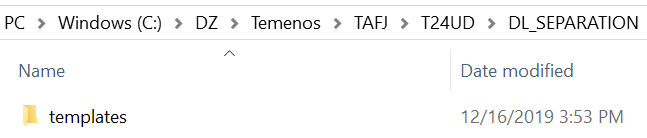
To work with DL.INITIAL.SEPARATION, you need to get the latest DL_SEPARATION package and unzip the pack into the run directory.
DLM.IS.CONTROL.FIELDS pre-configured records are available for 34 applications shown in the following screen captures.
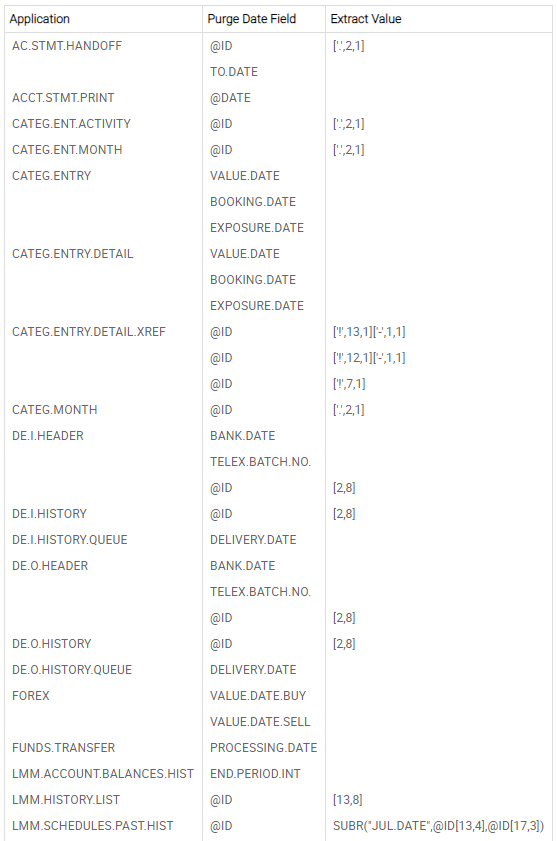
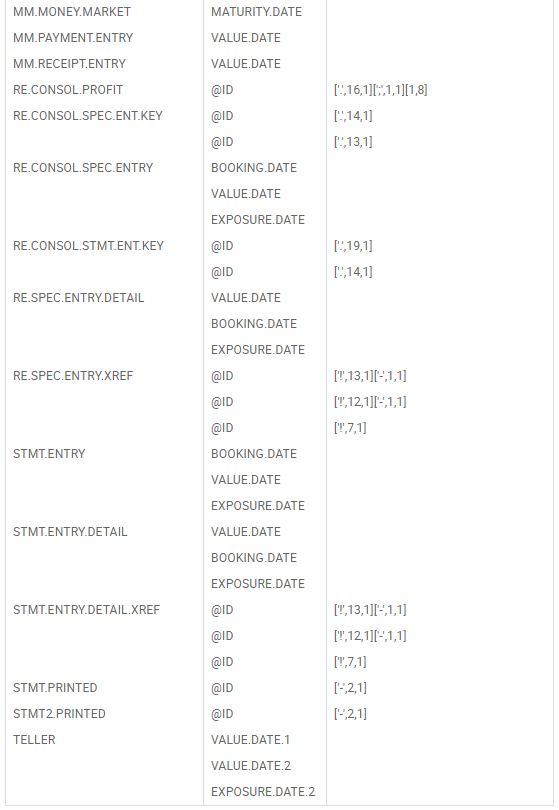
You can configure the other applications in DLM.IS.CONFIG.FIELDS, if required. The default records MSSQL, ORACLE and DB2 are available in the DLM.IS.CONFIG application. Based on the environment used configure the respective database record with the database and other details.
The following screen capture shows a MSSQL record used with MSSQL environment.
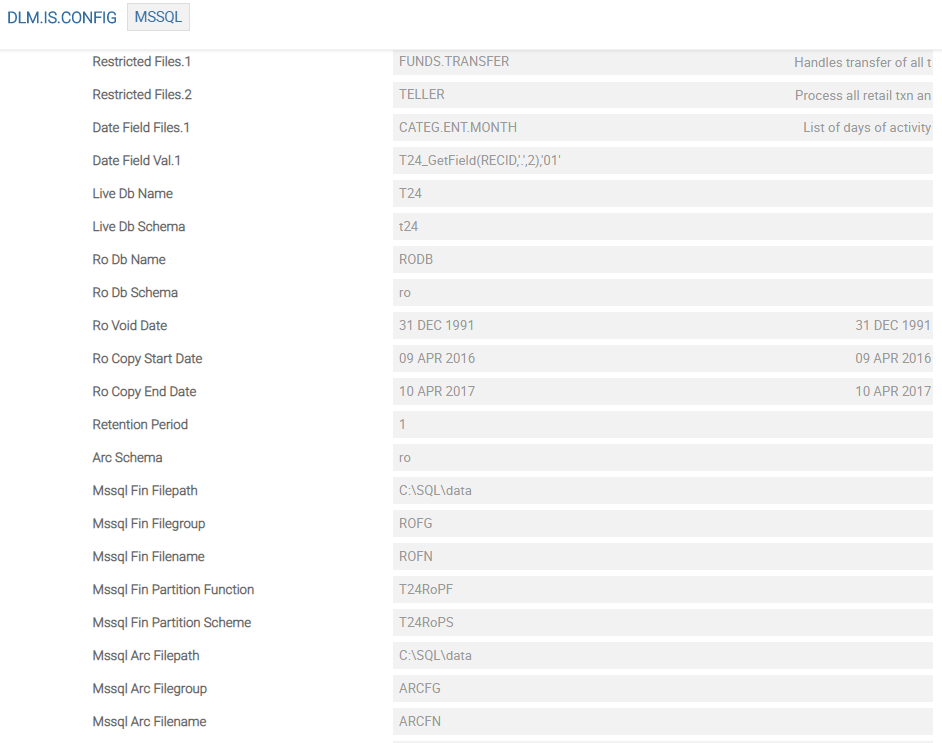
You need to execute DL.INITIAL.SEPARATION to generate the scripts required for RO database configuration Ensure that the DLM.IS.CONTROL.FIELDS and DLM.IS.CONFIG application records are configured, as required.

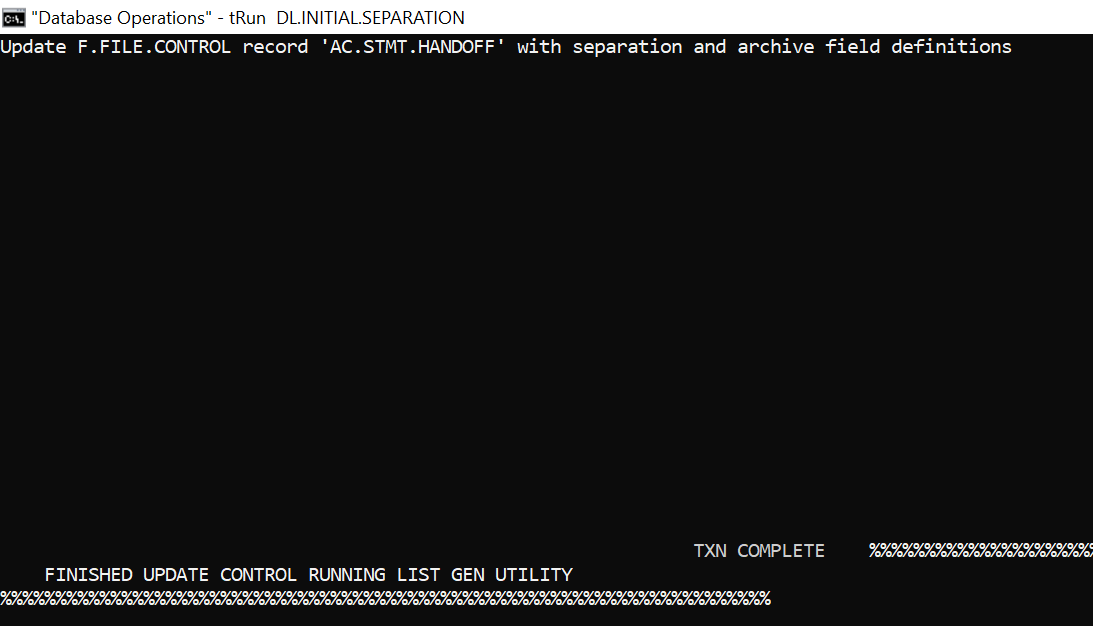
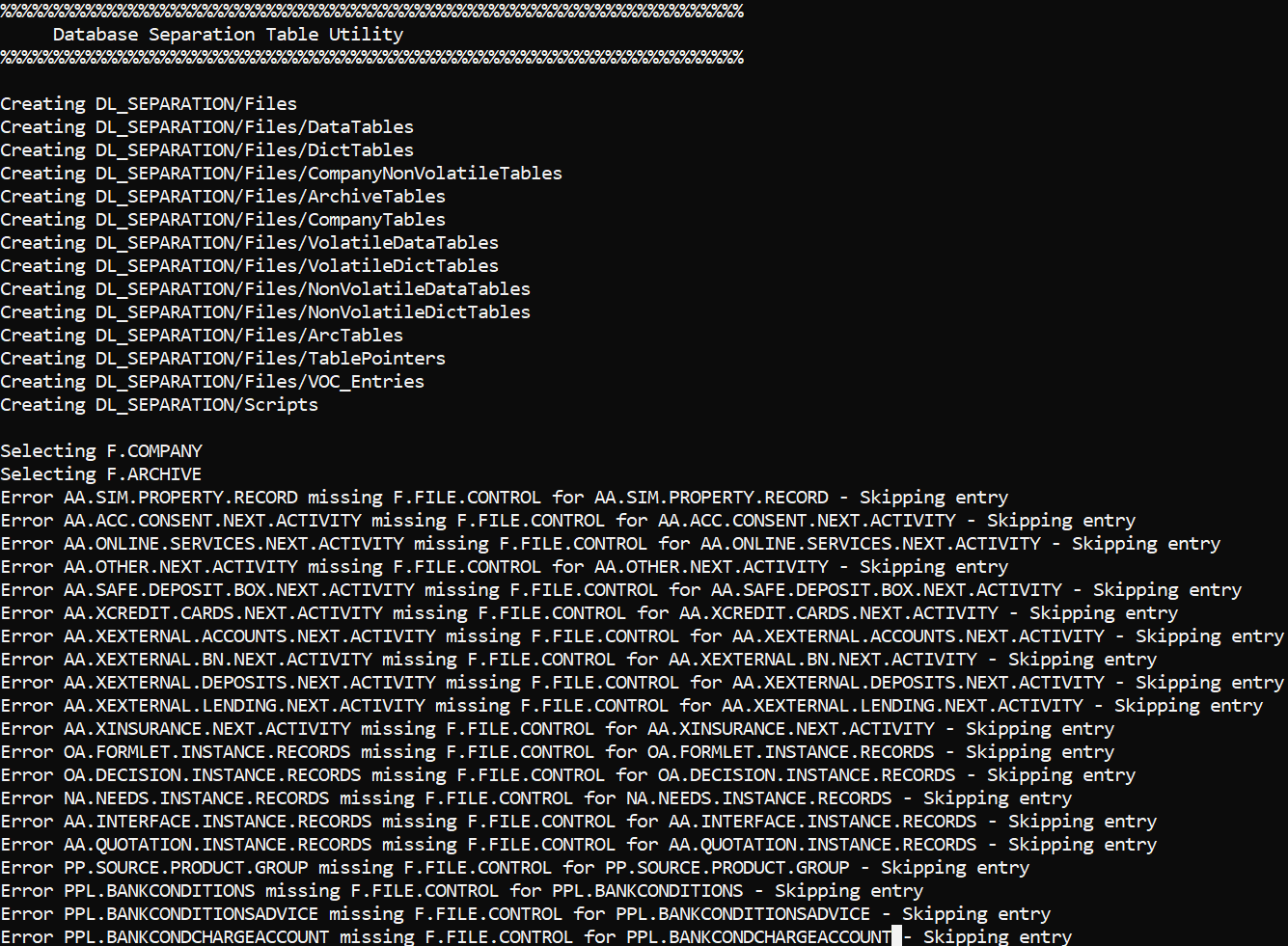
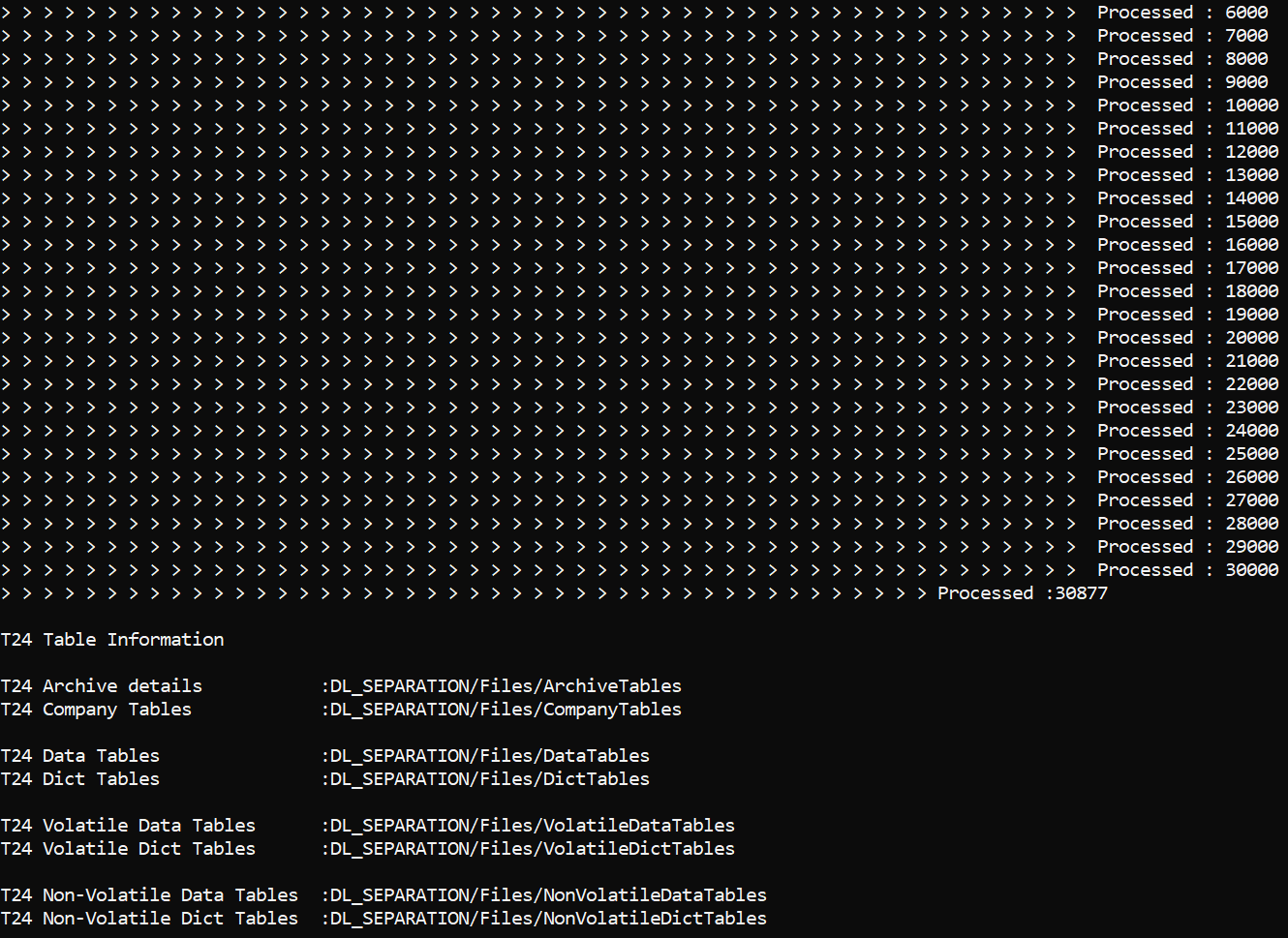
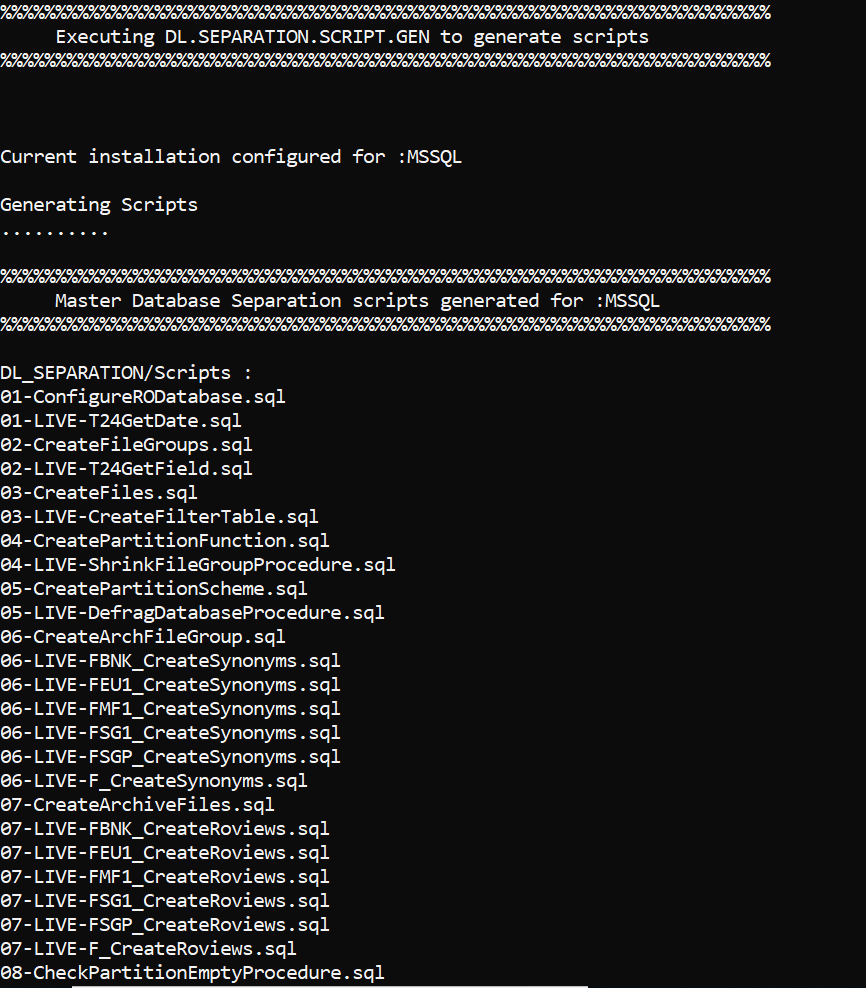
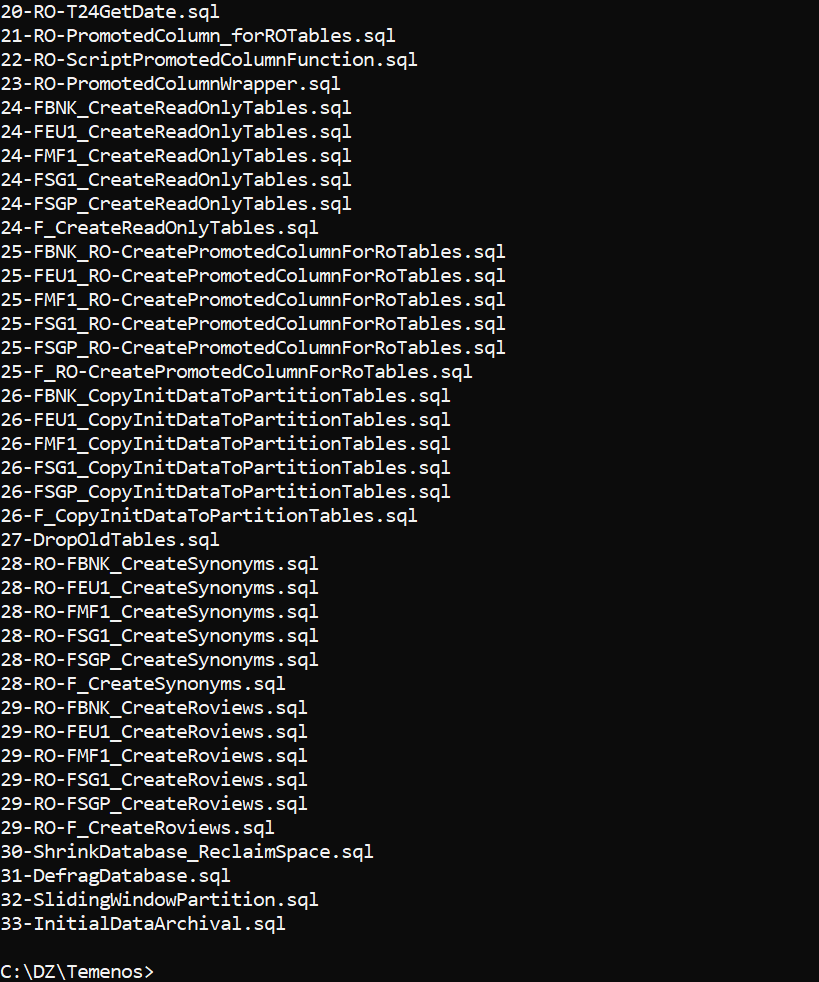
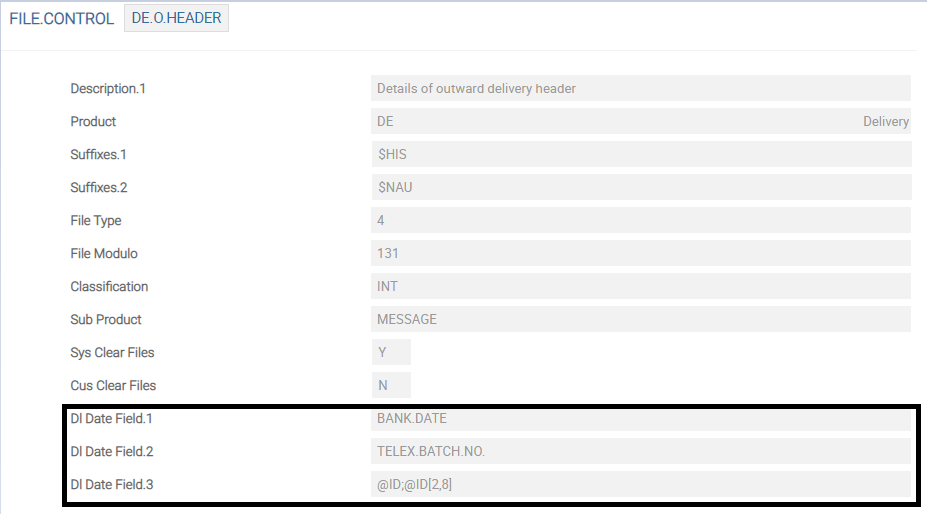
The Dl Date Field field value in the FILE.CONTROL record is updated with the values from the DLM.IS.CONTROL.FIELDS record. This field value is used in DL.COPY.PROCESS to get the PDATE value.
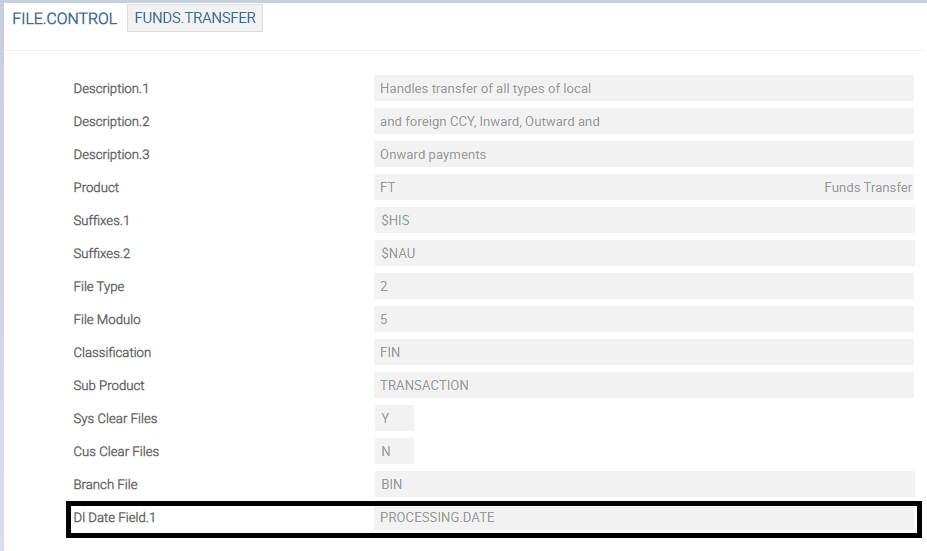
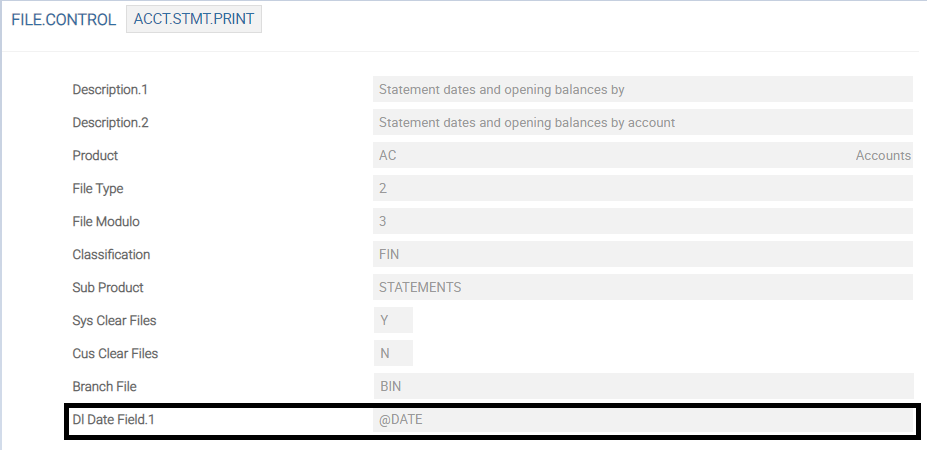
 Data Tables
Temenos Transact data can be classified into two types.
- Volatile data is the transactional data kept in the LIVE database
- Non-volatile data is the historical data moved to another database
The ARCHIVE application has the information about the read-only tables. The VOC tables are scanned to get the information about the DATA and DICT tables of the applications. More related information are gathered from applications like SPF, FILE.CONTROL and COMPANY. These data are consolidated and the list of tables eligible to move to read-only database is created and stored in a different location through the DF.SEPARATION.LIST.GEN utility. These lists are used to create scripts of the underlying database.
The DL.SEPARATION.LIST.GEN utility invoked from DL.INITIAL.SEPARATION generates the LIVE tables, which:
- Requires associate Read-Only (#RO) tables
- Are not required in the Read-Only database
- Needs to be skipped in the Initial Load
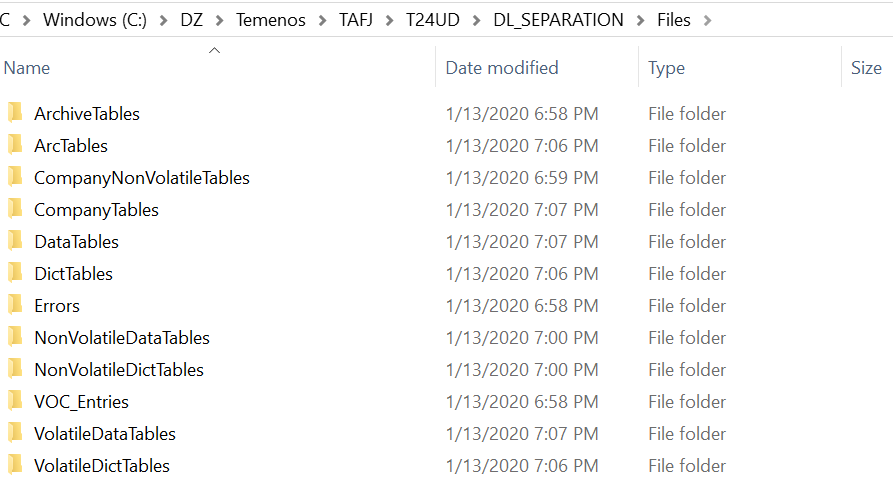
Temenos Transact data is split into different tables and stored in DL_SEPARTION\Files\. The following table lists the types of tables and their corresponding descriptions.
|
Table |
Description |
|---|---|
|
DataTables |
Indicates all DATA Tablenames |
|
DictTables |
Indicates all DICT Tablenames |
|
CompanyNonVolatileTables |
Indicates all the non-volatile Tablenames split on company. The MNEMONIC. RECID is <COMPANY REC.ID>-<MNEMONIC> |
|
ArchiveTables |
Indicates the names of the main and related tables of an Archival Application. RECID is same as ARCHIVE application. |
|
CompanyTables |
Indicates all tables of RO_VOC split as per company MNEMONIC. |
|
VolatileDataTables |
Indicates the volatile data table names |
|
VolatileDictTables |
Indicates the volatile DICT table names |
|
NonVolatileDataTables |
Indicates the non-volatile data table names |
|
NonVolatileDictTables |
Indicates the non-volatile DICT table names |
|
ArcTables |
Indicates the separate record for each of the files with company mnemonic for the files configured in ARC.FILENAME |
|
TablePointers |
Indicates the list of intermediate files for which synonyms are created in the RO database |
|
VOC_Entries |
Indicates the script files with Update scripts for LIVE VOC records and Insert scripts for $RO VOC records |
|
Errors |
Indicates the files with errors occurred during the LIST generation |
Scripts
The non-volatile data tables are stored in a separate package using the DL.SEPARATION.LIST.GEN utility. Before moving the historical data, the RO database has to be configured optimally to give high performance on queries. This depends on the size of the data to be stored and its retention period. All these details are first configured in a configuration file.
DL.SEPARATION.SCRIPT.GEN.TAFJ or DL.SEPARATION.SCRIPT.GEN.TAFC creates various database scripts that need to be directly run on the configured databases. These scripts configure or create the RO database for storing the non-volatile data.
The utility generates the scripts for the following.
- Creation of #RO and #ARC table spaces
- Creation of #RO and #ARC tables
- Initial Load from LIVE to #RO and #ARC
- Initial Delete from LIVE of the RO database data
- Deletion of irrelevant tables from the RO database
- Deletion of original live tables from the RO database
- Creation of synonyms for live tables in the RO database and vice-versa.
- Movement from live to archive tables.
- Movement and deletion of operational log data
- Maintenance and cycling
The generated scripts are stored in DL_SEPARTION\Scripts\.
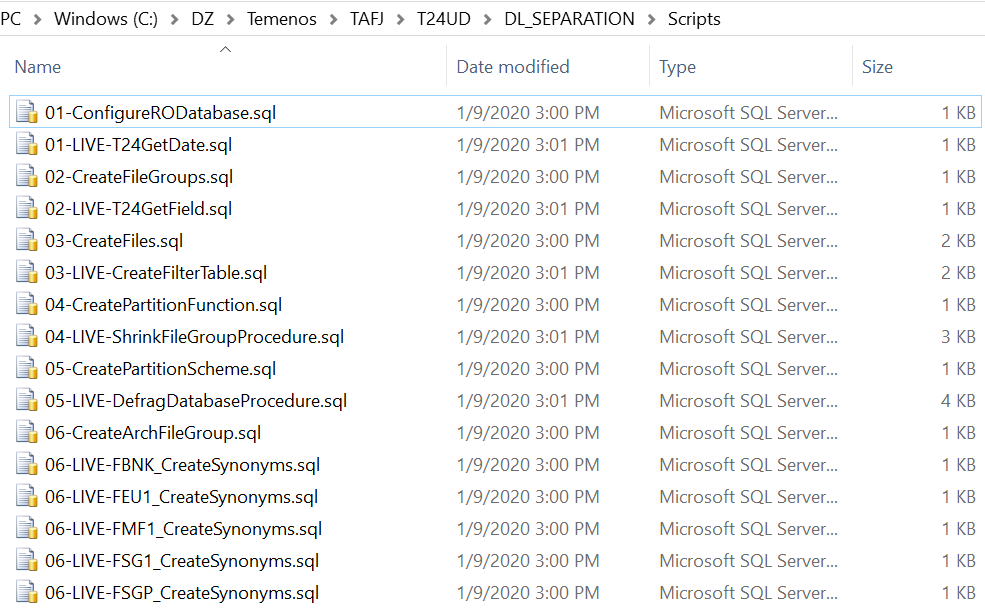
The scripts to be executed in RO and LIVE databases are added in Master-RO.sql and Master-Live.sql, respectively.
You need to execute DL.SEPARATION.VOC.UPDATE utility to create the VOC entries for DLM tables, which is required during enquiry execution.
Data Archival
This section provides details about the applications and other components involved in the data archival process.
ARCHIVE
Temenos Transact ARCHIVE application is designed to reclaim space by moving historic data that is no longer required. Archiving examines files for records to be archived, writes the selected records (and any associated records) to a $ARC archive file (which can reside on a separate disk, or even a separate machine if accessible via a network), then deletes the records from the LIVE database. You can also delete the data without archiving it.
The following screen captures show ARCHIVE details for CATEG.ENTRY and FUNDS.TRANSFER.
Each of the files to be archived must have an entry in ARCHIVE. The fields in this record are classified into four sets.
The first set of fields are Purge Date, Retention Period, Archive Data and $ARC Pathname.
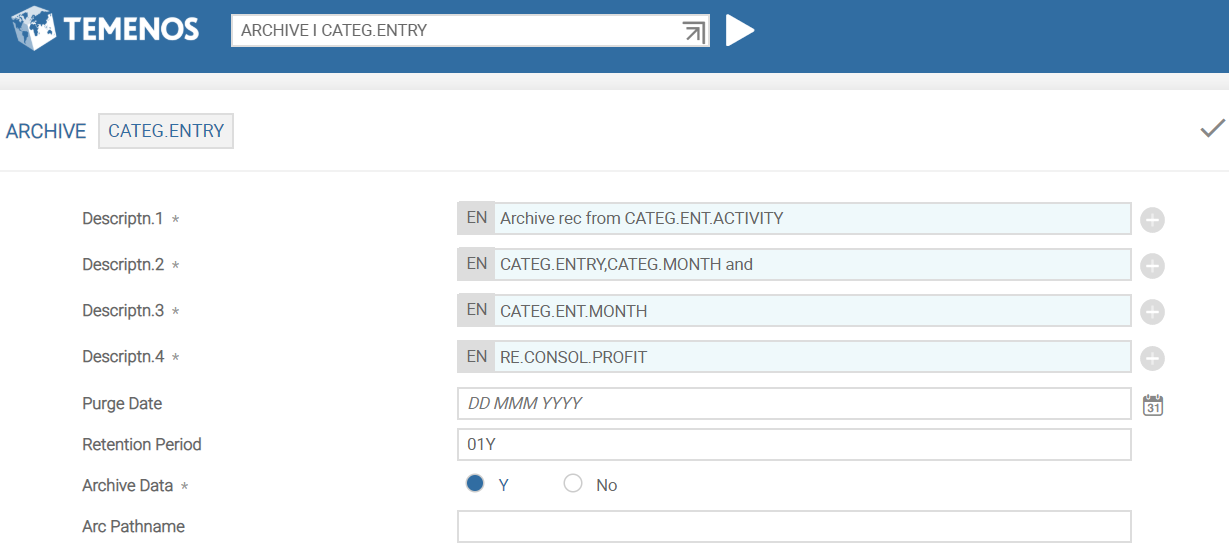
The Archive Data field indicates if the selected records need to be archived or deleted. The values are:
- Y = Records will be archived
- N/None = Records will be deleted
The Purge Date and Retention Period fields are used to specify the records selection for archiving. This is based on a date which can either be specified in Purge Date (must be the first of the month and for CATEG.ENTRY field must be before the last financial year-end) or Retention Period field. The records older than this date are archived or deleted. Purge Date is calculated automatically from the retention period at runtime. For example, if the current date is 23/05/2012 and retention period is specified as three months (03M), records dated before 1/2/2012 are archived or deleted.
The $Arc Pathname field indicates the destination location of the $ARC archive files. If this field is left null, then the $ARC files are created in the archive directory (BNK.arc).
The second set of fields (Arc Filename to Modulus) are related multi-value fields, which describe the archive files to be created.
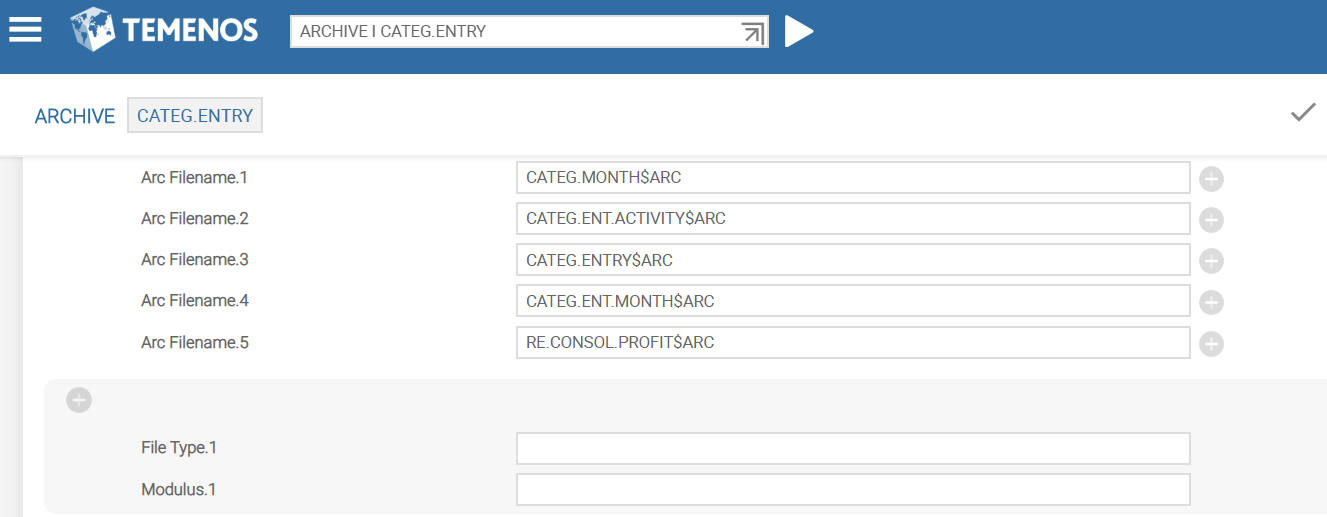
The Arc Filename field indicates the names of all the $ARC files which are created based on the type and modulo specified. If the type and modulo specification are not present, then $ARC files inherit the same type and modulus as the corresponding LIVE files.
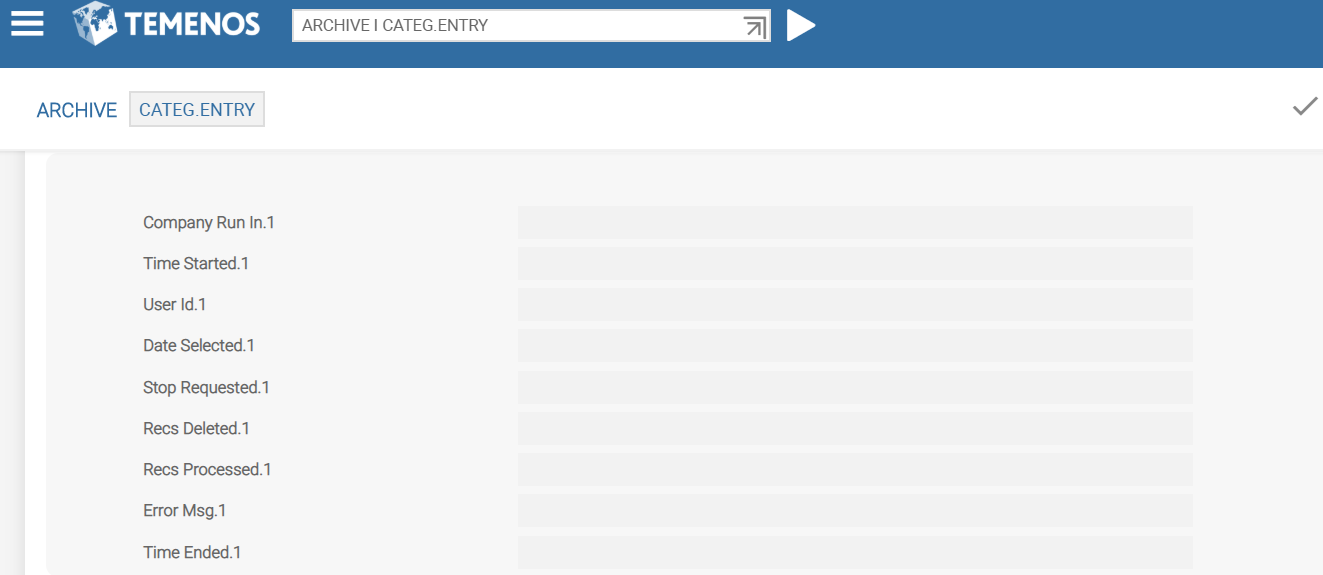
The third set (Company Run In to Time Ended) are related multi-value fields, which are auto populated by the system after the contracts are archived, which maintain a history.
The fourth set comprises the Generic Method, Main File, Field To Check, Filter Rtn, Related Files Rtn and Routine fields.
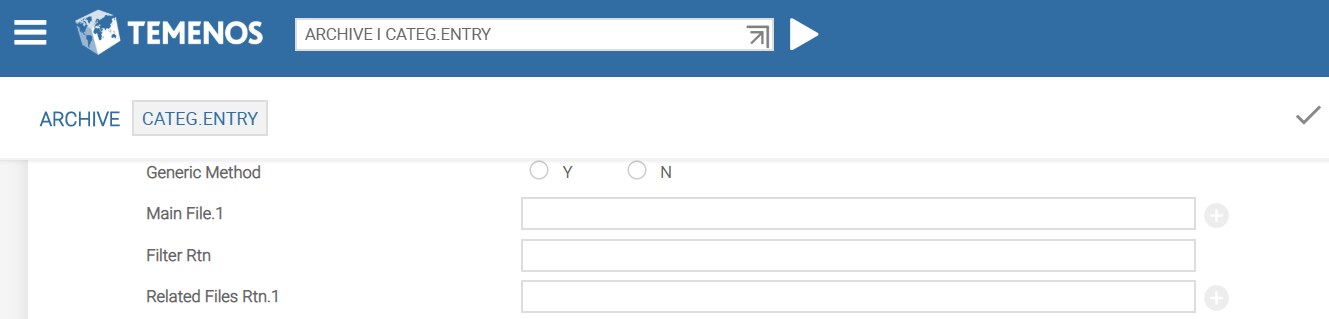
The Main File field accepts the file name that has to be archived. For example, FUNDS.TRANSFER$HIS.
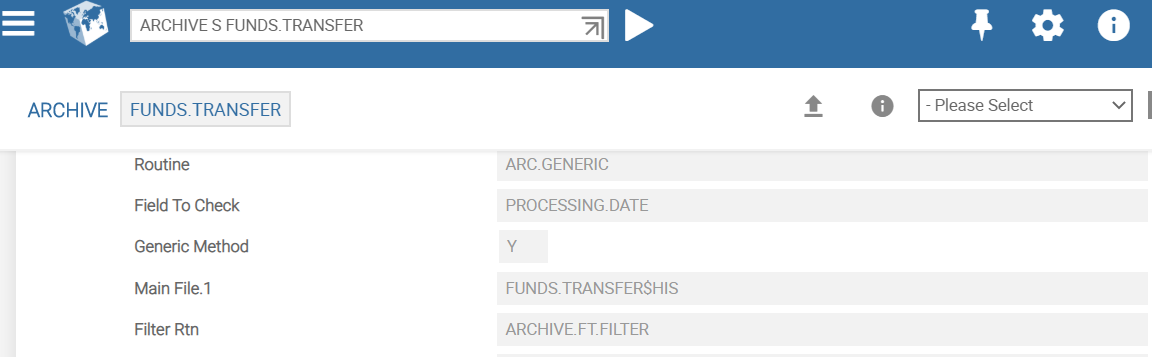
The Field To Check field indicates the date field in the contract, which must be compared with the Purge Date for archiving. If this field is left blank, the standard Date Time field value is used for comparison. For example, to archive the history records of the FUNDS.TRANSFER record, the Processing Date value of the contract is used.
NOTE: If the Main File field is multi-valued and populated with two or more applications, the date field mentioned in Field To Check considers the application populated in the first multi-value set.
The Filter Rtn field is a hook routine to select or ignore a contract for archiving. This field is used as an alternative to Field To Check field.
The parameters of this routine are:
- ID.CONTRACT (IN Parameter 1) - Record key of the contract
- R. CONTRACT (IN Parameter 2) – Entire contract record
- CONTRACTARCHIVE.DATE (OUT Parameter 1) – Date against which the purge date set in the ARCHIVE record should be compared with. For example, in FUNDS.TRANSFER, you can compare debit value date and credit value date of the contract and return a final date as the OUT parameter, which is compared with the purge date finally for archival.
- SKIP.FLAG (OUT Parameter 2) – Returns value 1 as the OUT parameter, to skip the current contract from archiving. Value 1 confirms that the current contract need not be archived. (logic to ignore the contract must be available in the filter routine. So, the current contract is skipped from being archived).
The Related Files Rtn field is a hook routine that returns the names of related files, which need to be archived along with the main archival record in a dynamic array.
The parameters of this routine are:
- ID.CONTRACT (IN Parameter 1) - Record key of the main contract that is ready to be archived.
- R.CONTRACT (IN Parameter 2) – Entire contract record.
- RELATED.FILES (OUT Parameter 1) – Information of related files to be archived in the File name, File ID, Archival Flag separated by @VM format. If there are multiple related files, each file information can be delimited by a @FM marker. For example, upon archiving LOANS.AND.DEPOSITS records, its balance file records must be archived. So, pass the balances file name, its ID and Y to the Archival flag.
NOTE: Both the routines mentioned above have two spare parameters for future expansion.
Generic Method
This field must be set to Y to execute generic archival process. This allows the ARC.GENERIC archival service to do the selection and purging of records. For example, FUNDS.TRANSFER, TELLER, STMT.ENTRY.DETAIL and so on are archived using the generic archival process based on the inputs provided in the Main File, Field To Check or Filter Routine fields.
Routine
This field indicates a valid multi-threaded routine that is responsible for archiving the set of files defined in the ARCHIVE record. These are application specific routines and should not be changed unless a site specific program is written. For example, for FOREX, the routine is ARC.FOREX. This record routine is responsible to decide on the archival logic and to do archiving. Separate ARC.FOREX.LOAD and ARC.FOREX.SELECT routines must be available for opening and selecting all necessary files for archiving. However, it is not necessary to create a separate ARC.FOREX service. The ARC.GENERIC service invokes ARC.FOREX.LOAD, ARC.FOREX.SELECT, and ARC.FOREX routines internally for archiving in the presence of Routine field.
Archiving Process Timing
It is recommended that the archiving process must be run after the cob, but before the users are allowed to sign in. However, since archiving remvoves the data that is no longer used, it can be executed even when the system is live.
Post Archiving Actions
Once the archiving process is complete, the size of all the files involved (both original and $ARC where applicable) must be reviewed to take the new number of records in the relevant files into account.
Segmentation
Initially, statement archiving was multi-threaded at account level, that is, each agent archives data specific to an account and if an account has a huge number of entries to archive, archiving takes long time to process as the multi-threading is not at the STMT.ENTRY level. It also results in an enormous transaction boundary at the database level resulting in DB failures.
To overcome this issue, segmentation is introduced in statement archiving, which is already a proven performance solution for SWIFT statements in Temenos Core Banking.
Segmentation is the process of multi-threading the job processing by splitting the entries between the available agents.
The statement archiving process consists of the following ARCHIVE records:
STATEMENT - To archive records from the following tables
- ACCT.SMT.PRINT
- ACCT.STMT2.PRINT
- STMT.PRINTED
- STMT2.PRINTED
- STMT.ENTRY
- RE.CONSOL.STMT.ENT.KEY
- AC.STMT.HANDOFF$HIS
STMT.ENTRY.DETAIL - To archive records from the following tables
- STMT.ENTRY.DETAIL.XREF
- STMT.ENTRY.DETAIL
This statement archiving can be executed using either of the following ways.
- Running STATEMENT.ENTRY.DETAIL and STATEMENT archiving sequentially as two separate processes.
- Setting ARCHIVE (STATEMENT) > ARC.FILENAME to STMT.ENTRY.DETAIL$ARC and running STATEMENT archive process only. This in turn archives records from all the above-mentioned tables including STMT.ENTRY.DETAIL.XREF and STMT.ENTRY.DETAIL without having to run STMT.ENTRY.DETAIL archive separately.
Running both archives together gives better control over data being archived and helps to maintain the referential integrity of the statement tables. However, the disadvantage is that it spans to archive all statement data relevant to a particular account. This is now broken down into smaller manageable transactions with segmentation processing without affecting the data referential integrity the solution already provides.
Segmentation solution is initiated only if the following conditions are met:
- ARCHIVE (STATEMENT) > ARC.FILENAME is set to STMT.ENTRY.DETAIL$ARC. This archives statement related tables just by running the STATEMENT archive alone instead of running it along with STMT.ENTRY.DETAIL.
- Segmentation value is set for STATEMENT archive in the Segment Value field in the SEG*<NNNNNNN> format, where NNNNNNN is the number of entries to be grouped per agent.
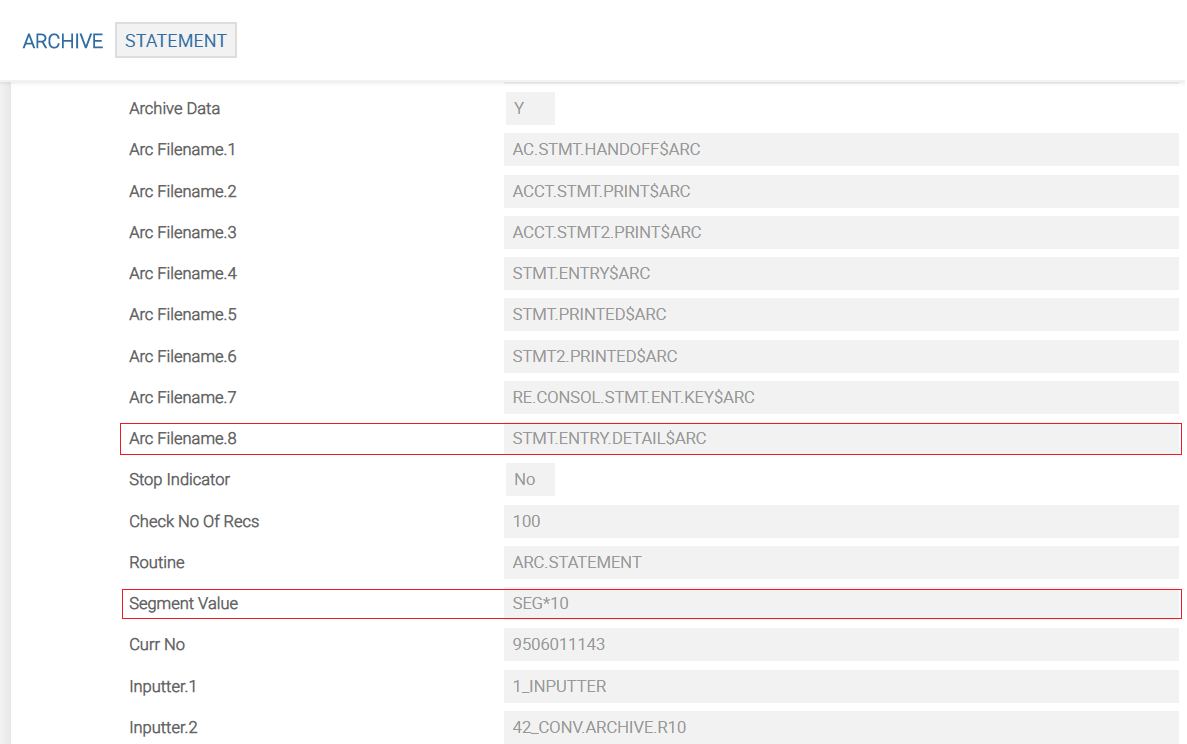
After the ARCHIVE record is setup as explained above, you need to trigger the archiving process by verifying the ARC.GENERIC.REQUEST according to the standard WAR.
If the Segment Value is set as SEG*5000, then each agent archives entries in groups of 5000, so the same account’s data is archived in parallel thereby resulting in a better performance.
ARC.GENERIC.REQUEST
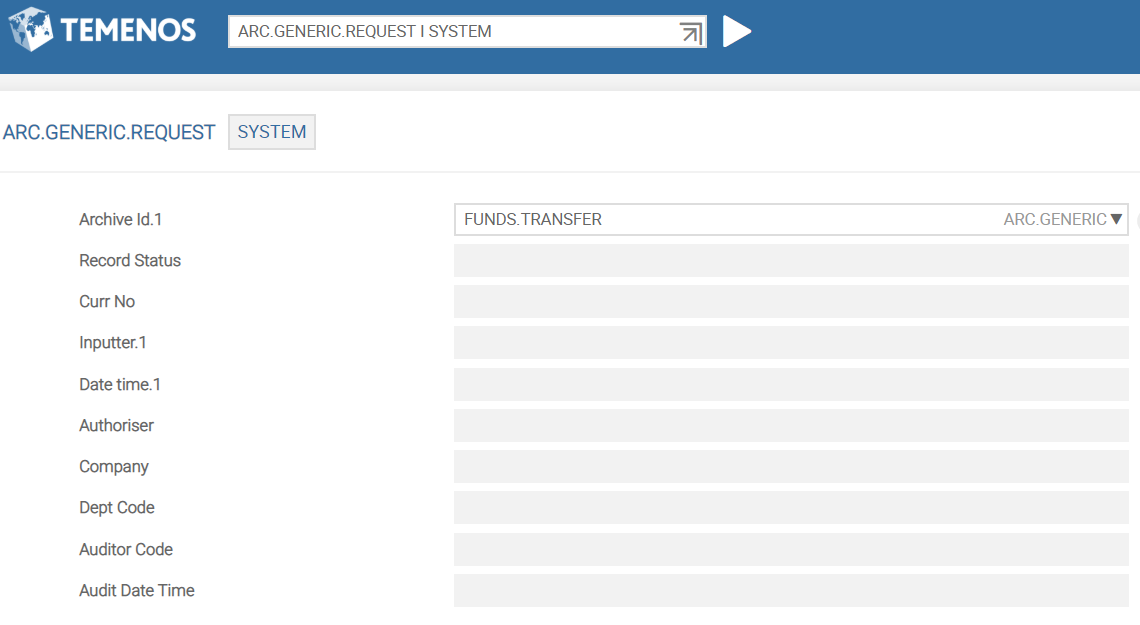
This application stores the archival IDs of the data records to be archived. If you verify this application, the archiving process will be activated. The ID for this application should be of SYSTEM.
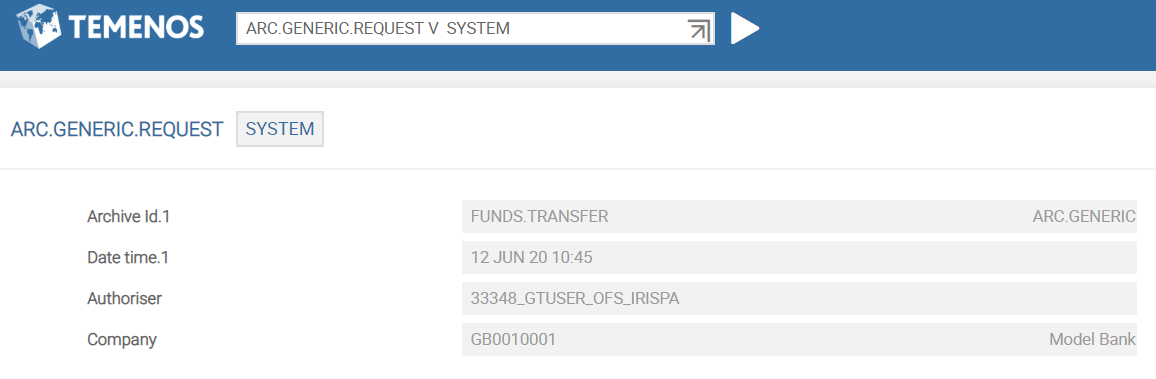
You need to create a SYSTEM record in ARC.GENERIC.REQUEST and specify the Archive Id for archival. Upon verification of this record, ARC.GENERIC service is started in the background and reads the ARCHIVE record. Based on the generic method set-up or the application specific Routine, the records are selected for archival. You need to ensure that TSM is already running.
The following screen capture shows the verification of an ARC.GENERIC.REQUEST record.
ARC.GENERIC
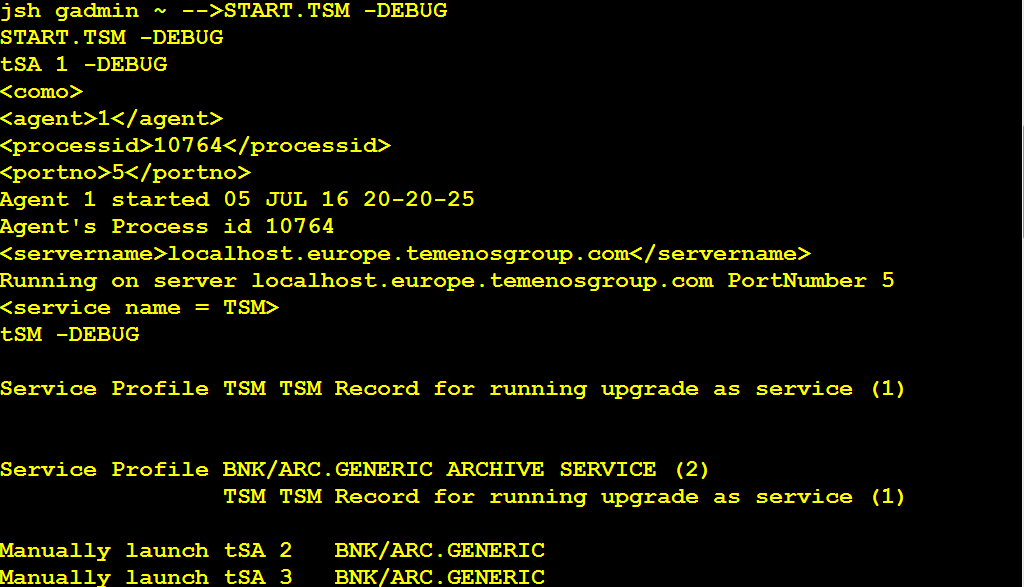
If you have already started the TSM service in DEBUG mode, you should ensure that the TSA agent IDs are generated for the ARC.GENERIC service.
NOTE: You should ensure not to set the service to start manually in the TSA.SERVICE application as the service starts automatically as soon as you carry out a verification (Ctrl+v) in the ARC.GENERIC.REQUEST application.
To run ARC.GENERIC, you must start the TSM service in DEBUG mode.
START.TSM – DEBUG
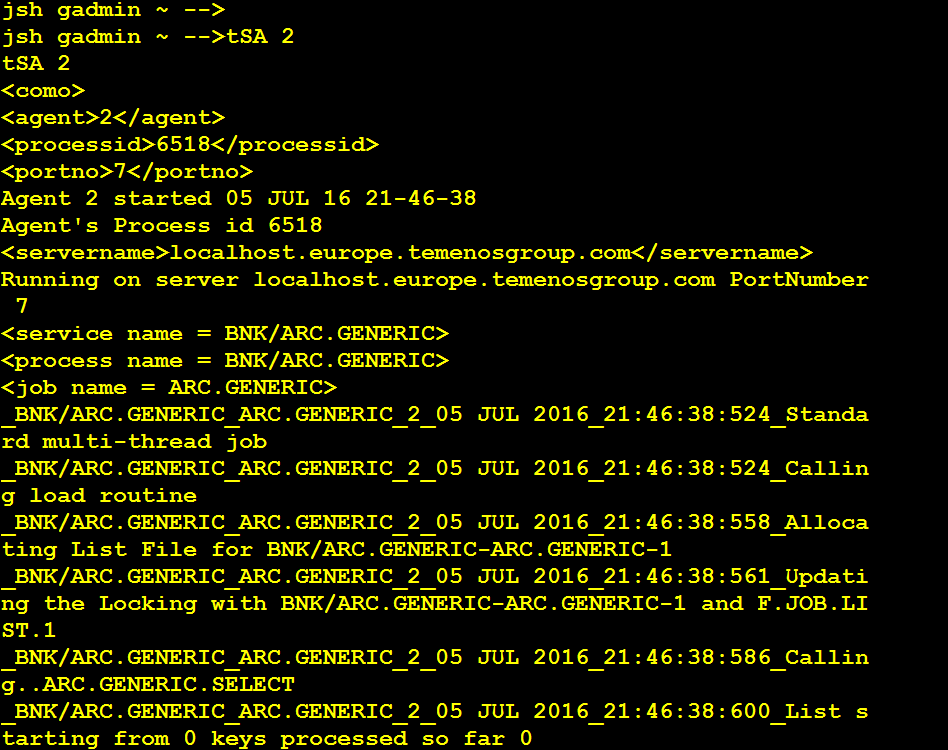
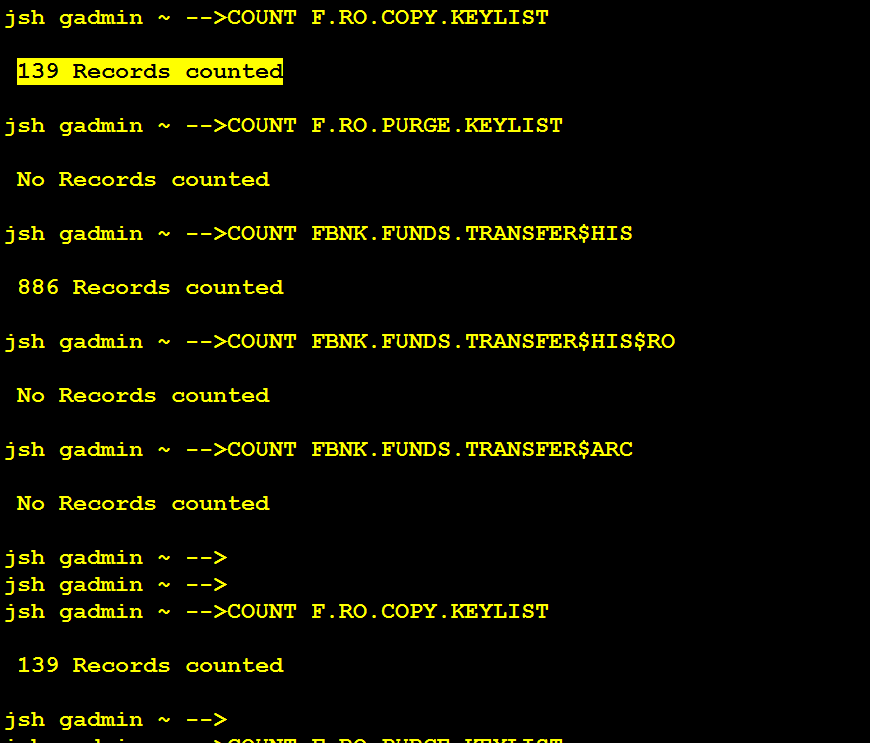
After the ARC.GENERIC process has completed, the RO.COPY.KEYLIST should contain data records. You need to count the data records, as these records will be moved to the destination read only table shortly and purged from the LIVE database eventually.
To count the data records in RO.COPY.KEYLIST, you need to run COUNT F.RO.COPY.KEYLIST from jshell.
Copy Process
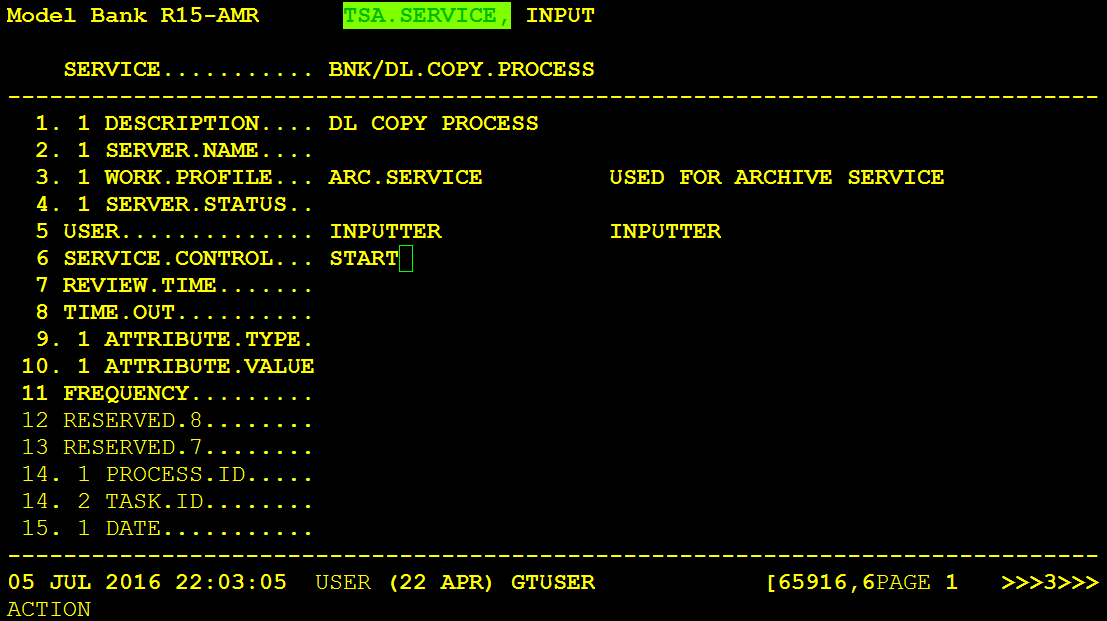
To initiate the COPY process, you need to set the TSM service to START from the Temenos Transact classic browser and then commit.
With your TSM service still running in DEBUG mode, you can see the generated TSA agent ID generated for DL.COPY.PROCESS.
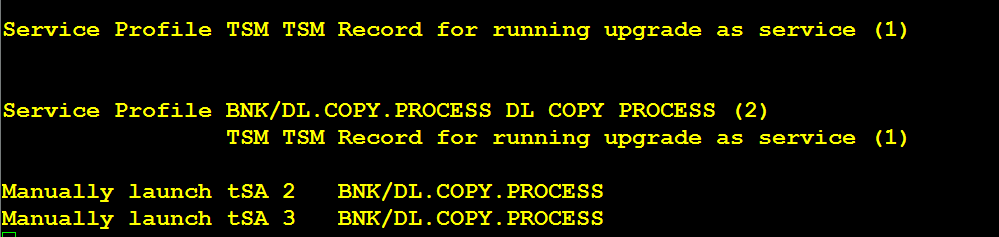
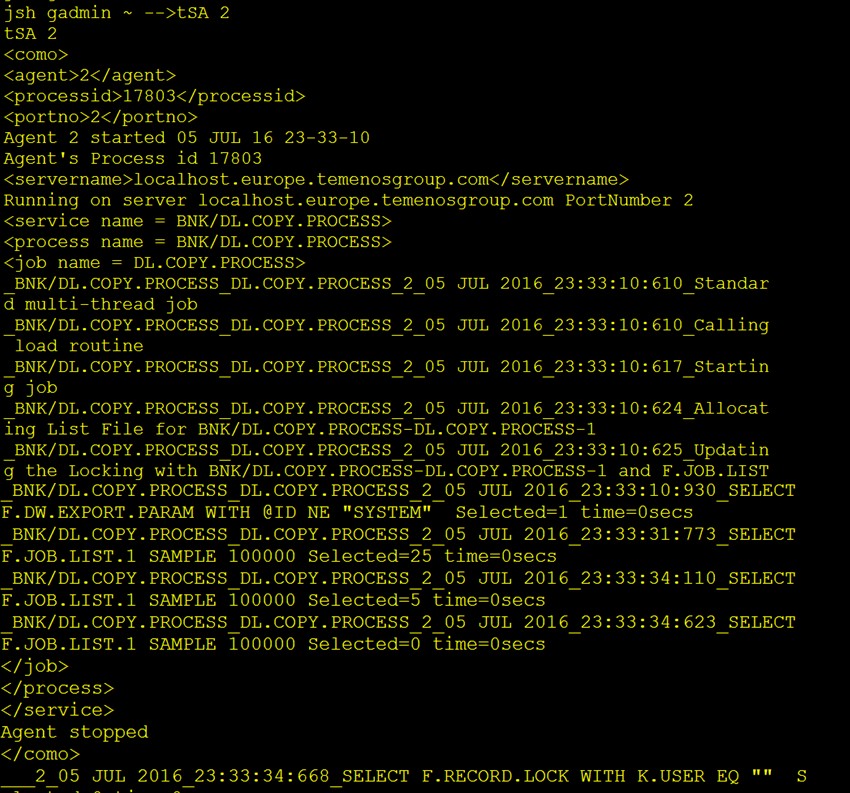
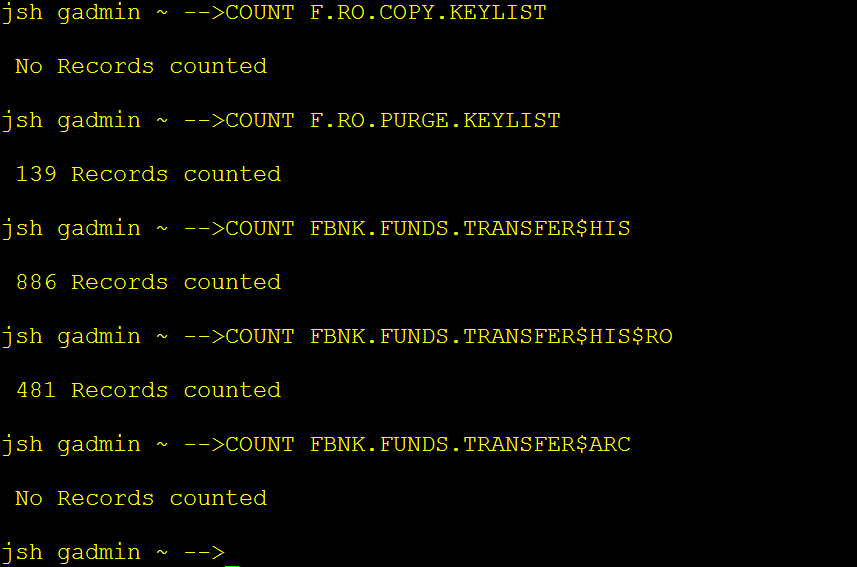
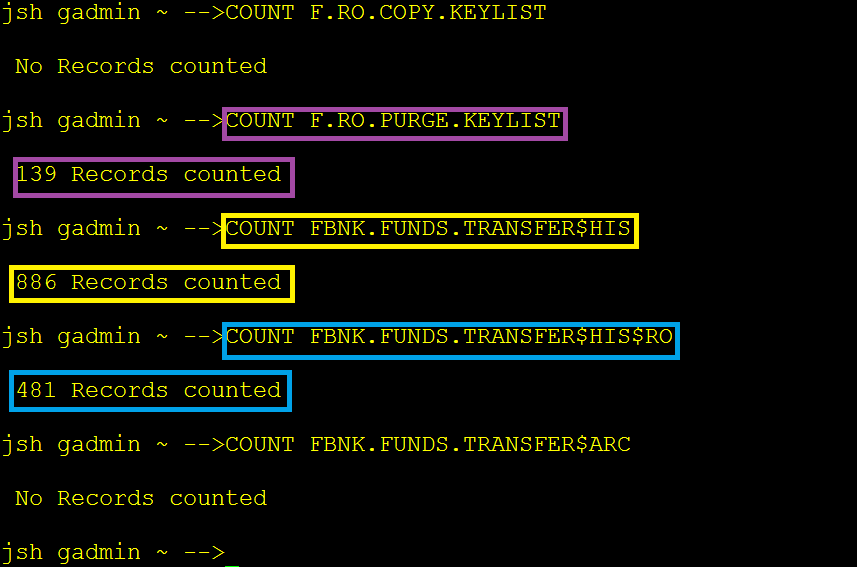
As per the above example screen captures, when the COPY process completes, 139 records read from RO.COPY.KEY.LIST must have been written in RO.PURGE.KEYLIST.
Purge Process
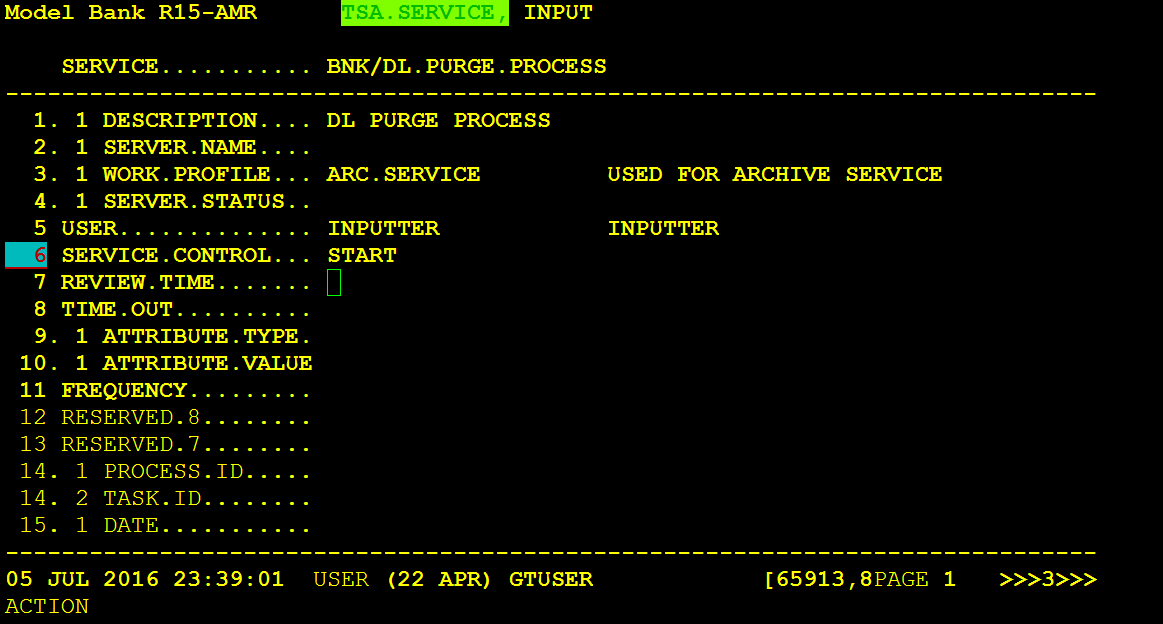
To initiate the PURGE process, you need to set the BNK/DL.PURGE.PROCESS to START in TSA.SERVICE from the Temenos Transact classic browser.
Then you need to get the TSA agent ID from the TSM console output and start the purge.process tsa agent

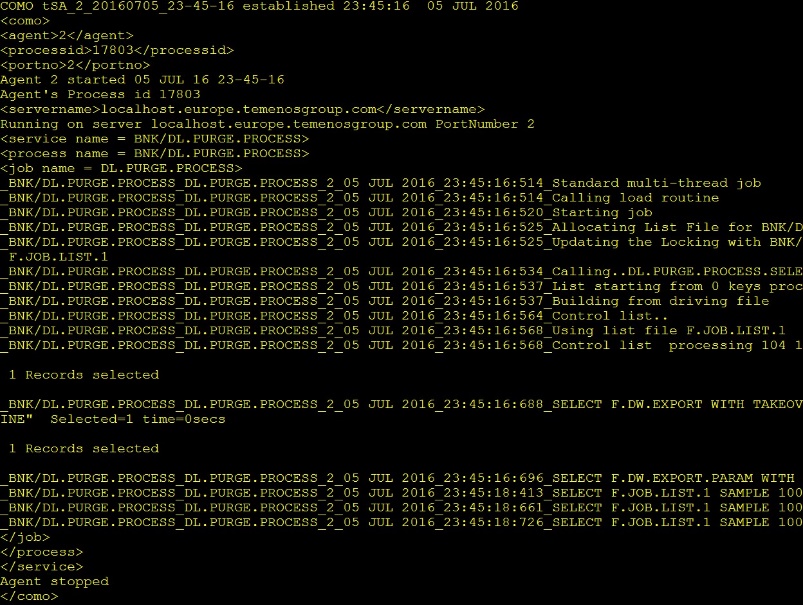
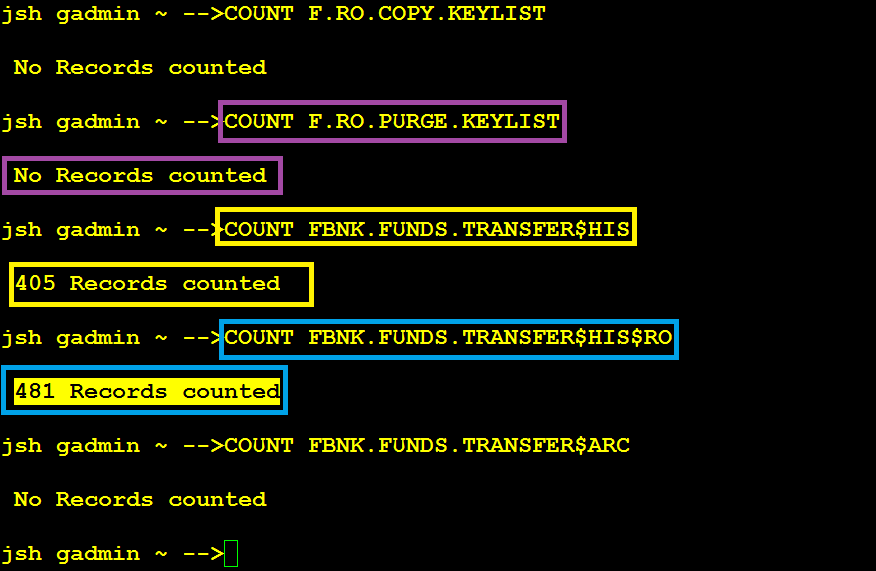
After the PURGE process, DL.PURGE.PROCESS reads the record keys in F.RO.PURGE.KEYLIST and deletes those record entries from the LIVE database tables.
The following example screen captures show that the original record count of the FBNK.FUNDS.TRANSFER table has been reduced from 886 to 481 by moving 405 records to the RO database table FBNK.FUNDS.TRANSFER#HIS#RO, which were in the PURGE.DATE range into the.
NOTE: Although the KEYLIST count 139 is a batch count, the actual number of data records belonging to those keys was 481.
Before PURGE process
After PURGE process
Add Bookmark
save your best linksView Bookmarks
Visit your best links BACK
BACK


Are you sure you want to log-off?