| Bookmark Name | Actions |
|---|
Configuring Transaction Fees, Charges and Taxes
This topic details the configuration of transaction fees, charges and taxes in Securities (SC) module.
There are named fees fields in order and trade applications in the SC module to handle the following:
- Customer commission (bank’s own commission) and tax on customer commission
- Broker commission
- Stock exchange fees (EBV fees)
- Foreign fees
- Stamp tax
- Miscellaneous fees
There are also named fees to handle taxes such as:
- Withholding tax
- Other taxes
Apart from the named fees, it is also possible to setup any number of fees and taxes using the multiple charges framework.
Configuring Named Fees and Tax Fields
The following section details about the configuration required to setup the fees and taxes for different types of transactions.
 Configuring Customer Commission
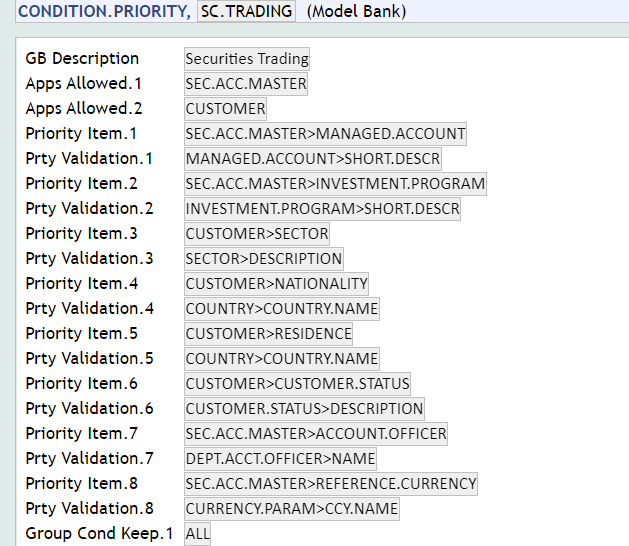
Customer commission is determined by the group to which the customer belongs to for the purpose of transaction charges. To group the customers, the first level configuration is done in the SC.TRADING record in CONDITION.PRIORITY. The fields in CUSTOMER and SEC.ACC.MASTER that are used to group customers has to be defined in the SC.TRADING record, along with the priority to be considered amongst the fields.
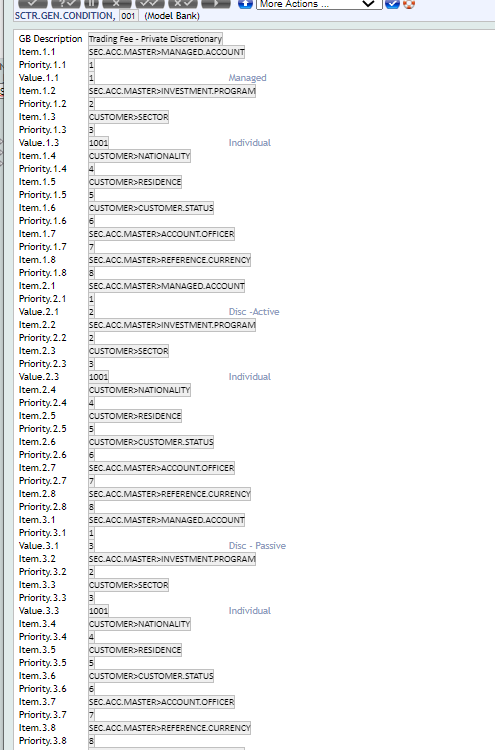
The groups can also be defined using SCTR.GEN.CONDITION.
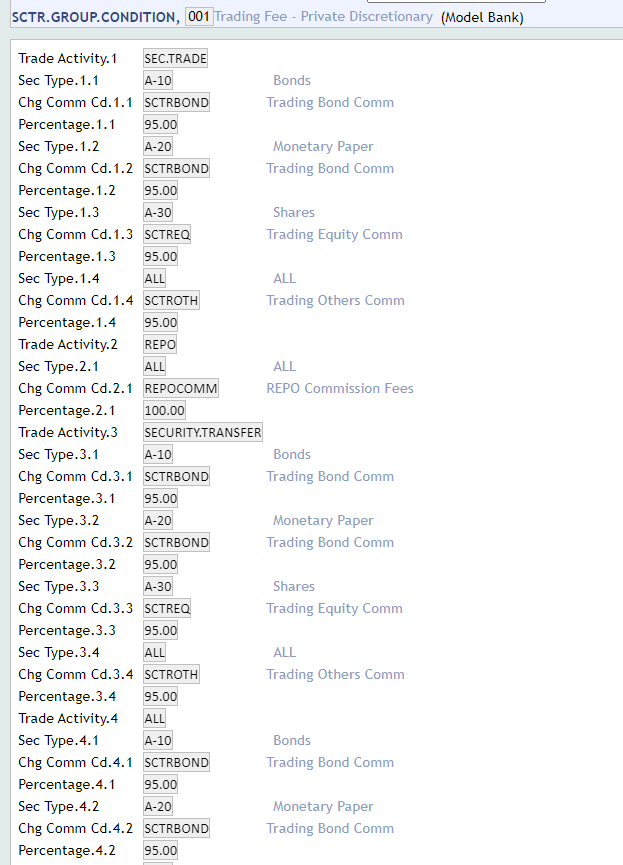
The actual commission that is to be charged for each group is defined in SCTR.GROUP.CONDITION.
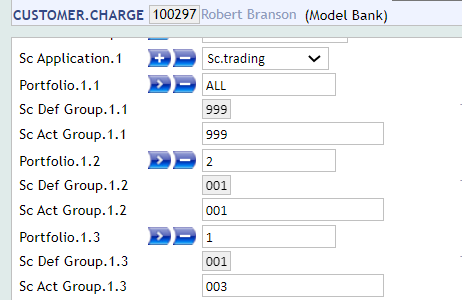
When a CUSTOMER record is created in Temenos Transact, the system determines the default group to which customer belongs for trading commission, and updates the group details in CUSTOMER record in CUSTOMER.CHARGE. User can change the system calculated group and update the actual group for the customer and/or for each portfolio.
Configuring Broker and Stock Exchange Fees
The detailed broker and stock exchange fees are configured in the SC.BROK.STK.EXCH.FEES application.
Broker Commission Fees
The SC.BROK.STK.EXCH.FEES application is configured if a detailed setup of broker fees or commission is required. This application is used to calculate the broker commission fees based on the combination of values such as broker, type of product, type of transaction, and stock exchange or stock exchange domicile.
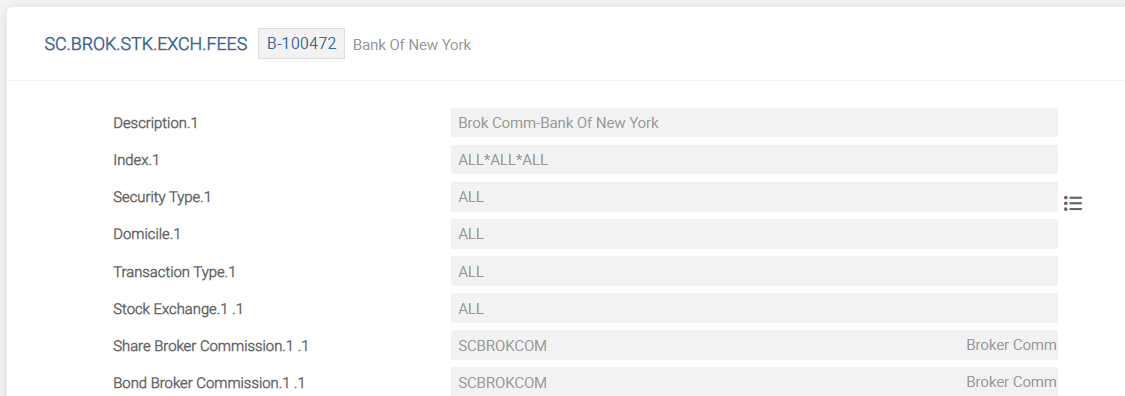
The Broker Commission field in SEC.TRADE is computed based on the FT.COMMISSION.TYPE defined for the combination of fields (Description, Security Type, Transaction Type, and Stock Exchange or Domicile). The ID of the SC.BROK.STK.FEES has to start with B<broker number> to attach a brokerage commission type. The fields used to define a brokerage fee in SC.BROK.STK.EXCH.FEES are explained in the below table.
| Field | Description |
|---|---|
| Security Type |
Holds a valid record in SECURITY.MASTER, ASSET.TYPE, or SUB.ASSET.TYPE |
| Domicile |
Holds a valid country code or ALL. Value of this field is mapped with the Domicile field in the SECURITY.MASTER application.
|
| Stock Exchange |
Holds a valid STOCK.EXCHANGE ID or ALL. The user can enter the value for either domicile or stock exchange. It is not logical to enter both the values
|
| Transaction Type | Holds a valid transaction type for BUY or SELL or ALL |
| Index | This is a no input field. Defaults the value based on the following combination. Security Type*Stock Exchange*Domicile*Transaction Type |
Stock Exchange Fees
The SC.BROK.STK.EXCH.FEES application is also used to set stock exchange fees based on the combination of values:
- Broker
- Type of product
- Transaction
- Issuer country
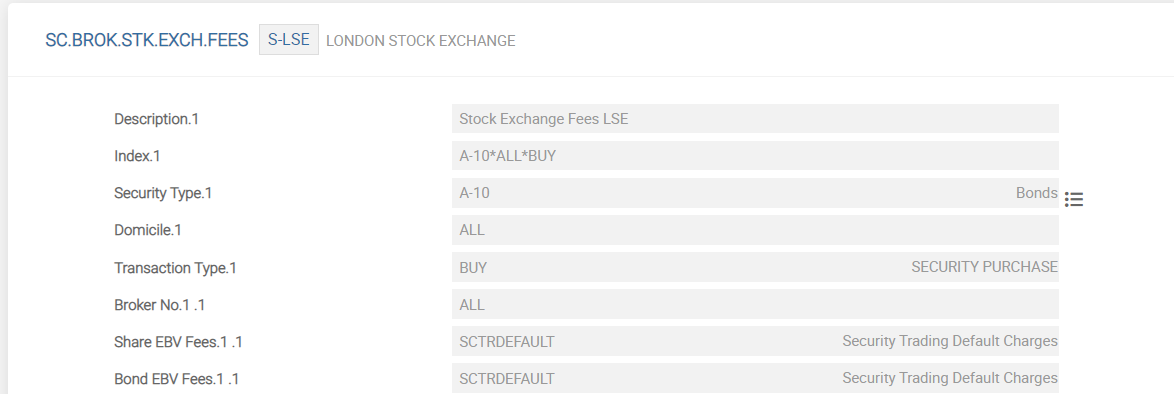
The EBV fees value is calculated and defaulted in trade based on the FT.COMMISSION.TYPE defined for the combination of fields (Description, Security Type, Transaction Type and Domicile). The ID of the SC.BROK.STK.FEES starts with S<stock exchange> to attach a stock exchange fee (EBV fees). The fields used to define a stock exchange fee in SC.BROK.STK.EXCH.FEES are explained in the below table.
| Field | Description |
|---|---|
| Security Type |
Holds a valid record in SECURITY.MASTER or ASSET.TYPE or SUB.ASSET.TYPE. Value of this field is mapped with the Sub Asset Type field of the SECURITY.MASTER application.
|
| Domicile |
Holds a valid country code or ALL. Value of this field is mapped with the Domicile field of the SECURITY.MASTER application.
|
| Transaction Type | Holds a valid transaction type or ALL |
| Index | This is a no input field and is defaulted based on the following values: Security Type*Issuer Country*Transaction Type |
| Broker No | Holds a valid broker number to which the commission is charged |
Configuring Tax
The following applications need to be configured in order to setup taxes for transactions.
TAX
A record needs to be created for each tax. The ID of this application is a numeric ID followed by the date. If there is a change in the rate, a new record for the same ID with the new effective date needs to be created. The rate of tax and the internal account category to which the tax is to be posted is defined in this application.
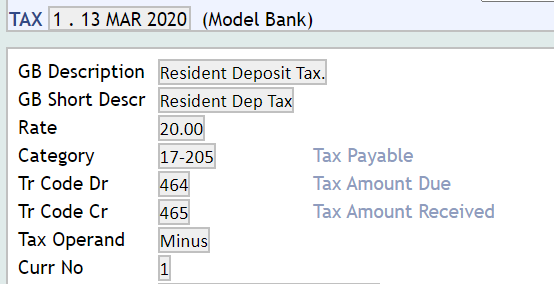
CONDITION.PRIORITY
The tax record in condition.priority allows the user to define the fields in CUSTOMER and FATCA.CUSTOMER.SUPPLEMENTARY.INFO applications that can be used to group customers for tax calculation.
TAX.TYPE
This application is used to create different tax types and the date from which the taxes are effective. If the tax has to be split between more than one customer (such as joint customers) in the customer relationship attached to SEC.ACC.MASTER, it needs to be specified here.
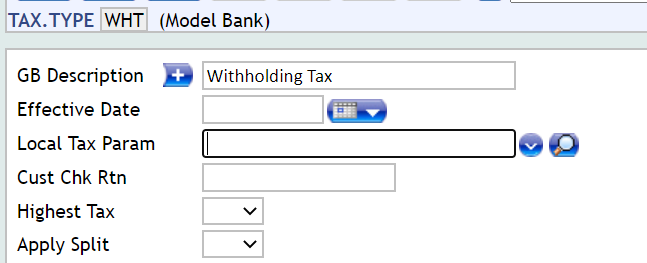
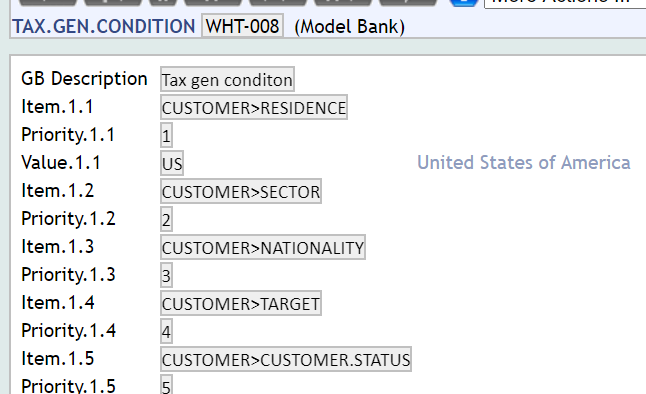
TAX.GEN.CONDITION
Customers are grouped for each tax type using the fields defined in CONDITION.PRIORITY.
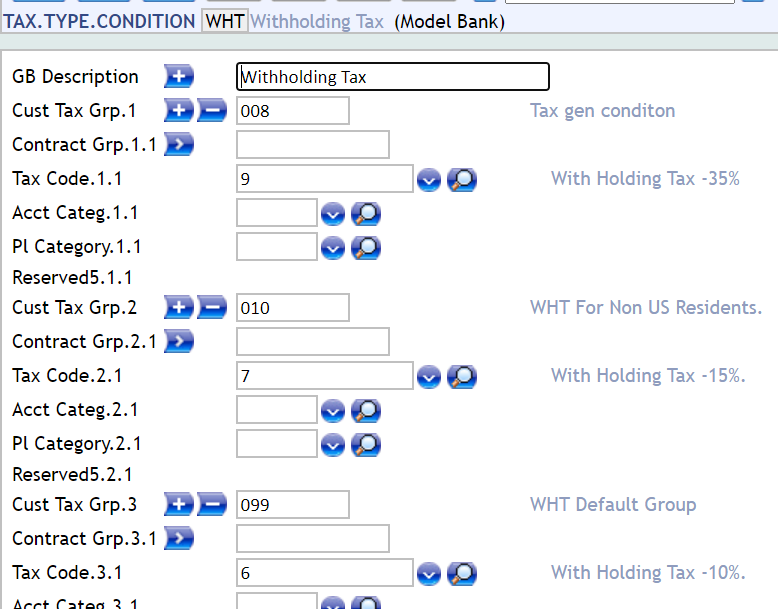
TAX.TYPE.CONDITION
Each customer group is linked to a record in TAX.
Configuring Withholding Tax
Withholding tax can be deducted at the time of redemption and also at the time of sale of fixed income securities.
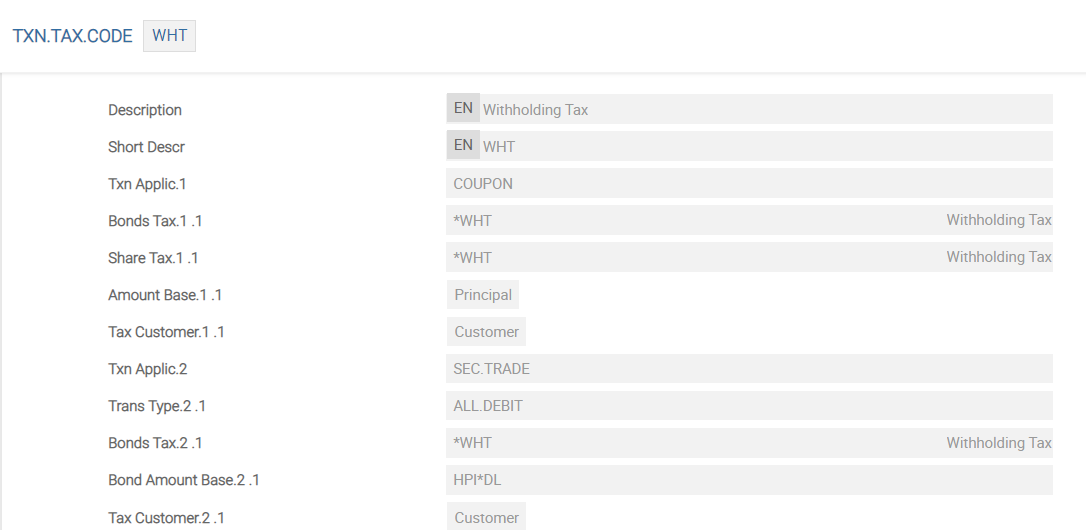
TXN.TAX.CODE
A record in the TXN.TAX.CODE application must be setup that states the TAX or TAX.TYPE.CONDITION that has to be applied and the applications where the taxes should be applied. The Amount Base field must be set to DISCOUNT for tax on discount calculations.
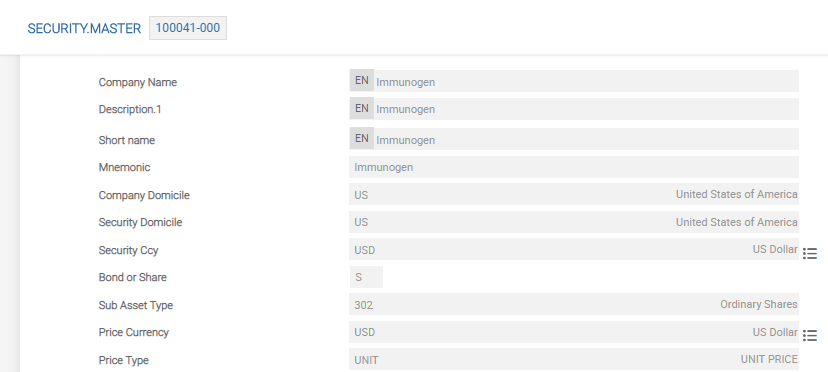
The Redem Price field in the SECURITY.MASTER application is populated with a value to calculate the discounted amount per sale transaction. In this case, the redemption price is 100. The TXN.TAX.CODE should then be attached to the SECURITY.MASTER application. The withholding tax (WHT) can only be calculated when a security is redeemed or sold. The record in SECURITY.MASTER displays the setup for consideration rounding and withholding tax on sales.

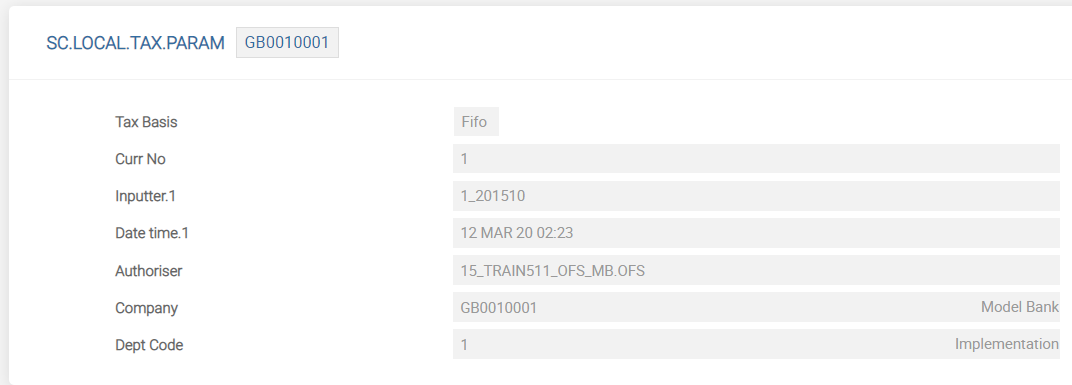
SC.LOCAL.TAX.PARAM
This application defines the Tax Basis field for calculating the withholding tax.
Configuring Multiple Fees and Taxes
The following section details about the configuration required to setup the multiple fees and taxes for different types of transactions.
SCDX.CHARGE.PARAMETER
This application is used to define any fees and taxes applicable for an application.
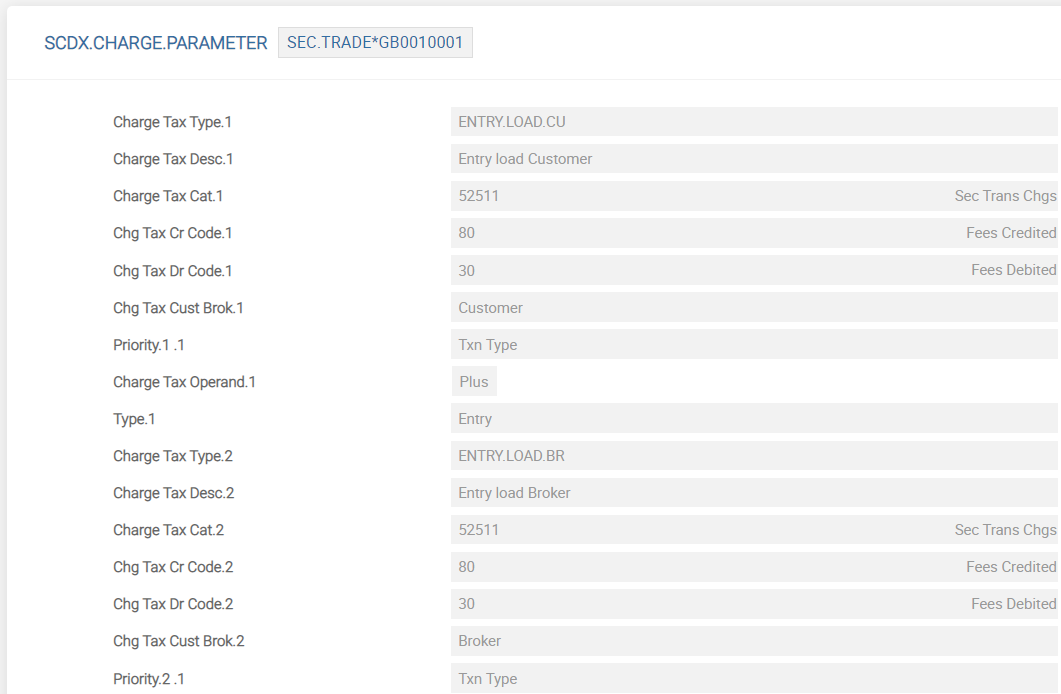
The ID of SCDX.CHARGE.PARAMETER application is Application*Company Code. If the parameter setup is done for an application (such as SEC.TRADE), the charge type is defaulted in the respective application on the customer side or broker side, which is defined in Chg Tax Cust Brok field. The Charge Tax Type field can be multi-valued to define multiple charges and taxes. This is a free format text field. However, each multi-value should have a unique name.
The Priority field defines the criteria based on which the fee can vary. For example, a fee varies by stock exchange (and no other criteria), then stock exchange is only priority defined. If more than one criteria applies (for example, in National Stock Exchange (NSE), turnover fee for equities is 0.005% and for debt instruments is 0.0003%), both the criteria are defined as priority (for example, the value in Priority 1.1 is Stock Exchange and Priority 1.2 is Txn Type). The category codes and transaction codes are defined in SCDX.CHARGE.PARAMETER only when the charges or taxes are manually input. If not, the category or codes in FT.COMMISSION.TYPE or TAX are used.
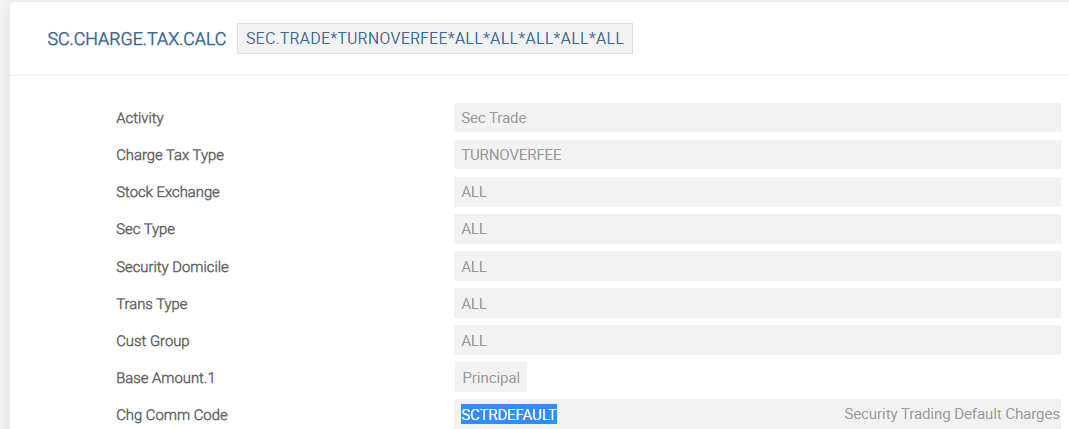
SC.CHARGE.TAX.CALC
The criteria for charging these fees and taxes should be defined in SC.CHARGE.TAX.CALC application once the parameter setup is done in SCDX.CHARGE.PARAMETER. The ID of the application is Application*Fee*Stock Exchange*Security Type*Security Domicile*Transaction Type*Customer Group.
A front-end application (SC.CHARGE.TAX.CALC.CREATE) is available to facilitate easy creation of records. The system automatically creates the records in SC.CHARGE.TAX.CALC application based on the individual data elements defined in this application. The Source field can be set to External or Bank.
| Value | Description |
|---|---|
| External | Indicates that it is an external fee. For example, turnover fee levied by stock exchange or securities transaction tax |
| Bank | Specifies any additional fee or charge levied by the bank on top of brokerage or commission |
Tax Code
The SC.CHARGE.TAX.CALC is for both taxes and commission. If the record is for TAX, the suitable TAX record can be defined instead of FT.COMMISSION.TYPE.
Where record in FT.COMMISSION.TYPE or TAX is input, the system automatically calculates the fee or tax and posts entries to the category codes defined in the respective records (that is, defined in the applications for which the tax or commission needs to be calculated). If FT.COMMISSION.TYPE or TAX is not input, then user has to manually input the same at the time of trade or transfer. In this case, the system posts entries using the category and transaction codes defined for this fee or tax in SCDX.CHARGE.PARAMETER.
Defining Factors or Criteria Based on which Fee or Tax Apply
The table below illustrates the factors that impact the fees or taxes that is applied during transactions.
| Factors or Criteria | Examples |
|---|---|
| Stock exchange – Fee based on stock exchange | Transaction charge is 0.0275% in BSE and 0.0325% in NSE |
| Product type – Fee per product type (that is, equities, funds) | 0.5% for equities and 0.25% for funds |
| Transaction Type – Fee based on transaction direction (buy or sell), type (cash vs delivery) | 0.6% for buy and 0.75% for sell |
| Security domicile – Fee based on security domicile | 0.05% fee for domestic funds and no fee for other funds |
Customer – Fee based on customer or customer group. This group is defined in SCTR.GEN.CONDITION. |
0.10% add-on commission for retail customers and no add-on fee for High Net Worth (HNW) |
The SC.CHARGE.TAX.CALC can be defined with additional parameters. The Addl Criteria field in SCDX.CHARGE.PARAMETER defines additional criteria such as Depository and Currency.

Set the priority for the fee using the Priority field in SCDX.CHARGE.PARAMETER. The records in SC.CHARGE.TAX.CALC can be created with the additional criteria using the Addl Criteria and Addl Criteria Value fields in SC.CHARGE.TAX.CALC.CREATE application.

 Base Amount
The base amount on which the fee is to be calculated can be on the:
- Principal
- Principal and interest or on any of the existing named fees or on any other fees defined in
SCDX.CHARGE.PARAMETER.
The base amount denotes the amount on which fee or tax is calculated and can include:
- Turnover, that is, the transaction amount. For example, turnover fees, transaction tax.
- Transaction amount and accrued interest, in the case of debt instruments.
Defining Fee or Tax as Stamp Duty or Stamp Tax
Certain securities are exempt from stamp tax or stamp duty. These securities are identified using the Stamp Indicator field in SECURITY.MASTER. This field is left blank for securities for which stamp tax or stamp duty is not applicable. The fee or tax (which must be considered as stamp tax or stamp duty) is defined by setting the Type field in SCDX.CHARGE.PARAMATER to Stamp.

The stamp fee or stamp duty is calculated only for securities with Stamp Indicator field set to Yes.

Setting Start Date
The Start Date field in SC.CHARGE.TAX.CALC (and SC.CHARGE.TAX.CALC.CREATE) holds the date from when the fee is applicable. If the trade date is less than the start date, then the respective fee is not calculated.

Add Bookmark
save your best linksView Bookmarks
Visit your best links BACK
BACK


Are you sure you want to log-off?