
| Bookmark Name | Actions |
|---|
Interest
The Interest Property Class is used for all interest definition and processing in AA. A Temenos Transact product defined and processed in AA can have multiple interest properties defined (For example: principal interest, penalty interest, commission, etc.). The number of interest properties is determined by the users defining the products.
Product Lines
The following Product Lines use the Interest Property Class:
- Accounts
- Bundle
- Deposits
- Facility
- Lending
Property Class Type
The Interest Property Class uses the following Property Class Types:
- Currency Specific
- Dated
- Enable External
- Enable External Financial
- Enabled For Memo
- Forward Dating
- Inheritance
- Multiple
- Tracking
- Variations Supported
Property Type
The Interest Property Class is associated with the following Property Types:
- Accrual by Bills
- Forward Dated
- Inheritance Only
- Memo Only
- Residual Accrual
- Suspend
- Suspend Overdue
- Variance
- Variation
 Memo Interest on Real Accounts
This Property Type is applicable only for Accounts Product Line. An Interest Property with Property Type as Memo Only can calculate memo type of interest only on real balances of account. The memo interest cannot be capitalised on real account but they can made due or pay.
Multiple Instances of a Property Class
- It is possible to have more than one instance of an Interest Property Class. This could comprise of examples such as Loan Interest, Penalty Interest or Overdue Interest.
- This is defined in the attribute type with a value of MULTIPLE.
Defining Future Conditions at the Arrangement level
The FORWARD.DATED TYPE in the Property Class controls and allows the user to introduce a new definition at the arrangement level, it can be dated.
Penalty Interest Included as Part of Outstanding Bills
The user can select Accrue by Bills from Property Type attribute in AA.PROPERTY to store accrued penalty interest in the individual bills.
Accrual by Bills
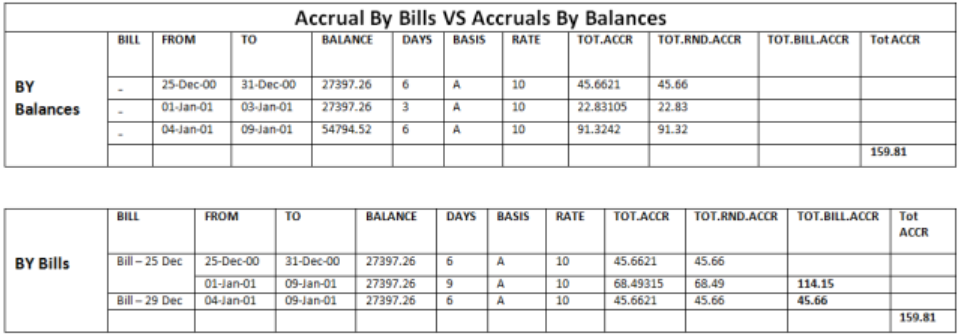
- Normally accruals are processed on the whole balance, but if Interest Property is set as Accrual by Bills, then the AA.ACCRUE.BILLS routine is called after normal accrual process is completed to update bill details with accruals corresponding to that bill.
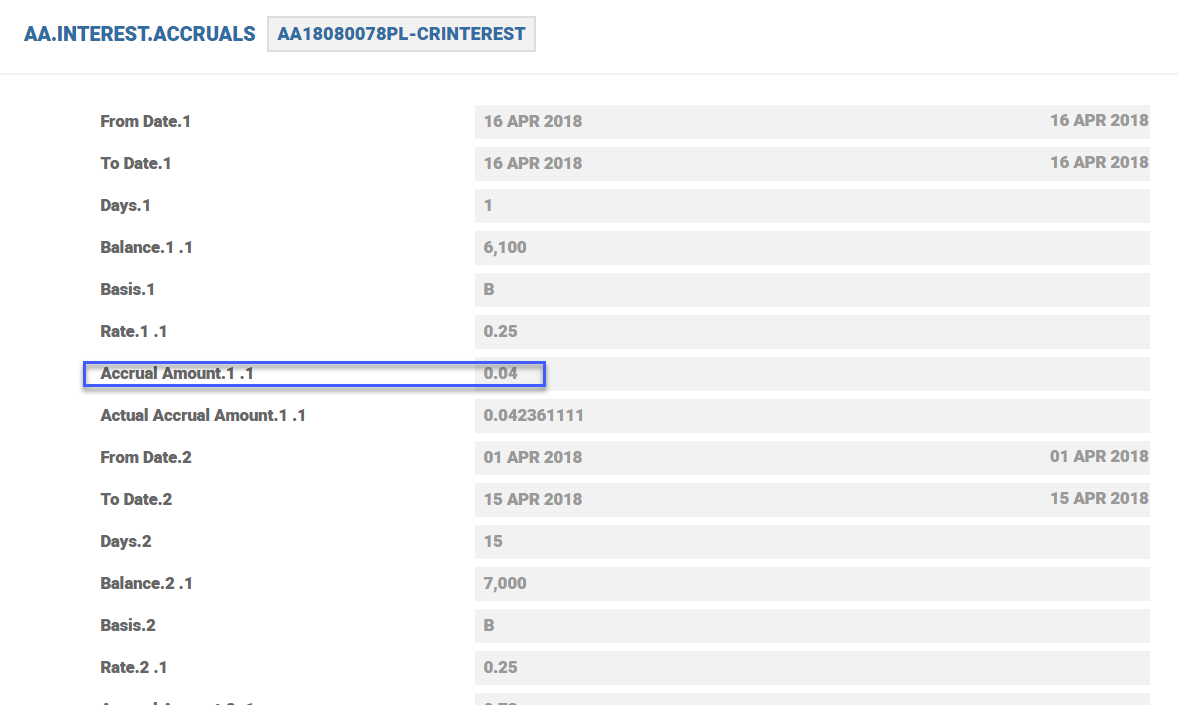
- The following example shows calculations based on both accrual methods (accrual based on balances and accrual based on each bills separately).
Balance Prefix and Suffix
| Product Line | Balance Prefix | Balance Suffix |
|---|---|---|
| Lending | Accrued | Suspend |
| Due | Customer | |
| Aged | Chargeoff | |
| Deferred | ||
| Residual | ||
| Receivable | ||
| Deposits | Accrued | |
| Payable | ||
| Deferred | ||
| Due | ||
| Accounts | Accrued | Suspend |
| Due | ||
| Deferred | ||
| Payable |
Attributes
The attributes of the Interest Property Class are explained below.
Defining Interest at Product Level
- Most Interest conditions are set at Product level, but there is the option to negotiate all of some of the attributes within the INTEREST Property at arrangement level if this is required.
- Temenos Transact supports three basic types of interest : Fixed, Floating, and Periodic. Each of these interest types can include one or more margins and can be specified in a tiered structure
- Following are the related attributes.
- Rate (Fixed/Floating)>Fixed
- Rate (Fixed/Floating)>Floating
- Rate (Periodic)>Index
Fixed Rate Interest
Fixed - A fixed rate is directly entered by the user into Fixed attribute. This rate must be entered as positive numbers unless a negative rate is allowed.
Floating Rate Interest
- Floating - A floating interest rate is tied to a variable base rate (that is, BASIC.INTEREST) and is entered in the Floating attribute. During interest calculations, Temenos Transact uses the currency specific rate applicable for the calculation date (that is, the rate used for the calculation changes whenever the base rate is changed).
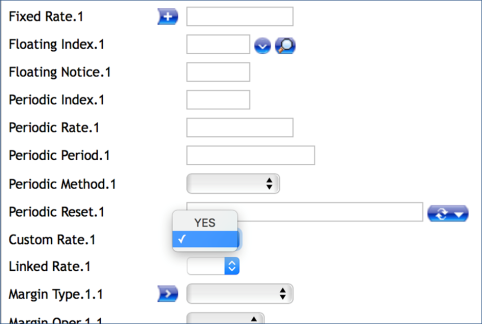
- Spread - It is possible to specify that the rate for a given tier be Linked, by setting this field to Yes. This can be mixed with normal rate calculations as well. When the Spread is set to Yes, system expects that an arrangement reference is given in the Linked Arrangement field along with the Interest Property to be linked to.
- Margin Type – It allows to define whether there are single or multiple margins. This attribute is part of a multi-value set of Fixed attributes . It is also part of a sub-value set with Operand and Rate.
- Operand - The options are ADD or SUB. This indicates whether the Rate should be added or subtracted from the Floating or Periodic Rate. This attribute is part of a multi-value set of Fixed attributes. It is also part of a sub-value set with Margin Type and Rate and input is only allowed if a rate is entered in Rate.
- Rate – It allows to define the margin rate that can be used to adjust the specified rate of interest and to appropriately reflect any rate profit realized. The result is the nominal rate of interest. Temenos Transact allows for the following margin configuration:
- Single or Multiple Margins (Margin Type field)
- Rate Adjustment Method (Operand field)
- This is part of a multi-value set of Fixed attributes. It is also part of a sub-value set with Margin Type and Operand.
- Linked Property - This attribute is used to specify the Interest Property of the linked arrangement that should be referred for getting the Interest rate.
- Upto Amt relates to the Tier Type attribute and amounts can be entered if either BAND or LEVEL are selected. This attribute is part of a multi-value set of Fixed attributes.
Periodic Rate Interest
- Periodic Index - A periodic rate is tied to an index ( For example: EURIBOR) which is dependent on a period of time (For example: term) and possibly an amount. The periodic interest index is entered into Periodic Index attribute.
- Once the arrangement is active, the rate is fixed until it is reset. Periodic rates can be reset at a pre-determined frequency. To define a periodic rate, the user specifies:
- Periodic Index - This is input as the 2 digit number at the beginning of the PERIODIC.INTEREST ID, for example, 01 may indicate that the EURIBOR rate should be used.
- Periodic Period Type: This allows the user to specify which period is used to fetch interest rate from the PERIODIC INTEREST table.
- Available options are:
- Maturity
- Renewal
- Reset Period
- Periodic Period
- Available options are:
- When the attribute value is Null or Periodic Period, then Temenos Transact uses the period defaulted by Temenos Transact in Interest Period attribute.
- Initial Reset Date: This attribute is available in the interest multi-value set to capture the first reset date.
- Interest Period - If not entered the system defaults values in the following order:
- Manual input.
- Change Period from Change Product Property Class.
- Term defined in Term Amount Property Class.
- Periodic Interest Method - Interest selection method if the term is not found on the index. The options are:
- Interpolate Rate
- Interest Reset – A Reset period can be selected using the pop up box at the end of the attribute. Reset frequency is based on the date convention, date adjustment and business day centres. For example, if periodic reset is set as every month on last day and in ACCOUNT Property, Date Convention set as Forward Same Month and Date Adjustment set as Period, the date of periodic interest reset is forwarded to the same month if it falls on a holiday and moves backward if it cannot forwarded within the same month.
Risk Free Rates
The following details are captured and passed to the TERMRATE API to obtain the daily compounded Risk Free Rates (RFRs). The periodic interest index is entered into Periodic Index attribute. The daily rate is tied to the RFR Index in the PERIODIC.INTEREST table.
- Rfr Convention – Defines the market convention to be used for rate calculation.
NOTE: AA uses Lookback convention only
- Rfr Lookback Days - Defines the number of lookback days. The formula uses n number of days earlier than the Interest Period Date. For example, if Interest Period Date is 5, January and Rfr Lookback Days is 2 days, then calculate the RFR rate from 3, January from the PI table.
- Rfr Lookback Type - Defines the convention where the RFR rate from N Lookback days is used for every day in the current interest period. Lookback can be of two types:
- Narrow Definition - Applies original interest period’s day count to the lookback rate used for this day (that is, if Wednesday’s rate is used for Friday, applies the Friday’s weight, three days, to Wednesday’s rate).
- Observation Shift - Applies the original day count of the lookback rate (that is, if Wednesday’s rate is used for Friday, applies the Wednesday’s own weight, one day, and does not use Friday’s day count for it).
- Rfr Spread Treatment - Defines the spread to be included or excluded in the calculation. Based on this definition, spread is either calculated before or after the compounded rate.
- Spread Exclusive - Compounds the rate and adds the spread separately.
- Spread Inclusive - Compounds the rate and adds the spread together.
- Rfr Calc Method - Defines the calculation method to be considered to arrive at the final compounded rate based on which final payment amounts are derived. RFRs are compounded on a daily basis in order to arrive at a final rate and the applications refer to this rate to be used in the arrangements.
- Rate Compounding - This method is more accurate in compounding interest when principal remains unchanged during the interest period.
- Simple Averaging - In this method, RFR rates are sourced daily and multiplied by the outstanding principal.
- Rfr Period Day Count - Controls the way in which the last available RFR is treated in the compounding process for the period end date.
- FULL - Calculates the compounding rate for the entire interest period given using the last available rate.
- TODAY - Calculates the compounded rate from Period Start Date to only up to the current day.
- Rounding Rule - Defines the number of decimal places to round each calculation. This attribute is linked to the EB.ROUNDING.RULE table. There should be an entry defined in EB.ROUNDING.RULE for the number of decimals of the RFR rate and the same entry should be entered to the Rounding Rule attribute.
NOTE:
- RFR supports only natural rounding.
- The new attributes added are allowed for modifications only during the beginning of the capitalisation period.
- Accrue By Bills Interest property type is not supported by RFR functionality.
- Adjust Type (Adjustments of Interest) and Advance of Interest (Accounting Mode) are not supported for RFR functionality.
- In the Tier Interest Configurations, multiple Periodic Indexes are allowed, but for RFR processing, validation permits only the same index record.
- Fixed Interest Rate on contracts is not supported for RFR processing.
- The Linked Arrangement and Linked Property functionality are not allowed for RFR processing.
- Pre-notice cannot be configured for maturing arrangements in Activity Messaging property conditions as we cannot determine the final interest rate on the defined pre- notification days.
Usage Percentage for Base Rate
The Usage Percentage attribute is used specify the percentage of the base rate has to be considered calculating the effective rate for the interest tier. This applies to fixed, floating, periodic, and linked or can be custom defined based on any algorithm. This can further be adjusted by means of margin definition. The effective rate is arrived at after applying the usage percentage on the reference rate.
Example
Floating Rate – 2%
Usage % – 60
Margin – .30%
Margin type – Add
Effective rate = (2*60%) + 0.30% = 1.5%
Pricing considerations / discount is applied on top of the adjusted effective rate. For example, if a loan product offers a benefit to reduce .35%, then the effective rate on that arrangement is 1.15% (continuing with the previous example)


Negative Interest Rates
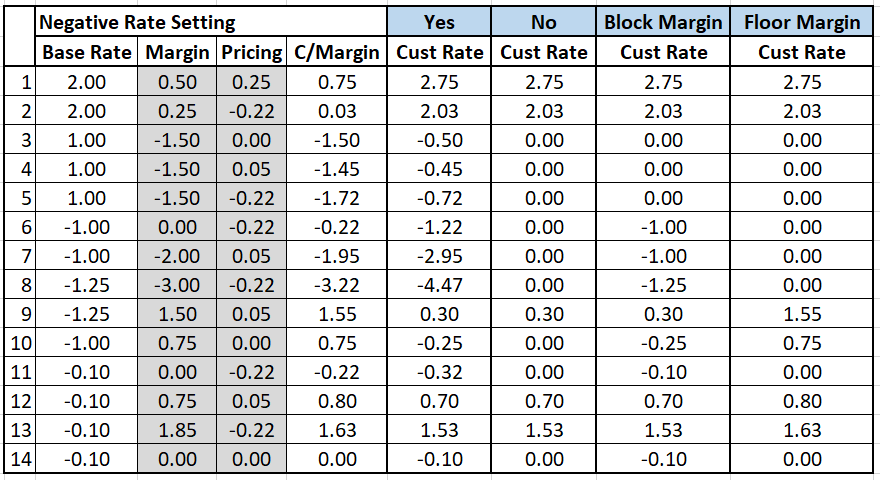
- It is possible to set the control and functionality of how negative rates operate within each individual multiple tier. Irrespective of single, band or level, the Tier Negative Rate attribute can have four settings. Related attribute is Negative Rate.
- Blank or No - Indicates that negative rates cannot be input and if a rate becomes negative as a result of the reference rate or an additional margin the derived rate is set as zero.
- Yes - Indicates that negative rates can be input and the reference rate or the additional margin can make the derived rate more negative.
- Block Margin - Indicates that negative rates can be used but the following conditions apply:
- If the reference rate is positive and the margin makes the rate negative then the derived rate is set as zero.
- If the reference rate is negative and the margin makes the rate more negative than the margin is ignored and the reference rate (negative in this case) is used.
- Floor Margin - Indicates that negative rates can be used but the following conditions apply:
- If the reference rate is positive and the margin makes the rate negative, then it is set to zero.
- If the reference rate is negative and the margin makes the rate more negative, then it is set to zero.
- If the reference rate is negative and the margin is positive, then the system ignores the original negative reference rate and uses the margin.
- If the reference rate is negative and there is no customer margin, then it is set to zero.
An example of Floor Margin processing in comparison with other attributes are as follows:

Example
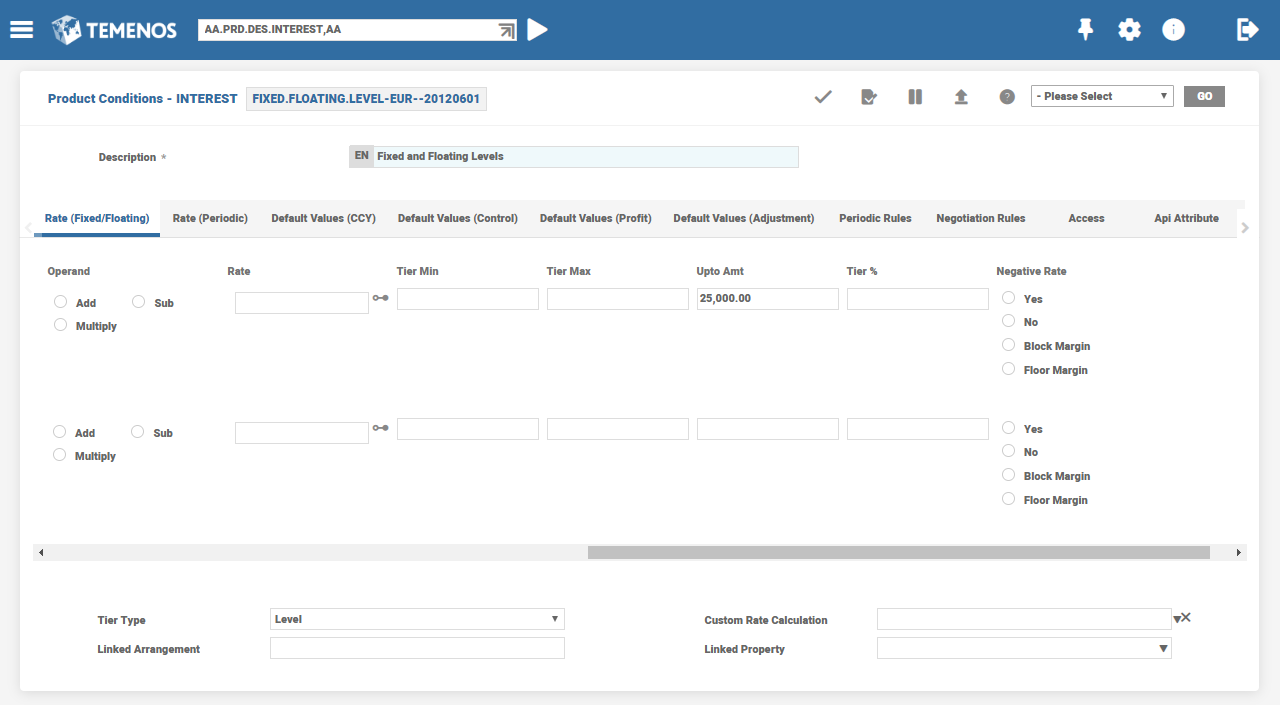
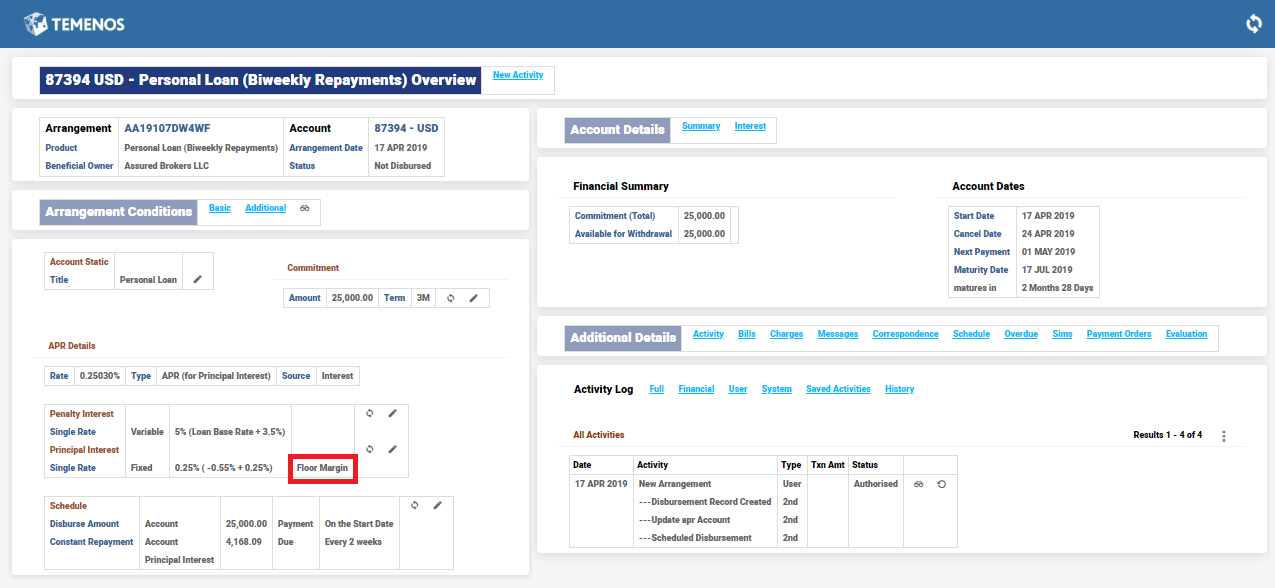
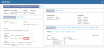
The above selection of the setting in the Negative Rate field within Interest Property Condition helps display an enrichment value on the Negative Rate field, both within the product as well as on the existing arrangements. The enrichment informs the use of that negative rate attribute, which has been selected on the AA overview screens of Lending, Deposits, Accounts and Bundle (Cash Management – Master Accounts Overview screens).
- Null – No enrichment is displayed
- Yes – Enrichment will display No Floor
- No – Enrichment displays Absolute Floor
- Block Margin – Enrichment displays Block Margin
- Floor Margin – Enrichment displays Floor Margin
Margins
- A margin rate can be used to adjust the specified rate of interest and to appropriately reflect any rate profit realized. The result is the nominal rate of interest which is stored in Effective Rate attribute.
- Temenos Transact allows for the following margin configuration:
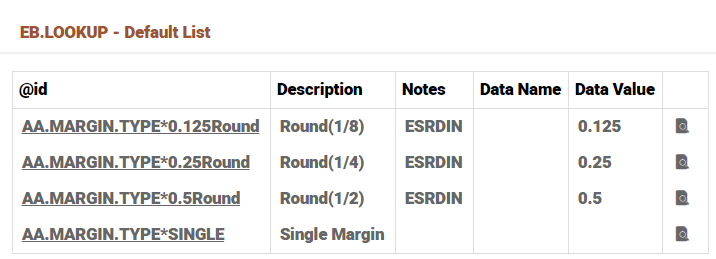
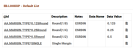
- Single or Multiple Margins – the attributes for margin are a multi-value set for multiple margin types. The types available are defined in the AA.MARGIN.TYPE virtual table in EB.LOOKUP.
- Examples may be a Corporate or Treasury margin.
- Rate Adjustment Method – this is defined in Operand attribute with the following options:
- Add to rate.
- Subtract from rate.
- Multiply (that is, the nominal rate is [100+Margin] % of the specified interest rate).
- The actual margin is defined in Rate.
Adjustments in Interest Rate
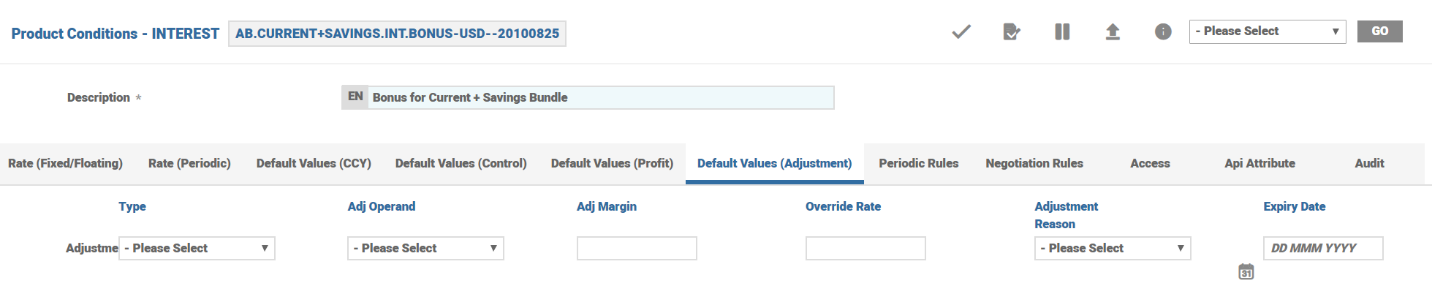
Interest rate change of an arrangement is possible by adjustment set of associated multi-value attributes. The Type attribute allows the user to select whether they are adjusting the final rate or overriding it with a fixed rate.
Adjust Type set as Adjust
Allows an adjustment in the given or calculated Interest rate using Adj Operand and Adj Margin. The operands can be add, subtract or multiply and the adjust margin is applied accordingly. Default Values (Adjustment)>Type is a related attribute.
Adjust Type set as Override
- Allows to input the final rate of interest to be applied. This means any interest rate given or calculated is overridden or ignored and the Interest rate is picked up from Override Rate.
- Adjustment Reason attribute records the reason for the change in interest. The AA.ADJUSTMENT.REASON virtual table allows the adjustment reasons to be pre-configured.
- An adjustment set either as Adjust or as Override expires on the date given in Expiry Date. This date is either a direct date or a relative date.
- Related Attributes are:
- Default Values (Adjustment)>Adj Operand
- Default Values (Adjustment)>Adj Margin
- Default Values (Adjustment)>Override Rate
- Default Values (Adjustment)>Adjustment Reason
- Default Values (Adjustment)>Expiry Date
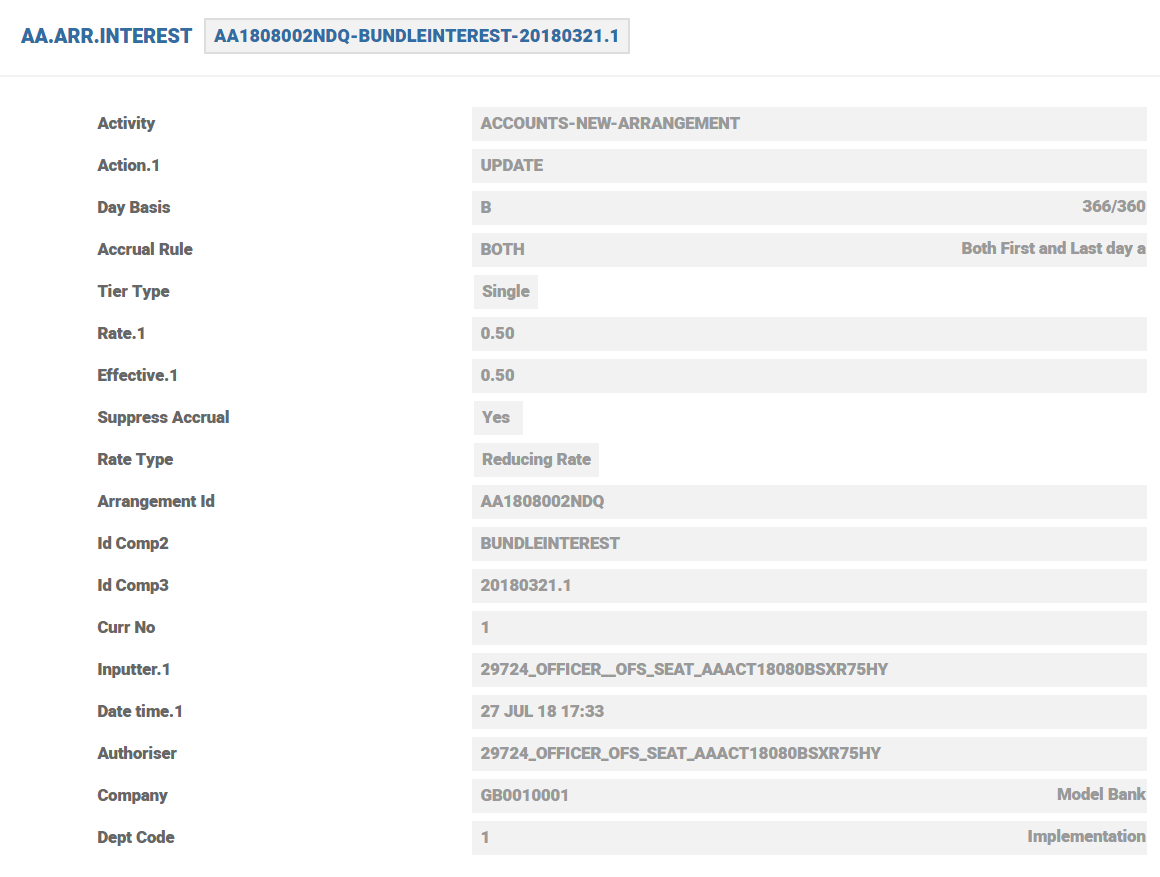
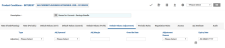
- AA.ARR.INTEREST records the details of the Interest rate adjustment or override if any.
- The AA.ARR.INTEREST record is seen below

 NOTE: These adjustments are on top of the neg
Compound Interest
Temenos Transact supports the compounding of both debit and credit interest in Compounding attribute. The following compound frequencies are supported:
- Daily (D) – Interest is compounded 365/6 times a year.
- Annual (M12) – Interest is compounded once per year.
- Semi-Annual (M06) – Interest is compounded 2 times a year.
- Quarterly (M03) – Interest is compounded 4 times a year.
- Monthly (M01) – Interest is compounded 12 times a year.
- Bi-Monthly (M02) – Interest is compounded 6 times a year.
- Twice-Monthly (TWMTH) – Interest is compounded 24 times a year.
- Weekly (WEEK) – Interest is compounded 52 times a year.
- Bi-Weekly (WEEK2) – Interest is compounded 26 times a year.
Types of Interest Rate
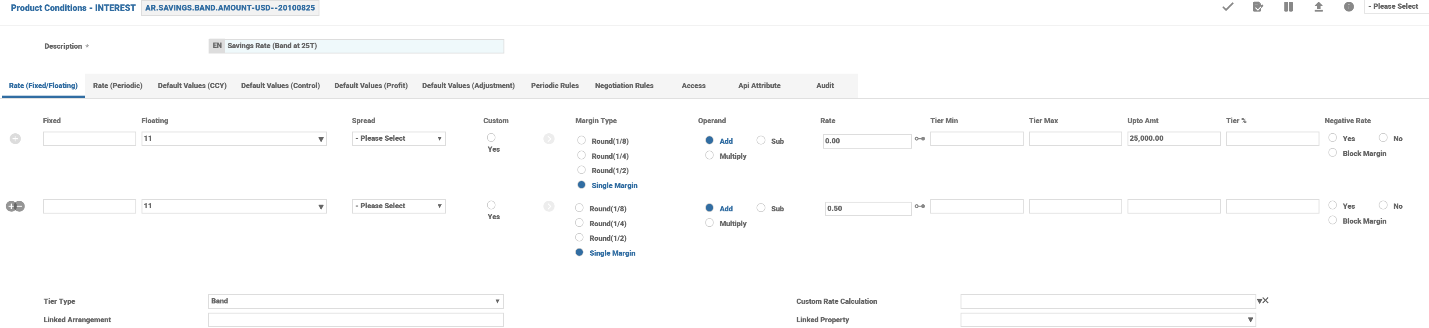
Temenos Transact allows for the definition of different types of interest rates. There are three types of tiers: Band, Level and Single and these are selected in Tier Type attribute.
Single
When the option Single is selected, a single nominal interest rate applies for the entire balance amount.
Level
- By specifying level tiers a product can be defined which calculates interest at different rates depending on the balance amount. A single rate of interest gets selected and applied based upon the balance amount.
- For a deposit you might want to have a higher rate of interest for accounts which maintain higher credit balances. Conversely, for a loan product, a higher rate of interest can be charged for accounts with higher debit balances.
- For example, assuming a credit balance of 15,000 and level interest which specifies an applicable rate of 10 per cent up to 10,000 and 15 per cent above 10,000. A single rate of 15 per cent gets applied to the entire amount of 15,000.
Band
- Banded tier interest typically results in a blended interest rate. This is similar to Level tiers, but allows for the interest rate of each tier to be applied to the portion of the balance that falls within the tier.
- For example, assuming a credit balance of 15,000 and banded interest which specifies an applicable rate of 10 per cent up to 10,000 and 15 per cent above 10,000. Two calculations can be performed (that is, 10 per cent on 10,000 and 15 per cent on 5,000).
- Each tier is specified by defining the amount up to which the interest rate applies. Additionally, each tier can be of a different interest rate type (that is, fixed, floating, or periodic).
- In each case the attributes Fixed through to Upto Amt are part of a multi-value set of attributes and can be utilised if either LEVEL or BAND are selected. The rate to be applied to the calculation amount is specified in the Upto Amt attribute.
- It is possible to control the interest rate of an account during its lifetime using Tier Min and Tier Max. This is applicable for variable and periodic or rates and allows the tier rate to be controlled.
- We can also define interest condition such that different rates are applied for different percentage of the loan amount. This can be achieved by multi-valuing the Tier % attribute and giving an absolute value. The total of every multi-value of this attribute should result to 100.
- Related Attributes are
- Rate (Fixed/Floating)>Tier Min
- Rate (Fixed/Floating)>Tier Max
- Rate (Fixed/Floating)>Tier %
Compound Interest on Banded Tiers
- The Interest Property Class facilitates to define compounding interest effect based on weighted rate method for interest rate tier type BAND.
- The formula to calculate the weighted rate is:
- Weighted Rate = ∑i=1n (Weight i* Rate i) / Balance
- Where, the Weight i is the part of the balance used for the accrual on the specific tier i.
- The daily accruals happens based on the example shown below.
- An account balance of €800,000 is available during COB. The Interest Product Condition is defined as Band with the following rates:
| Tier Number | Threshold | Rate% |
|---|---|---|
| 1 | 500,000 | 5 |
| 2 | >500,000 | 15 |
The weighted rate is calculated as shown below.
| Weight 1 = | 500,000 / 800,000 |
| Weight 2 = | (800,000 – 500,000) / 800,000 = 300,000 / 800,000 |
| Weighted Rate | Weight 1 * Rate 1 = [(500,000 * 5) + (300,000* 15) + ] / 800,000 = 8.75 |
| Interest accrual for the day | Interest = Balance (800,000 ) * Weighted Rate / Denominator = 800,000 * 8.75/ 360 / 100 = 193.76 |
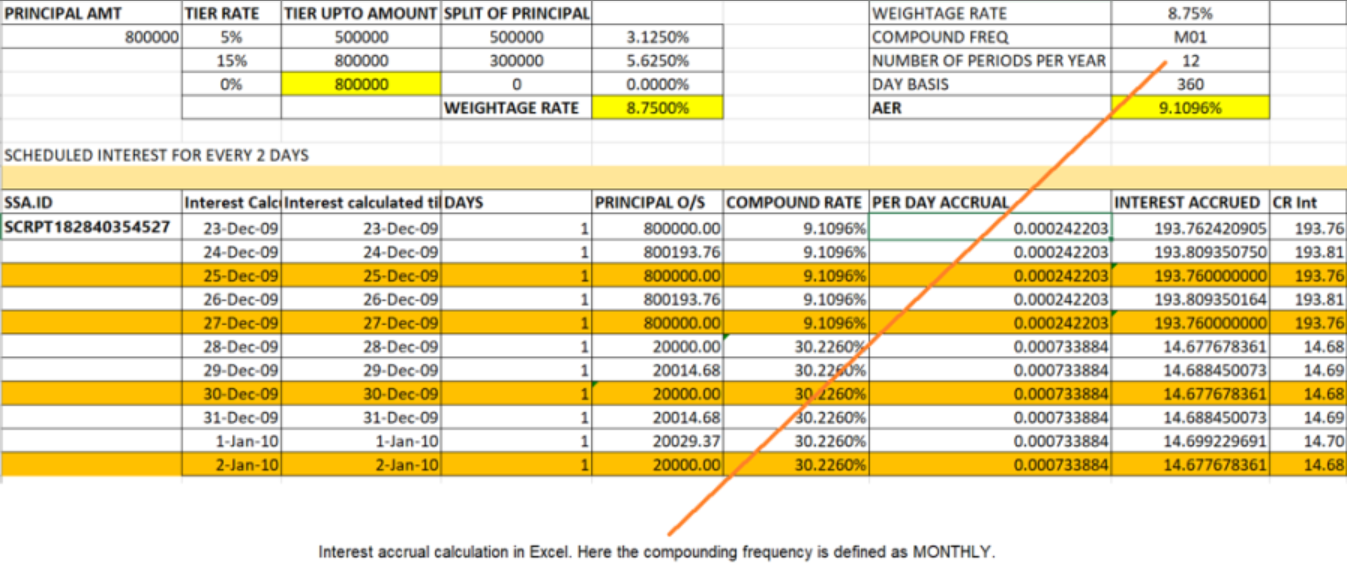
Click here to view the excel formula embedded for in-depth details.
Calculating Tier Balance using Routines
A user routine can be attached in the Refer to Routine attribute to calculate the tier amount for interest calculation.
EXAMPLE: In a corporate pool structure, the account balance can be segregated proportionately based on their contribution to the pool balances.
The parameters of the hook routine are listed below:
|
Parameter |
IN/OUT |
Description |
|---|---|---|
| ARRANGEMENT.ID | IN | Arrangement Id |
| EFFECTIVE.DATE | IN/OUT | The effective date for details requested.Return date separated by FM if there are multiple dates |
| TIER.AMOUNT | OUT | Tier Amount Separated by VM Marker. If multiple dates then each tier set will be separated by FM |
NOTE: This attribute cannot be populated when Refer to Limit is set.
Interest Calculation Threshold
Using Calc Threshold attribute, a user can specify that interest can only be calculated if a balance threshold is surpassed. For credit interest, the user can specify the minimum balance which must be maintained. For debit interest, the user can specify the maximum debit balance for which interest cannot be calculated.
Interest Accrual Rules
- When accruing interest, Temenos Transact must determine which amounts to include in each day’s balance, the actual days to include in the period (For example: first day, last day) and how to round any calculations. Temenos Transact allows users to define the calculation method to use, by specifying an accrual rule in EB.ACCRUAL.PARAM.
- Users can define the following in Accrual Rule attribute.
- First Day Inclusive (Yes or No)
- Last Day Inclusive (Yes or No)
- Rounding Rule (Natural, Down, Up, Currency, None)
- Intermediate Calculation Rounding (Yes or No)
- Credit value date adjustment
- Debit value date adjustment
Interest Day Basis
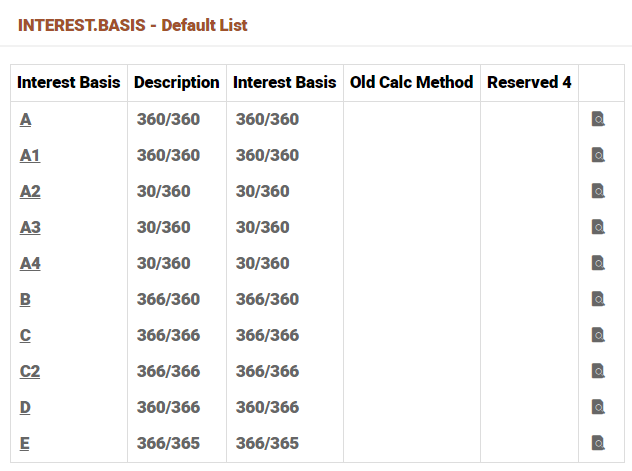
- Temenos Transact can calculate interest based on day basis types which are defined in the Interest Basis application and these values are stored in the Day Basis attribute.
- Each Interest Day Basis type is represented as a numerator and denominator.
- Numerator (interest days)
- 360 – Each month is considered to have 30 days
- 366 – The exact number of days are used
- Denominator (days in the year)
- 360 – Each year is considered to have 360 days
- 365 – Each year is considered to have 365 days
- 366 – The exact number of days in the year are used (365 or 366)
Temenos Transact allows the following interest day basis types:
Rate Control
Temenos Transact provides several ways to control the interest rate of an account during its lifetime.
- Tier Minimum or Maximum - For each tier defined, a user can specify a Tier.Min and/or Tier.Max for the tier. This is applicable for variable and periodic rates and allows the tier rate to be controlled.
- Rate Increase and Rate Decrease - Through periodic rules, users can control the increase and decrease of the overall rate during a period of time (for example: per month, per year, account lifetime, etc).
- Rate Cap and Rate Floor - Through periodic rules, users can control the maximum (cap) and minimum (floor) rates that apply to a balance amount.
- Suppress Accrual - A non-mandatory attribute that accepts the options yesor alternate or Info Only. It indicates whether accruals needs to be Suppressed or Accrual should be done for the Alternate Interest Property.
- When the value is set as Yes by the system if the Donor Accrual attribute is set as Suppress for any product or arrangement in INTEREST.COMPENSTION Property of a Bundle arrangement.
- When the value is set as alternate for a Property then the accrual is suppressed for the Property for which it is set and accrual happens for the alternate property which is set in Activity Restriction.
- When the value is set as Info.Only the interest is calculated by the system, but no accounting entries are passed.
- When the value is left blank there is no suppression of accrual.
- Refer Limit - For an arrangement under Accounts Product Line, it is possible to link the first tier amount of debit interest to the LIMIT record attached.
- It can be achieved by setting the Refer Limit field in INTEREST Property Condition as Yes. This functionality can be enabled only if the LIMIT is managed by AA.
- For tiered interest conditions in AA, a value in this field decides if limit amount to be used as first tier amount, if first tier is left blank. This can be set to either Yes or No or left blank.
- When this is set to Yes, during interest accrual calculation for an arrangement, system picks the limit amount from the Limit Property Class attached to the arrangement. If limit is managed outside of AA, first tier cannot be left blank.
- On Activity - When the periodic interest rate needs to be recalculated for certain activities, this attribute in combination with Recalculate may be used to setup the activity for which interest needs to be recalculated
- Validation Rules
- Applicable only for Periodic interest rate recalculation
- Must be a valid Activity in AA.ACTIVITY
- Recalculate - Related to ON.ACTIVITY Activity, when set to RATE, system recalculates Periodic rate when the Activity setup in On Activity is processed. When the value is Nothing, periodic rate is not recalculated when the Activity setup in On Activity is processed
- Validation Rules
- Mandatory when On Activity is setup
- On Activity attribute and Recalculate in Interest Property Class is enhanced to allow user to define when to recalculate Profit Amount.
- All activities which can result in payment schedule recalculation can be configured to recalculate Profit Amount that is, activities with payment schedule calculate and update action.
- Min Int Amount - This attribute indicates the minimum interest amount to be posted for an arrangement or account.
- When the calculated interest amount is less than the amount specified in this field, system waives the interest amount or adjusts the interest amount based on the option set in the Min Int Waive field
- Defines the minimum interest amount that is compared to the system calculated interest amount. If the interest calculated is less than the minimum amount set, then based on the waive setup field, either the min interest amount is applied or it is waived.
- Min Int Waive - This field indicates if the calculated interest amount has to be waived or adjusted.
- When the value is set to Yes, then the system waives the interest amount if it is less than the Min Int Amount specified.
- When Null value is set and if the calculated interest amount is less than the Min Int Amount specified, then system posts the minimum interest amount.
- Defines if the calculated interest amount goes below minimum interest amount set in the Min Int Amount field, if the system waives the interest amount or posts the minimum amount.
- Mode - Specifies how the accounting entries are raised. Whether it needs to work like discounted or fixed type of interest.
- Advance: This is discounted interest, interest amount is collected in advance before the interest periods.
- Upfront Profit: Interest amount is collected at the beginning of the contract.
- None: Denotes conventional interest bearing contract
- Date Convention - Specifies the date convention to be followed for the reset frequency that is, if the cycled Periodic Reset date falls on a non-working day, the reset date is moved based on the option chosen. Allowed Values are as follows
- Arrangement or Null – Based on the date convention specified in the Account Property Class.
- Periodic Interest – Based on the convention used by the index that is, the Periodic Interest record.
- Forward Same Month convention for Monthly periods and Forward convention for all other periods if USE.LAST.WORKING.DAY is set to Y.
- Forward Convention for all periods if USE.LAST.WORKING.DAY is not set.
- Txn Type - This attributes allows a valid record from the FT.TXN.TYPE.CONDITION application
- Adjust Option - Allows the user define if the accrual calculation can be adjusted or reversed.
Suspension with Capitalisation
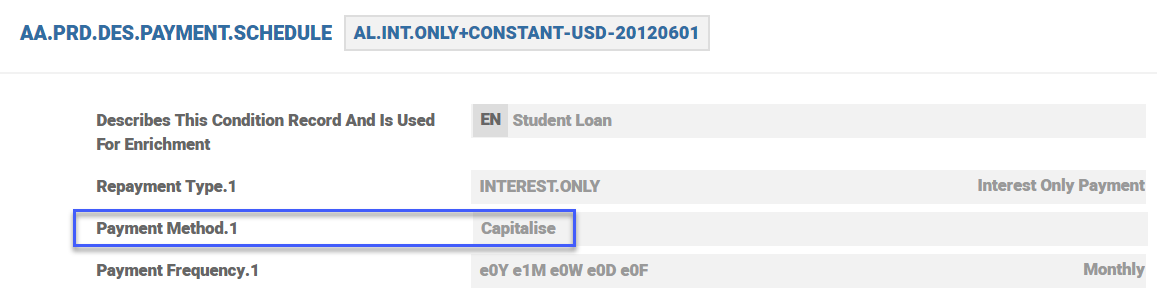
- It is possible to allow an arrangement to be suspended even if interest is being capitaliszed when the Property Type is designated as SUSPEND in AA.PROPERTY.
Consider an example where USD 1000.00 is already suspended. Now, on schedule date, as interest is set to capitalise, this USD 1000.00 is reversed from the suspension category and booked under P&L and the entries for capitalisation are - credit the accrual category if Interest Property and debit the current balance of Account Property.
Interest payment to Customer (Deposits and Savings Plan)
For deposits and savings plan products, interest is paid to the customer periodically or on contract maturity based on the type of contract. Interest can also be capitalised such that interest amount is added to the principal to be paid to the customer. The same is paid from PAY balance of Interest Property.
Fixed Profit
- Interest property class in AA allows calculation of interest amount based on Flat rate and Reducing Rate. It provides an option to fix the total interest amount calculated during contract creation regardless of any change to the loan parameters which affects the profit or interest calculation.
- Additionally when the interest or/ profit amount has to be recalculated on exceptional cases, the On Activity and Recalculate attributes in Interest condition can be configured to recalculate interest or profit amount.
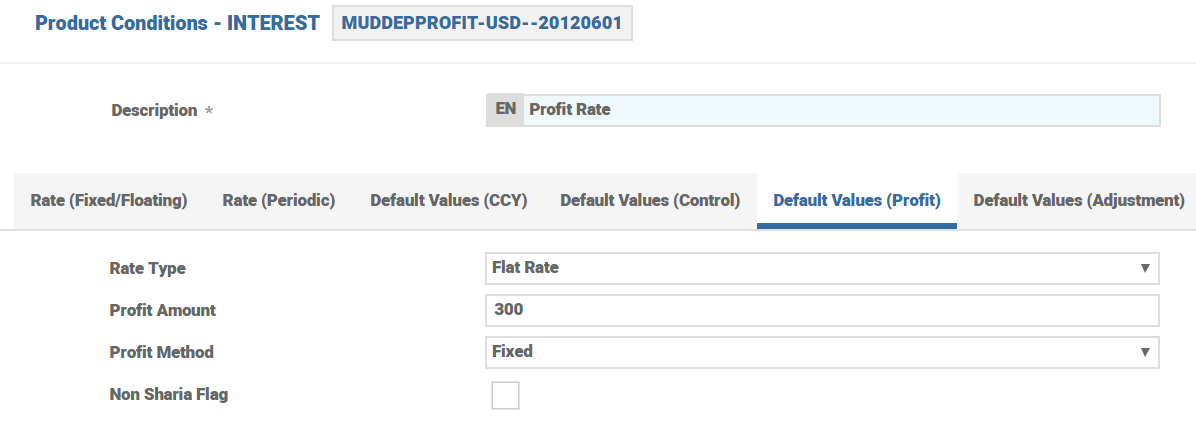
- Profit Amount : User can define the Total interest or profit amount for the arrangement or contract. This attribute is mandatory when Rate .Type is Flat Amount.
- Based on the value given, the value in the Calc .Profit. Amt attribute is calculated at arrangement or contract level which can be edited by the user.
- Profit Method : allows user to specify whether interest method is fixed life of the arrangement or contract. Available values are:
- Fixed – Fix the total profit amount regardless of any change to loan parameters.
- Null – Is treated as a normal interest bearing property.
- Non Sharia Flag -– Income or expense is posted to internal account category specified in Accounting condition instead of PL categories
- Related attributes:
- Default Values (Profit)>Rate Type
- Default Values (Profit)>Profit Amount
- Default Values (Profit)>Profit Method
- Default Values (Profit)>Non Sharia Flag
Recalculating Profit
For upfront profit contracts, the profit amount is calculated and agreed upfront. In case of certain business activities, it is possible to recalculate the profit. This is achieved using the On Activity and Recalculate attributes in Interest condition.The different types of upfront profit contracts and profit recalculation are detailed below.
Flat Amount of Profit
The profit amount agreed upfront can be changed using Change Profit Activity (LENDING-CHANGE-INTEREST).
Reducing Rate
The user can define the activites for which profit amount should be recalculated using On Activity and Recalculate set of fields in Interest Condition. On occurrence of these activities, the interest/profit amount is recalculated for the contract.
Flat Rate of Profit
An upfront profit contract can have a flat rate of profit defined with or without scheduled disbursements. When a contract is booked in the system, the profit is calculated based on the scheduled disbursements in the arrangement. If there are no scheduled disbursement, the upfront profit is calculated on the TOT<TERM.AMOUNT> (total commitment).
For example, when the contract is booked and if there is disbursement scheduled only for a part of the commitment amount (that is, only 70% of the commitment is scheduled for disbursement and remaining 30% is not scheduled for disbursement), the profit is calculated only for that part of the scheduled disbursement in the contract (70% in this example).
It is possible to recalculate the profit of the contract on occurrence of specific activities. The user can define the activities for which profit amount should be recalculated using On Activity and Recalculate set of fields in Interest Condition. For a multiple disbursement contract, when disbursement activity is part of this profit recalculation, the profit is determined based on the Include Future Disb field.
- When Include Future Disb is not set, the profit calculation is only for the disbursed amount
- When Include Future Disb is set, the profit recalculation considers future scheduled disbursements also
For example, on 15 Mar, 20 when a contract is booked with the below scheduled disbursements the profit is 4,607.64. The calculation is as show below.
|
Disb Date |
Amount |
No. of days |
Profit Calculation |
Profit amount |
|---|---|---|---|---|
|
18-Mar-20 |
25000 |
348 |
25000*5%*(348+1)/360 |
1211.81 |
|
10-Apr-20 |
75000 |
325 |
75000*5%*(325+1)/360 |
3395.83 |
On 18 Mar, 20 during the first disbursement and recalculation of profit is set for disbursement activity:
- When Include Future Disb is not set, the profit is recalculated as 1211.81
- When Include Future Disb is set, the profit is recalculated as 4.607.64
Recalculation of profit is triggered on occurrence of activities specified in the On Activity and Recalculate set of fields in Interest condition.
NOTE: Recalculation of profit is restricted to the below given list of activities. Activities for calculation and recalculation of profit/interest are:
- LENDING-NEW-ARRANGEMENT
- LENDING-AUTO.DISBURSE-TERM.AMOUNT
- LENDING-DISBURSE-TERM.AMOUNT
- LENDING-CHANGE-PAYMENT.SCHEDULE
- LENDING-RENEGOTIATE-ARRANGEMENT
- LENDING-CHANGE-INTEREST
- LENDING-CHANGE.TERM-TERM.AMOUNT
- LENDING-TAKEOVER-ARRANGEMENT
A custom routine can be attached to Interest condition of upfront profit contracts with flat rate of profit, to define the conditions for recalculation of the profit amount in the contract.
Profit will not be not recalculated for activities other than the activities listed. An override appears while creating the product condition or arrangement condition indicating the same.
For example, when Recalculate Profit is set for change product activity, an override appears stating that interest will not be recalculated for the activity.
Memo Interest
- Where the account has been set as a Memo account (Balance Treatment in ACCOUNT property set to Memo), any Interest property in the Account is treated as a Memo interest.
- During accruals, accounting is suppressed automatically so as not to post anything on the Accrued Balance or the PL.
- However, AA Interest Accruals are still maintained by the system.
- It is still possible to specify Capitalisation or Make Due frequencies for such Interest.
- During Make Due processing, it triggers the settlement of such accrued interest between the Settlement Account and a Counter Booking Account (Read Settlement Property Class for more details)
Custom Rate Calculation
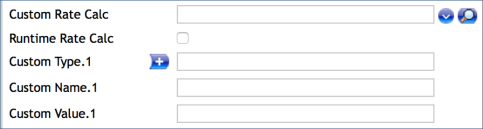
- Custom Rate is yet another type of Source Rate calculation (others being Fixed or Floating or Periodic or Linked Rate) in the Interest Property Class.
- It can be enabled by setting the Custom Rate attribute to Yes as part of the Tier multi-value set.

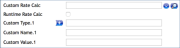
- Run Time Rate Calc - when the attribute is checked the rate is not stored in the Effective Rate attribute, instead system calculates the rate in runtime.
- The Currency, Fixed or Floating and Rate or Index attributes can be used to configure custom values to be used by the API.
- The CUSTOM RATE CALC API is invoked by the core interest processing at the time of Change Interest Activity and also during Accrual or Cap or Make Due Processing when it has to derive the interest rate dynamically.
- This run time calculation is controlled by the Run Time Rate Calc attribute being set to Yes.
- An example implementation of this Custom Rate calculation is given below as used by the Balance Netting Cash Pool.
- In the case of multi-currency AR Accounts (Memo) and in multi-Currency Interest compensation, Currency weighted average rate calculation can be used.
EXAMPLE:
- Main Account Currency is USD and the following is the Currency wise Balance (either as a Multi Currency memo account or as Participants in an Interest Comp pool).
- USD Balance: 1000
- EUR Balance: 2000 (FX Rate 1 EUR=1.23USD)
- GBP Balance: 5000 (FX Rate 1 GBP=1.4USD)
- The following is the setup in the Custom Type or /Name/ or Value set of Attributes where Type = Currency, Name = Fixed or Floating and Value – a Rate or an Index.
- USD 0.9
- Margin of 0.5 negotiated for this Account
- EUR 0.75
- GBP 0.3
- Interest can be set to be calculated as follows:
- Total Balance: USD 19,400 (USD 10,000 + (EUR 2,000 * 1.23) + (GBP 5,000 * 1.4)
- Currency Weight (% of the Currency balance against the total balance)
- USD Balance: 51.54639175 %
- EUR Balance: 12.37113402 %
- GBP Balance: 36.08247423 %
- Currency weighted Interest Rate
- 0.664948 ((51.54639175 * 0.9) + (12.37113402 * 0.75) + (36.08247423 * 0.3))/100
- Effective Interest Rate
- 1.164948 (0.664948 + 0.5 Margin on USD)
- Related Attributes are:
- Default Values (Ccy)>Run Time Rate Calc
- Default Values (Ccy)>Currency
- Default Values (Ccy)>Fixed/Floating
- Default Values (Ccy)>Rate/Index
Custom Recalculation of Profit
A custom routine can be attached to Interest condition in the Interest Override Routine attribute for upfront profit contracts with flat rate of profit. This routine can be used to define the conditions for calculation of the profit amount in the contract. The parameters of the routine are listed below:
|
Parameter |
IN/OUT |
Description |
|---|---|---|
| ARRANGEMENT.ID | IN | The arrangement ID of the contract |
| INT.PROPERTY.ID | IN | The name of the interest property for which profit is to be calculated |
| INTEREST.RECORD | IN | The interest property record for the interest property for which profit is to be calculated |
| INT.PROPERTY.DATE | IN | The date for which the processing is happening for the interest property |
| TOTAL.PROFIT | OUT | The profit amount calculated by the local routine. |
| CALC.ERR | OUT | Error flag to indicate that there has been an error during calculation. If this flag is returned by the routine, then system will ignore the local routine calculation amount and proceed with the system calculated profit amount. |
Advance of Interest
Accounting Mode – Specifies the way in which accounting entries are raised. Decides if it has to be discounted or fixed type of interest.
- Advance – This is the discounted interest and the interest amount is collected in advance before the interest periods.
- Upfront Profit – Interest amount is collected at the beginning of the contract.
- None – Denotes conventional interest bearing contract.
NOTE:
The Risk Free Rates functionality does not support advance or upfront interest.
Periodic Attribute Classes
| Attribute | Description |
|---|---|
| Maximum Rate | The maximum rate for life |
| Minimum Rate | The minimum rate for life |
| Rate Decrease | The rate decrease tolerance value |
| Rate Decrease 1y | The rate decrease per year |
| Rate Increase | The rate increase tolerance value |
| Rate Increase 1y | The rate increase per year |
Actions
Individual AA.PROPERTY.CLASS.ACTION records control which Product Line it’s associated to.
The INTEREST Property supports the following actions:
| Action Name | Description |
|---|---|
| ACCRUE | This action can be initiated by the system or manually as part of the ACCRUE-INTEREST Activity. This results in calculation of the accrued interest amount to the requested effective date and the generation of accounting entries. |
| ADJUST | This action can be initiated by the system. This results in calculation of the accrued interest amount to the requested effective date and the generation of accounting entries |
| ADJUST.BILL | Used to adjust the bills for the applicable Interest. |
| ADJUST.PERIODS | To adjust the Interest applicable for the underlying product line. |
| ADVANCE.RESET | To pre-define the frequency for the periodic interest rate reset. |
| AGE.BILLS | Used to age the applicable Interest that are overdue. |
| ALLOCATE | It updates the bills when the underlying activity is triggered. Based on the interest amount the outstanding bill amounts and status would be updated. |
| ALTERNATE | The accrual is suppressed for the Property for which it is set and the accrual happens for the alternate property which is set in Activity Restriction. |
| CAPITALISE | This can be initiated by the system. This results in calculation of the accrued charges to requested effective date and generation of accounting entries. |
| CAPTURE.BILL | Used to capture the Interest details on the bills. |
| CHARGEOFF | Used in the charge-off action on the Interest component. |
| CHECK.PROJECTION | To check for the accrual projection of the Interest component online. |
| CREDIT | This action applies the unallocated amount from a credit to the arrangement to the unallocated credit balance of the arrangement. |
| DATA.CAPTURE | This action is used in capturing the information on Interest when records are migrated from Legacy to AA. |
| DEBIT | This action applies the unallocated amount from a debit to the arrangement to the unallocated debit balance of the arrangement. |
| DEFER.CAPITALISE | Defer the capitalisation of the accured Interest. |
| DEFER.MAKEDUE | Defer the make due of the accrued interest. |
| LINK.UPDATE | To specify the Interest Property of the linked arrangement that should be referred for getting the Interest rate. |
| MAINTAIN | To maintain the Interest component of Source and Target for the Bundle product. |
| MAKE.DUE | This action applies the amount of interest due to be repaid to the DUE interest property. The amount to be made due is determined from the associated BILL that is being made due. |
| MOVE.BALANCE | Action routine to move the PAY interest balance to an internal account. |
| PAY | For the Payout of the Interest component. |
| PAYOFF.CAPITALISE | To capitalise the interest payoff. |
| PERIODIC.RESET | This action is used for the periodic reset of the Interest rates. |
| PROJECT.ACCRUE | Used to project the accrual of the applicable interest. |
| REPAY | This action allocates the amount of interest to be repaid to the appropriate account balance. Depending on the PAYMENT.RULE applied the interest is made against billed or current amounts. |
| RESUME | To resume the accural and capitalisation of the Interest component. |
| SUSPEND | Suspend the accrual and capitalisation of the interest component. |
| UPDATE | This action is initiated manually and allows the user to change any of the INTEREST attributes. This action is initiated as part of the NEW-ARRANGEMENT and UPDATE- INTEREST Activities. |
| UPFRONT.PROFIT | To collect the applicable interest amount at the beginning of the underlying contract. |
Accounting Events
The following actions generate accounting events as defined in the Attribute Accounting attribute.
- ACCRUE
- ADJUST
- CAPITALISE
- DEFER.MAKEDUE
- DEFER.CAPITALISE
- MAKE.DUE
- REPAY
- SUSPEND
- RESUME
- DEBIT
- CREDIT
- CAPTURE.BILL
- ADJUST.BILL
- PAY
- PAYOFF.CAPITALISE
Limits Interaction
For an arrangement under the ACCOUNTS Product Line, it is possible to link the first tier amount of debit interest to the LIMIT record attached. It can be achieved by setting the Refer Limit attribute in the INTEREST Property Condition to YES. This functionality can be enabled only if the LIMIT is managed by AA.
Add Bookmark
save your best linksView Bookmarks
Visit your best links BACK
BACK


Are you sure you want to log-off?