
| Bookmark Name | Actions |
|---|
Tax
The Tax Property Class is used by all products and it primarily controls the Taxes applicable for the arrangement. Taxes can be based on properties of Interest and Charges Property Classes.
Product Lines
The following Product Lines use the Tax Property Class:
- Accounts
- Agent
- Bundle
- Deposits
- Facility
- Lending
- Safe Deposit Box
Property Class Type
The Tax Property Class (optional) uses the following Property Class Types:
- Currency Specific
- Dated
- Enable External
- Enable External Financial
- Multiple
- Tracking
Property Type
There are no property types associated with the Tax Property Class.
Balance Prefix and Suffix
The Tax Property Class is associated with the below listed Balance Prefix:
- Lending - Due, Aged, Invoice
- Deposits - Due, Aged, Invoice
- Accounts - Invoice
For a deposit contract, the due tax balance reflects the amount of tax calculated. The due tax is identified with a prefix of DUE.
 Attributes
The following are the associated attributes:
Tax Definition at Product Level
At the AA product level, tax can be defined either at Property Class Level or at Property Level. For example, a value INTEREST in the Property Class field means if a deposit product has one or more Properties of Interest Property Class (deposit interest, commission), tax is calculated for each of these Properties. The corresponding tax code has to be entered in the Tax Code field which should hold value from TAX table or a TAX.TYPE.CONDITION can be given.
If the user wants to restrict tax to any of the Properties of the product, this can be achieved by entering the Property in the Property field and corresponding values in Property Tax Code and Property Tax Cond fields.
Only Interest and Charge Property Classes or its associated Properties can be defined. It is mandatory to specify a value either in TAX or a TAX.TYPE.CONDITION for the Property Class or Property.
Property Class
The Property Class field is an associated multi-valued field, which allows to define the products on which the tax can be collected.
Tax Code
The Tax Code field represents a reference on the TAX table, which indicates the rate used for computation of taxation for the associated Property Class. Either Tax Code or Tax Condition fields can be allowed.
Tax Condition
The Tax Condition field accepts a valid TAX.TYPE.CONDITION value to calculate TAX for the associated Property class. Either Tax Code or Tax Condition fields can be allowed.
Property
The Property field is an associated multi-valued field defines the Properties on which the Tax can be collected for the product.
If defined, the associated Property Tax Code and Property Tax Condition fields take precedence over Tax Code or Tax Condition fields for related Property Class.
Property Tax Code
The Property Tax Code field represents a reference on the TAX table, which indicates the rate to be used for computation of taxation for the associated Property. Either Property Tax Code or Property Tax Condition fields can be allowed.
Property Tax Condition
The Property Tax Condition field accepts a valid TAX.TYPE.CONDITION to calculate TAX for the associated Property Class. Either Property Tax Code and Property Tax Condition fields can be allowed.
Net Tax for Debit Interest Offsetting Credit Interest for Tax
The Net Tax field enables tax netting. It is used in connection with the Property Net Tax field to control netting of tax calculation.
In the Tax Property, the Net Tax field enables the functionality and in the Property Net Tax field user can define the Interest Properties that are included for netting. A minimum of two interest Properties are needed but there is no limitation to the maximum. A combination of multiple credit or debit interest Properties is allowed as well as only two credit or two debit Properties.
Property Net Tax
The Property Net Tax field is a multi-value field, which is used to define the Properties that needs to be selected for tax netting. At least two Properties must be selected. Used in connection with the Net Tax field.
Bill amounts for the properties selected here is netted before tax calculation is applied. Netting only happens for bills having matching payment dates, payment methods (PAY or DUE or CAPITALISE) as well as matching defer dates.
Interest Properties with negative rates are not netted.
EXAMPLE:
With 10% tax on CRINTEREST:
Bill A has CRINTEREST 100 and CRINTEREST-TAX 10 (10% of 100) and Bill B has DRINTEREST 50
After netting:
Bill A has CRINTEREST 100 and CRINTEREST-TAX 5 (10% of 100 - 50) and Bill B has DRINTEREST 50
Tax Definition at Arrangement Level
- At arrangement level, it is possible to remove the values of the TAX or TAX.TYPE.CONDITION defaulted from the product level allowing for zero or no tax calculation.
- On reaching the interest schedule AA.BILL.DETAILS holds the information related to interest paid to the customer and the tax, which is charged on the interest portion.
- AA.INTEREST.ACCRUALS holds the interest accruals for the period on which the tax gets calculated. The entry for the tax is debited from the customer’s account and then credited to the category given in AC.ALLOCATION.RULE.
Tax Inclusive Annuity Calculation
For annuity payment calculation, tax can be both included and excluded during calculation. The calculation is based on the settings on the Tax Inclusive field in Payment Type. If set to Yes, then the annuity is calculated including the principal, interest and the tax.
Calculation of Split Tax Amount
Tax engine is also used to calculate the split tax amount based on the tax liability percentage defined in the customer condition.
EXAMPLE:
Customer 1 – 50% Customer 2 – 50%
Interest capitalization amount: $1000.
Tax percentage for Customer 1 is 10% and for Customer 2 is 0% (since the customer is minor).
Now, the tax can be calculated by applying 10% on $500 and 0% on $500. So the net tax amount is $50 for which tax accounting is raised.
Tax on Pro-rata basis
Tax is calculated on pro-rata method based on the repaid amount. The adjustment of balance and the corresponding tax calculation is represented with an example as given below:
EXAMPLE:
If the Interest Amount is 50$
and Tax Rate is 10.00%
Then Tax Amount is 5$
Amount Repaid is 40$
Interest Repaid is 36.36$
Tax Paid (on Pro-Rata basis) is 3.64$
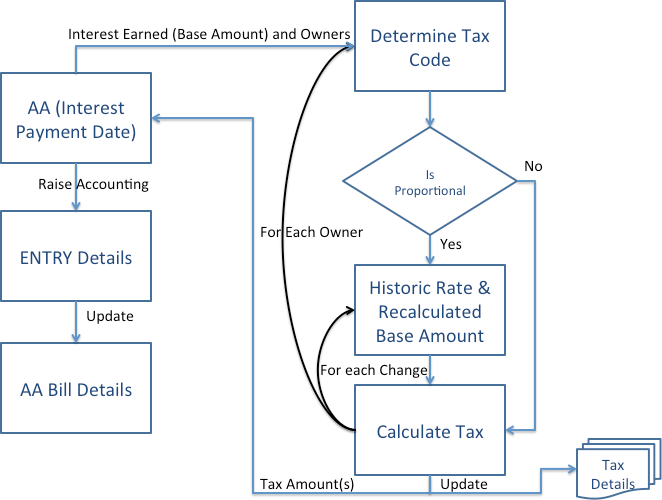
Proportional Tax Calculation
- Regulatory requirements require proportional calculation of tax which is enabled using Temenos Transact Tax engine and AA. System allows the user to configure such that the system can calculate Proportional Tax.
- The user can perform this configuration at the Tax Code level.
- After configuration, when the Tax Engine detects a change in the Tax Rate during the current Interest Payment period, then it splits the Interest earnings by Tax Rate Change periods and calculates the Tax proportional to the Interest earned within each of those periods.
- Given below is an illustration of how the tax can be calculated.

TAX.CODE.PARAMETER
- The Tax Code Parameter table is an optional to configure to switch on Proportional Tax Calculation for a given Tax Code.
- The key to this table is the tax code (without the Date).
- Proportional Calc can be set to,
- Yes—Tax is calculated proportional to the Interest accrued for each Tax Rate Change period.
- No (or left blank)—Tax is calculated on the total interest accrued for the Interest Payment period, based on the Tax Rate applicable as of the Interest Payment Date.
- Update Tax Details can be set to,
- Yes—ST.TAX.CALC.DETAILS is maintained for the break-down of Proportional Tax calculated for a given arrangement, Interest Property and Interest Payment Date.
- No (or left blank)—ST.TAX.CALC.DETAILS is not maintained.
- The system does not expect an entry in this table for each Tax Code configured in the TAX table.
- ST.TAX.CALC.DETAILS includes the breakdown of how the Tax was calculated proportional to the interest accrued within each of those Tax Rate Change periods.
- Tax calculation works the same way for payment of interest (Credit or Debit Interest) for,
- AA Deposit
- Scheduled Interest Payment
- Redemption of Deposit
- Maturity of Deposit
- Adjust Bill
- AA Loan
- Scheduled Interest Payment
- Loan Payoff
- Adjust Bill
- AA Account
- Scheduled Interest Payment
- Account Payoff
- Adjust Bill
- Adjust Payoff Info Bill
- AA Deposit
- Refer the Proportional Tax Calculation user guide for more information on Tax Tables section.
Exclusions
- All other Temenos Transact Modules besides AA,
- Although the solution is generic, scope of this functionality is confined to AA. Other modules may need to be enhanced to provide relevant information to the Tax Engine in order for the Tax Engine to calculate the split.
- Back dated Tax Rate Changes
- These do not trigger any Reverse and Replay on the arrangements and therefore it does not impact the Tax, which is already calculated.
- Forward dated tax rate changes to be reflected in Schedule Projection
- Tax on Charges
- Tax Rate Changes as a result of,
- Change of Ownership of the Arrangement
- Change of Product of the Arrangement
- Change of applicable Tax bucket of the Owner of the Customer
- Effectively these may result in the Tax Code applicable for the Arrangement itself being changed during the Interest Period – but they will not have any impact. The system will only determine the Tax Code applicable as on the Interest Payment Date and will look for any Rate Changes only under that Tax Code.
- Proportional Calculation on Interest calculated based on Compounding Interest instead of Simple Interest.
- This is supported only if the Tax Rate change happened mid-period. Then the base amount is calculated on a pro-rated basis based on the number of days. There will be minor differences because this Pro-rata is linear and not compounded.
Tax Split in Arrangements
Customer Relationship can define the percentage split of income or tax amongst the primary and joint customer. Tax splits are calculated between the various joint holders based on the tax types linked to them. Tax Type to have the Apply Split field as Yes and Tax parameter to be available.
AA enables the tax calculation based on the customer relation for a customer having a portfolio reference. Temenos Transact splits the tax calculated on an income for a primary customer amongst the primary and joint customers in a pre-defined percentage as indicated in the Customer Relationship.
ST.CUST.RELATIONSHIP.DATES includes the list of dates for a customer relationship record. ID being customer relationship ID without the date
ST.TAX.REPORT.DETAILS includes Tax report file to store customer-wise tax details against a single transaction
NOTE: Tax Split between Customers is possible using AA.CUSTOMER.ROLE. Read the Customer Property Class for more information.
Periodic Attribute Classes
There are no periodic attribute classes associated with Tax Property Class.
Actions
The Tax Property Class supports the following actions.
| Action Name | Action |
|---|---|
| ADJUST.BILL | Used to adjust the bills for the applicable charges. |
| ADJUST.INFO.BILL | Used to adjust in the information on the generated bills. |
| AGE.BILLS | Used in aging the bills to calculate the applicable charges. |
| CAPITALISE | Used to capitalise the tax amount. |
| CAPTURE.BILL | Used to capture the tax details on the bills. |
| CHARGEOFF | Used in the charge-off action on the tax component of interest and charges property. |
| DATA.CAPTURE | Used in capturing the information while migrating from Legacy to AA. |
| MAKE.DUE | The due action applies the amount of tax due to be repaid to the MAKEDUE tax property. The amount to be made due is determined from the associated BILL that is being made due. |
| PAYOFF.CAPITALISE | Used for the calculating the tax payoff to be capitalised. |
| REPAY | Used during the repayment of charges. |
| UPDATE | The UPDATE action is initiated manually and allows the user to change any of the Tax attributes. This action can be initiated as part of the NEW-ARRANGEMENT and UPDATE-TAX activities. |
Accounting Events
The MAKEDUE action generates accounting events as defined in Accounting field.
Limits Interaction
Actions associated with the Tax Property Class don’t have an impact on the Limits.
Add Bookmark
save your best linksView Bookmarks
Visit your best links BACK
BACK


Are you sure you want to log-off?