
| Bookmark Name | Actions |
|---|
Payment Holiday
The Payment Holiday is a transaction (soft) Property Class which is used to skip an installment completely or skip part of the installment amount for a defined period.
Product Lines
The following Product Lines use the Payment Holiday Property Class:
- Deposits
- Lending
Property Class type
There is no associated Property Class Type with this Property Class.
Property Type
There is no associated Property Type with this Property Class.
Balance Prefix and Suffix
There is no associated Balance Prefix and Suffix with this Property Class.
 Attributes
Payment Holiday is a feature offered by banks, by which, a customer for variety of reasons, may opt to take an instalment break to skip repayments. The system stops generating bills during the holiday period.
Flexible Repayment Definition
The following table describes the attributes related to Flexible Repayment Definition.
| Attribute | Description |
|---|---|
| Holiday Start Date | This field denotes the date from when the payment holiday is to be processed. The activity effective date would be considered when left blank. This works along with Hol Num Payments. |
| Hol Num Payments | This field denotes the number of scheduled payments to be skipped from the holiday start date. This is a mandatory field when holiday start date is given. |
| Hol Payment Type | This field the type of payment for which the holiday processing should be considered. This must be a valid input from AA.PAYMENT.TYPE. This can be inputted only when the Hol Start Date and the Hol Num Payments are defined. Else, this cannot be input. |
| Holiday Date | This is a no – input field which is defaulted by the system. This field specifies the holiday dates for the payments. |
Cancellation of Flexible Repayment Plan
The following are the attributes used to cancel a flexible repayment plan.
| Attribute | Description |
|---|---|
| Cancel
|
This field allows the user to cancel a flexible repayment that is already defined. Cancellations are allowed only on consecutive future holidays. This attribute is available only for change payment holiday activity class (LENDING-CHANGE-PAYMENT.HOLIDAY). |
Restriction in Flexible Repayment
The following are the attributes used in the restriction of flexible repayment.
| Attribute | Description |
|---|---|
| Hol Restrict Item | This field allows the user to choose holiday processing based on either property class, property, bill type or payment type. |
| Hol
Restrict Type
|
This field
specifies the type of holiday restriction. The following options are allowed
for the same:
|
Modification of Payment Amount
The following are the attributes used to modify the payment amount.
| Attribute | Description |
|---|---|
| Original Pay Amount | This is a no input field. This field defaults the original payment amount that was calculated for a given payment date while declaring holiday and also defaults the actual amount given by the user. |
| Holiday Pay Amount | This field allows the user to modify the payment amount of the bill by way of increasing or decreasing it but has to satisfy the minimum payment restriction. |
Key Features
The following are some key features of Payment Holiday.
Payment Holiday Control Parameters
The Payment Holiday parameters are available in the Payment Schedule Product Condition shown below.
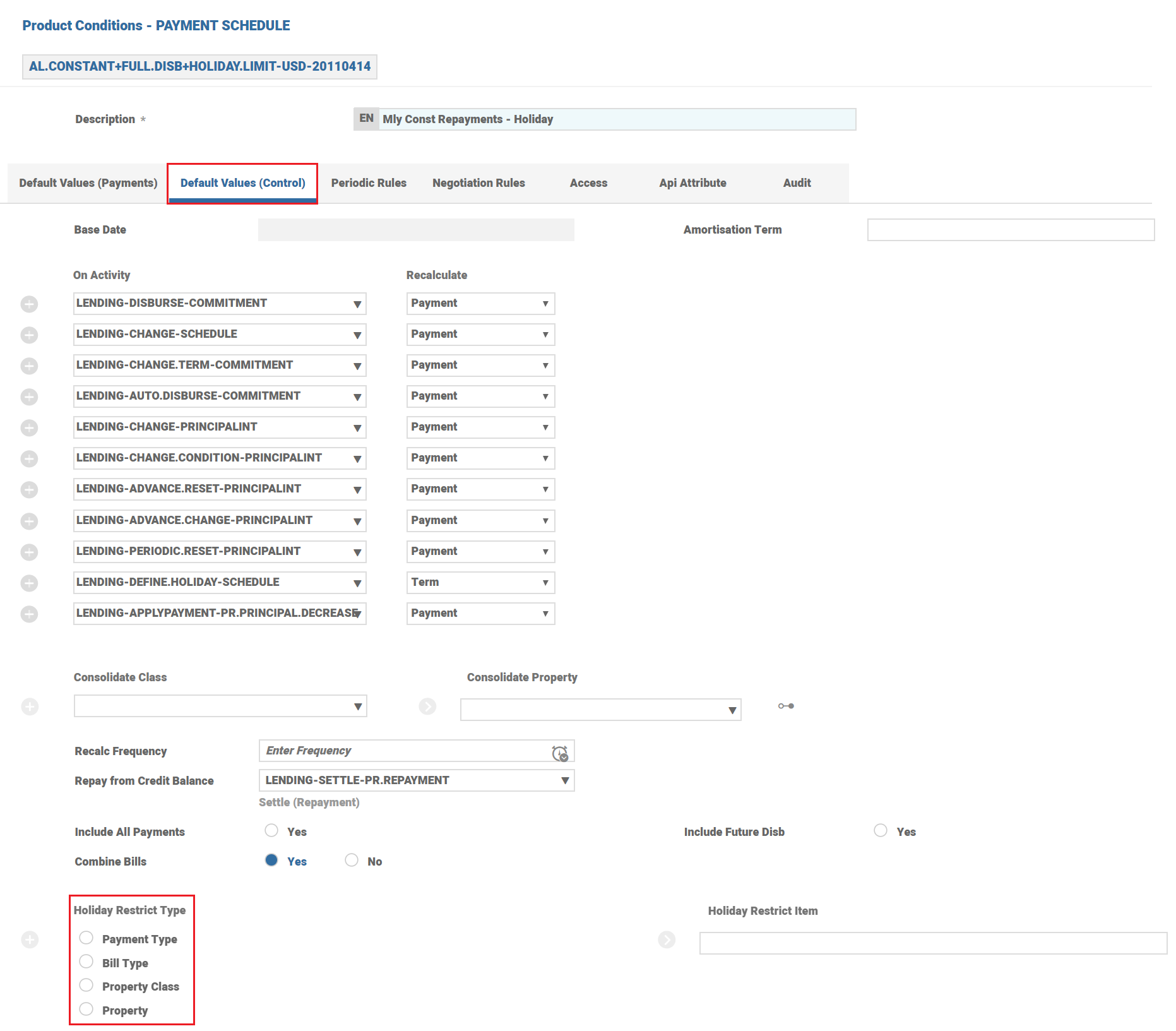
Periodic Attributes
The HOLIDAY.LIMIT and HOLIDAY.LIMIT.REVOLVING periodic attributes are used to control the maximum amount and maximum percentage of the total commitment amount allowed as payment holiday.
Activity Class
The LENDING-DEFINE.HOLIDAY-PAYMENT.SCHEDULE Activity Class calculates holiday payment details for given payment type based on given definition.
Holiday Start Date cannot be less than activity effective date. For Holiday start to be backdated then the Activity itself has to be run effective back dated.
In case, Holiday Start date is future date then base date for holiday payment calculation is previous payment date of holiday start date.
The LENDING-DEFINE.HOLIDAY-PAYMENT.SCHEDULE Activity Class is used for postponement of payment schedule dates.
When payment type is removed using LENDING-UPDATE-PAYMENTSCHEDULE Activity and left untouched in Holiday Multi value set, then system throws as an override message only when inputting new LENDING-DEFINE.HOLIDAY-PAYMENT.SCHEDULE Activity.
Payment Holiday Reversal
To reverse a holiday definition, the actual Activity itself must be reversed or the user should input another DEFINE.HOLIDAY Activity with number of holiday payments as zero or may delete the holiday payment type multi-value set.
Payment Holiday Amendments
Amendments to the existing holiday payments definition should be done via DEFINE.HOLIDAY Activity.
Multiple Payment Holiday Definition
When the user defines multiple holiday payment with multiple start dates, then payment schedule projection honours all of the payment holidays.
NOTE: There may be few payments between holiday start dates.
Payment Holiday at the Arrangement Level
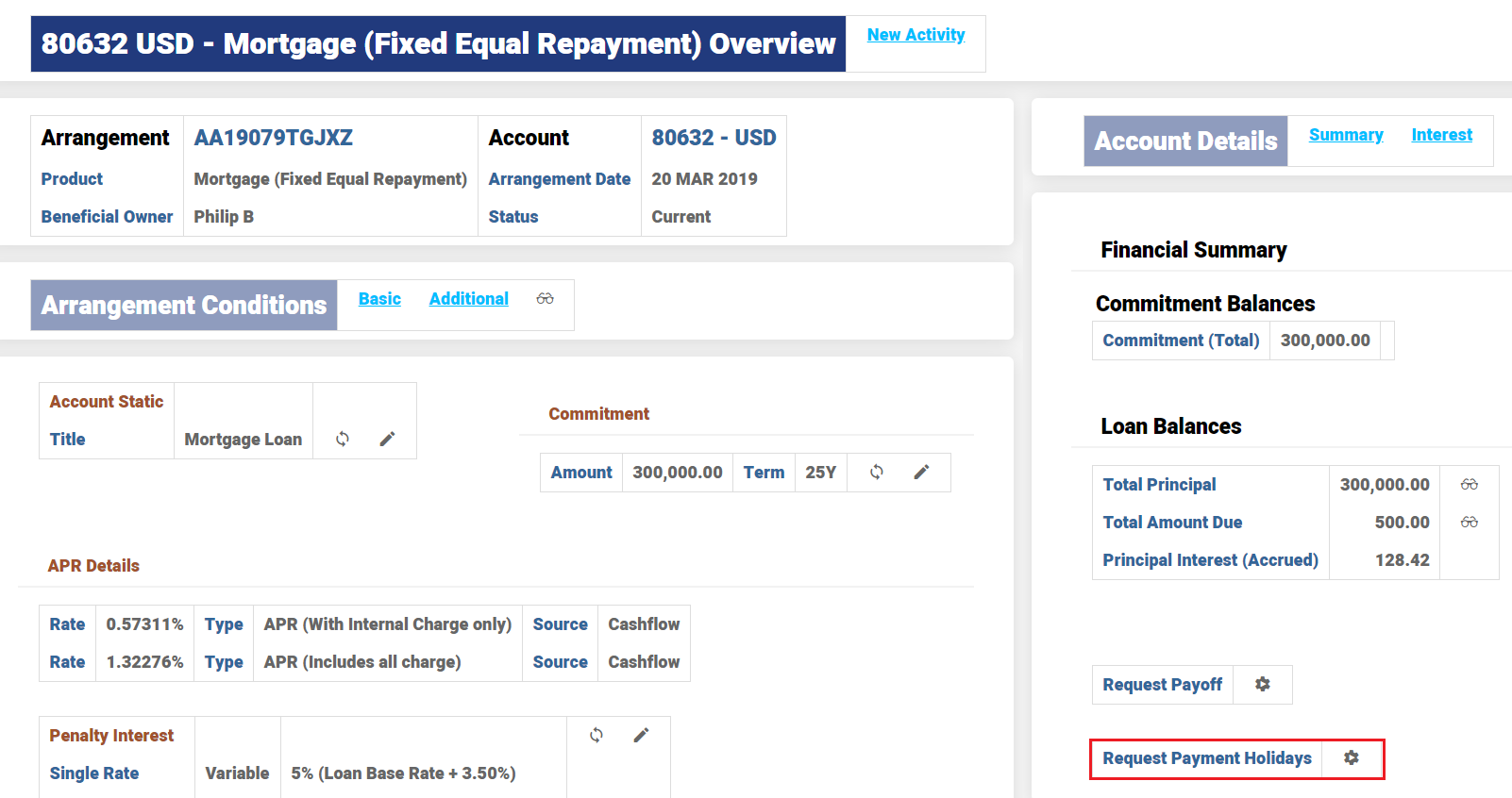
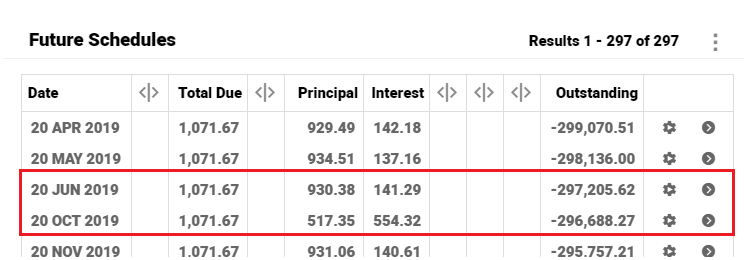
The below set of screenshots display the payment holiday applied on a Mortgage loan.
The Request Payment Holiday option on the Arrangement overview screen enables the user to select which payments has to be marked as Holiday.
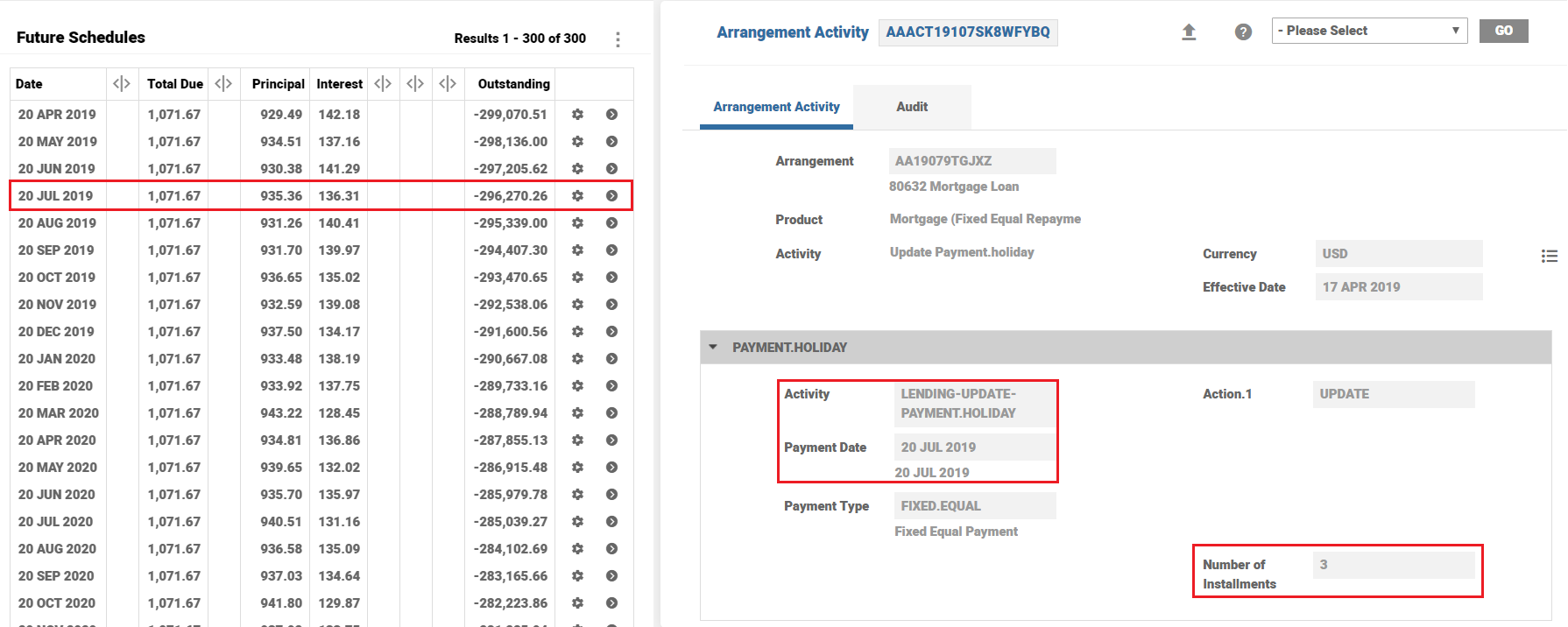
Once the required payment is marked as Holiday, the Payment Holidays option is visible in the Arrangement overview screen. The Payment Holidays screen displays the instalment from which the schedule has been marked as holiday(s).
As per the below example, three instalments effective July month have been marked as Holiday.
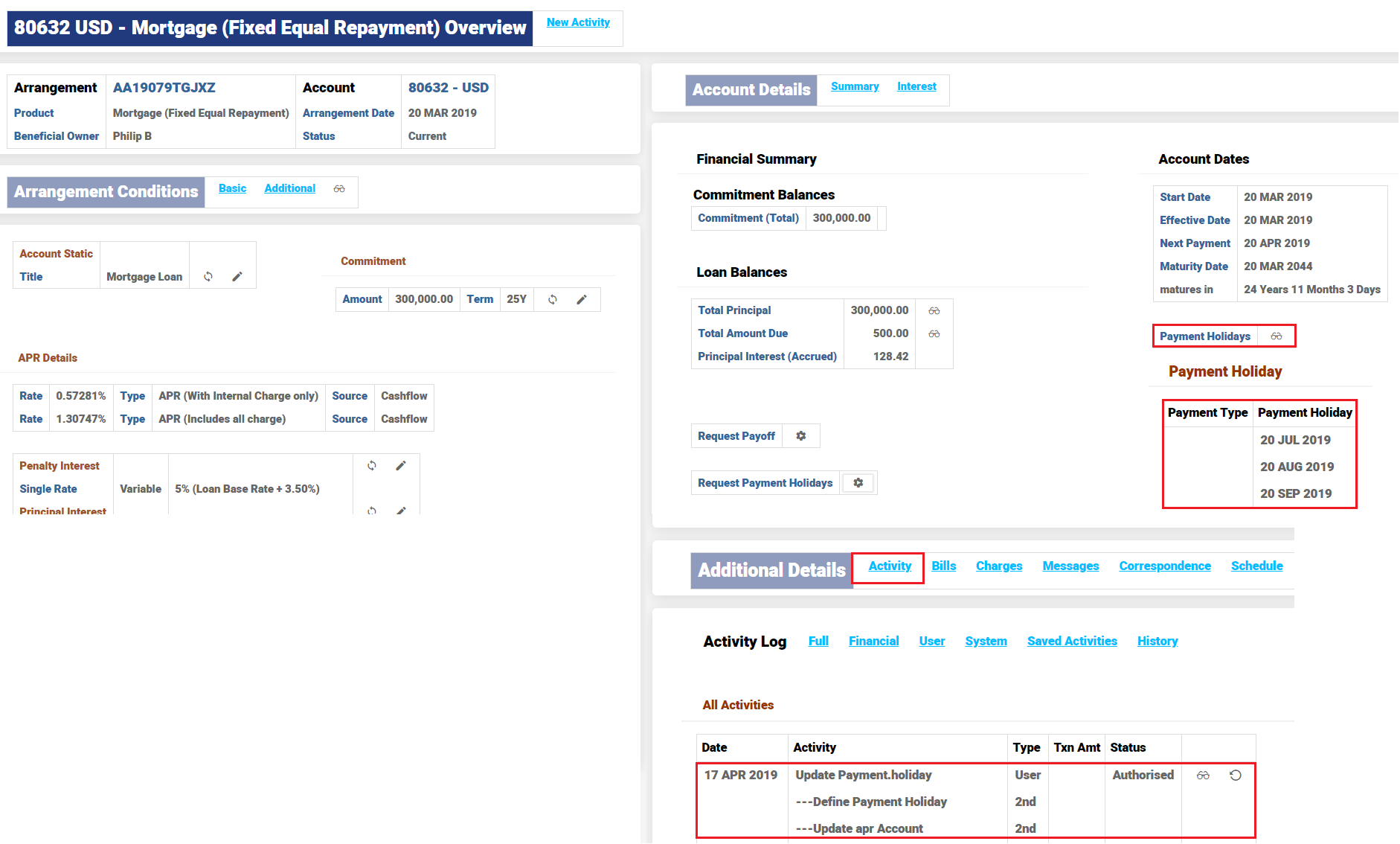
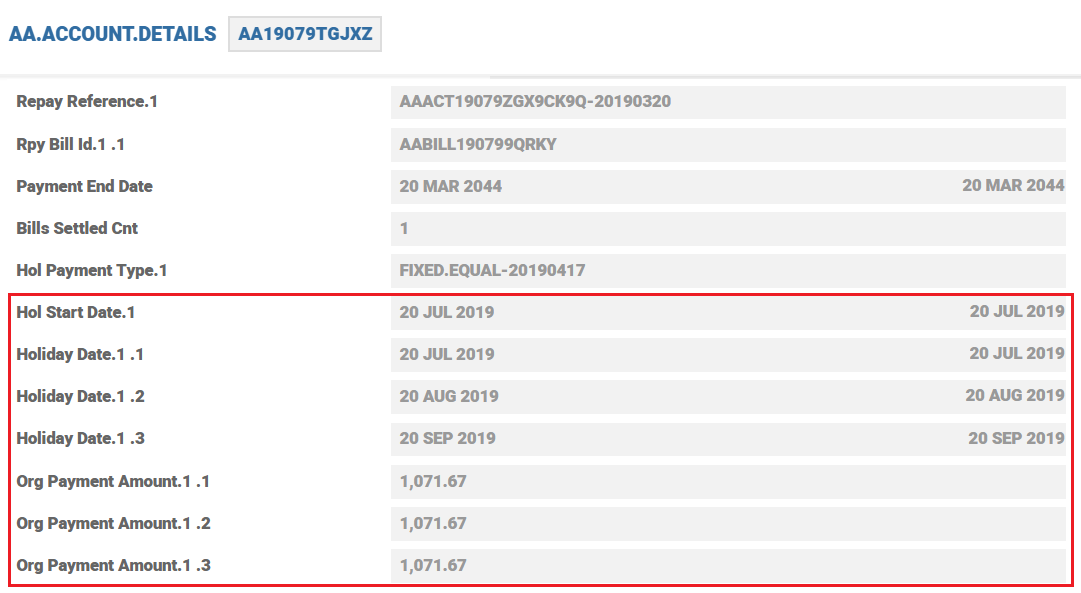
Payment holiday details as updated in AA.ACCOUNT.DETAILS is shown below.
Periodic Attribute Classes
There are no associated periodic attribute classes.
Actions
The Payment Holiday Property Class supports the following actions:
| Action Name | Description |
|---|---|
| UPDATE | Update the Payment Holiday table to re-calculate the repayment schedule. |
Accounting Events
This Property Class does not generate any accounting events.
Limits Interaction
This Property does not perform any actions that impact the limits system.
Add Bookmark
save your best linksView Bookmarks
Visit your best links BACK
BACK


Are you sure you want to log-off?