| Bookmark Name | Actions |
|---|
Introduction to General Ledger
A general ledger (GL) is a set of numbered accounts a business uses to keep track of its financial transactions and to prepare financial reports. Each account is a unique record summarising each type of asset, liability, equity, revenue and expense.
It is a central repository for accounting data transferred from all sub-ledgers. GL is usually divided into at least seven main categories. These categories generally include assets, liabilities, owner's equity, revenue, expenses, gains and losses. For banks, the sub ledgers could be loans, deposits, current and Nostro accounts, interest and charges payable or receivable, provisions, fixed assets, depreciation and income and expenses.
An organization's statement of financial position and the statement of income are both derived from the general ledger.
The posting to the accounts occur in general ledger. Posting is the process of recording amounts as credits and debits.
 Chart of Accounts
A chart of accounts is a listing of the names of the accounts that a company has identified and made available for recording transactions in its general ledger. A company has the flexibility to tailor its chart of accounts to best suit its needs, including adding accounts as needed.
Within the chart of accounts you will find that the accounts are typically listed in the following order:

Trial Balance
The extraction of account balances from the GL is called a trial balance. The purpose of the trial balance is a preliminary stage of the financial statement preparation process, to ensure the equality of the total debits and credits.
Debits and Credits
At the heart of accounting is the system known as double entry bookkeeping. Because each bookkeeping entry debits one account and credits another account in an equal amount, the double-entry bookkeeping system helps ensure that the general ledger is always in balance, thus maintaining the accounting equation:

This user guide is laid out in three sections covering Financial Accounting, Financial Reporting and Utility Tools in Temenos Transact Transact.
Financial Accounting and Financial Reporting
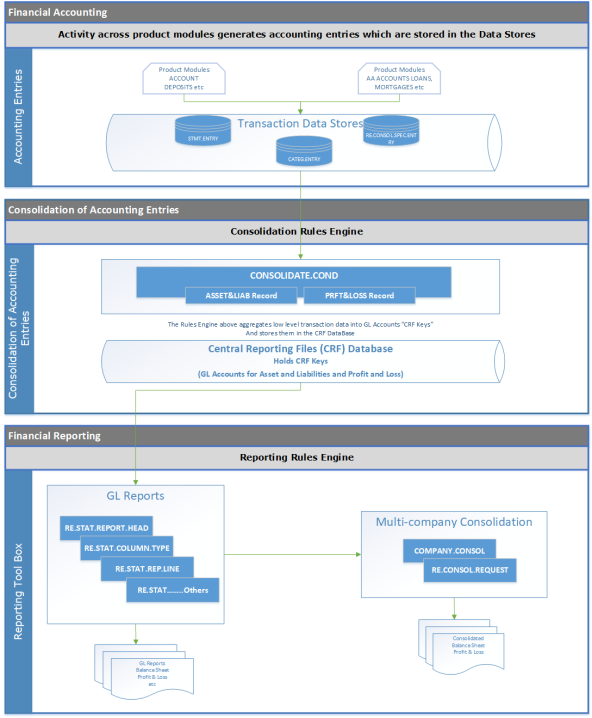
Financial Accounting is a specialised branch of accounting that keeps track of a company's financial transactions. Using standardised guidelines, the transactions are recorded, summarised, and presented in a Financial Report or financial statement such as an income statement or a balance sheet. The aggregation of low level data into GL Accounts as described in Financial Accounting forms the basis of financial reporting including the Balance Sheet and the Income Statement (Profit and Loss).
The following diagram shows the conceptual view of accounting and reporting in Temenos Transact Transact.
Multi GAAP Compliance Reporting
Compliance is more of a reporting function. If the row data is available, a compliance reporting tool can be deployed in Temenos Transact and use Temenos Transact’s offerings or data can be exported to an external system. Both these are available for users. Temenos Transact complies with the specific accounting policies and procedures required by International Financial Reporting Standards (IFRS) for the generation of raw data. It also supports reporting based on local or other GAAPs (Generally Accepted Accounting Principles), which are the standards set by a country’s regulator or accounting standards body. This is termed as Multi-GAAP.

The functionality is covered in detail in this user guide under the section on Multi GAAP including IAS and US local GAAP.
Period End Procedure (Month End Closure)
For the month end closing, Temenos Transact has an optional Post Closure (PC) module.
Period End Procedure (Year End Closure)
Please refer to section End of Year Procedure – PL.CLOSE.OUT
Utility Tools
The system provides a number of utility tools that can be deployed for specific tasks.
GL Feature Grouping
Financial Accounting
Financial Reporting
Utility Tools
Illustrating Model Parameters
This section covers the high-level parameterization of Financial Reporting module, which controls the update of Central Reporting Base with the data passed from different Temenos Transact applications and the production of the reports.
Consolidation Parameters:
| S.No. | Parameters | Description |
|---|---|---|
| 1. | CONSOLIDATE.COND
|
This application allows the user to define the parameter setup to consolidate data under two categories – Asset and Liability, Profit and Loss.
|
Report Generation Parameters:
| S.No. | Parameters | Description |
|---|---|---|
| 1. | RE.STAT.COLUMN.TYPE
|
This application allows the user to define the details for each column to be printed. These details indicate if the balance amount or movement amount must be printed for local currencies, foreign currencies or for all currencies. |
| 2. | RE.STAT.REPORT.HEAD
|
This application allows the user to define the heading details indicating the column to be printed, amount size, reports for currencies, report heading and if entries have to be printed. |
| 3. | RE.STAT.REP.LINE
|
This application allows the user to define the details containing the different line and line of contents. It also contains details about totaling, spacing of the lines, and types of Central Reporting Base records to be printed. |
| 4. | RE.STAT.ENT.FORMAT
|
This application allows the user to define the file containing details about the presentation and format of entries to be included in a report. Titles, headers and columns are described and special masks can be specified. |
| 5. | RE.STAT.RANGE
|
This application allows the user to define a record containing a range of values or a set of individual values for a report line content definition. User can also set up a ‘standard’, often used for virtual views as a help or short cut in the report line definition process. |
| 6. | RE.STAT.NAME
|
This application allows the user to group different consolidation conditions under a common mnemonic name. The purpose is to provide a shortcut for definition of reporting line contents, which are repetitive within one or among several reports. |
| 7. | RE.AMT.ABBREV
|
This application allows the user to define the file that holds the descriptions for amount format displays to be printed in a specified user language at the top of a report. |
| 8. | RE.STAT.OUTPUT
|
This application allows the user to define the content and layout of this output file. The user can generate output to a sequential disk file or in the standard printed output. |
Add Bookmark
save your best linksView Bookmarks
Visit your best links BACK
BACK


Are you sure you want to log-off?