| Bookmark Name | Actions |
|---|
Introduction
The Centralised Reference Data module handles the upload of reference data in Temenos Transact. This module has its own license code (RD). This module provides the following:
- The centralised bank directory is the Temenos standard solution for the following:
- Managing BICs and national IDs.
- Replacing the existing
DE.BICapplication, as well as Temenos Payments Hub (TPH) own directories.
- An automated and manual process to upload SWIFTRef bank directory plus to the Temenos centralised bank directory.
- An automated and manual process to upload SWIFTRef IBAN directories to the Temenos IBAN-related directories that are part of the IBAN module (IN). The upload of the IBAN structure is manual.
- Enhanced capabilities to handle future date changes are published in the SWIFTRef bank directory plus and in the IBAN plus directories.
- Tracks the bank directory plus, IBAN plus and exclusion list upload (stores the name of the source file, create deleted records before moving them to history) and eliminates the exceptions (Unauthorised records are not present for modified or deleted records).
- Separate data for master (created and maintained through upload) and custom reference data (created and maintained manually by the bank).
- A mechanism to restrict reference data to specific companies or exclude reference data for specific companies.
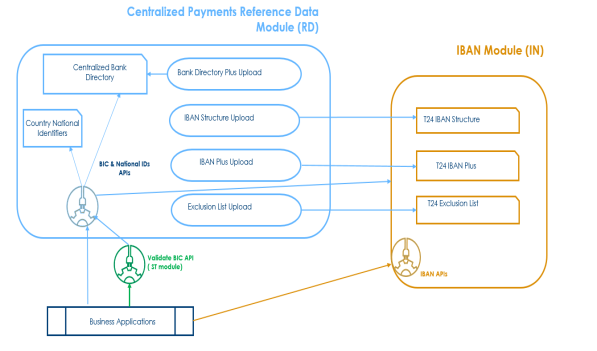
Reference Data Usage:
RD and IN modules are available to new and migrating customers. TPH refers to the centralised bank directory and centralised IBAN directories than its own directories. The following are the Country Model Bank layers and L3 implementations:
- Must stop accessing the reference data directly.
- Use the reference data through the APIs.
A one-time service 'RD.COPY.DE.BIC' is provided to existing customers to migrate data from the Temenos Transact BIC directory (DE.BIC) to the centralised bank directory or, the customer can proceed with a full upload of the latest bank directory plus file to the centralised bank directory.
Non-TPH customer with existing local developments that refer to the legacy BIC directory directly and not through the published APIs, a parameterisation option allows them to indicate if the BIC validation API (DE.VALIDATE.SWIFT.ADDRESS* routine) considers the centralised bank directory or the legacy BIC directory as the main reference data.
Temenos recommends its customers to plan the amendment of the existing local code to refer the BIC reference data through the published APIs to make use of the benefits introduced by the RD module.
NOTE:
The Temenos BIC directory is the legacy solution for BIC after the current functionality and is moved to care and maintenance. Temenos still supports this but will not be improved further.
Product Configuration
This section covers the configuration of Upload Principles for Directories and Reference Data Parameter
 Upload Principles for Directories
Full vs Delta
Upload Principles for Directories
Full vs Delta
The SWIFTRef IBAN plus and exclusion list, SWIFTRef bank directory plus and SWIFT gpi directory are valid (activated) at the publication date, where the publication date is indicated in the file name.
The SWIFTRef directories and SWIFT gpi directory containing the reference data are distributed by SWIFT as follows, based on the file type.
| File Type | Frequency | Description |
|---|---|---|
| Daily full | Once a month | The daily full file is only required for an optional data resynchronisation. The daily full file is published as a separate file along with the daily delta. |
| Daily delta | Every day, including weekends | This file contains only the changes of the previous day. |
| Monthly full | Once a Month | The file contains full details. |
| Monthly delta | Once a month | The file contains the changes from the previous month. |
In a Full file, the Modification Flag is always A (addition), as the full file has all the records present in the directory.
The Delta file contains the changes, which occurred from the previous file. In this case, the Modification Flag indicates the action to be taken on the appropriate record.
The Modification Flag in the SWIFTRef IBAN plus, SWIFTRef bank directory plus and SWIFT gpi Directory file has the following values:
- A – A new record is introduced.
- M – An existing record is modified.
- D – An existing record which is no longer in use is deleted.
- U – No change to the existing record.
- E – Record expired.
Banks are available 365/7/24 for online and instant payments and therefore, a full upload process (which can clear the directory) is not feasible as a payment initiated during the upload might get rejected because the payment reference data is not uploaded yet.
The following principles are recommended to be followed:
- The full upload is recommended to be used during testing and for the initial upload and it must only be used in a production environment in exceptional circumstances ACTION = OVERWRITE.
- A regular delta upload is recommended to be used as the normal upload process in a production environment, ACTION = UPDATE.
NOTE:
Automatic upload of full files using ACTION = UPDATE is not recommended as these do not remove the obsolete records.
Current vs Future Dated
Most of the entries in the full and monthly files are valid from the publication of the directory. However, a few of them change at a later date (indicated in Field A of the file).
This data is uploaded as future dated but considered by the API based on the request date.
- For IBAN plus and exclusion list, BNK/FUT.IBAN.EXCL.MERGE service checks all the future dated records and makes them current and the previous current records are moved to history.
- For the centralised bank directory, BNK/RD.MERGE.FUT.BANK.DIR service checks all the future dated records and makes them current and the previous current records are moved to history.
- For the SWIFT gpi directory, BNK/RD.GPI.MERGE.FUTURE.SERVICE service checks all the future dated records and makes them current and the previous current records are moved to history.
Automated vs Manual
The following two different upload options are supported:
- Manual method – The admin user must indicate the file location and the file name. An online service can be scheduled automatically or started manually to upload the file in the corresponding Temenos directory.
- Automated – The admin user must indicate the file location and the file format. An online service can be scheduled or ran manually to upload the file(s) available in the file location according to the upload parameters.
NOTE:
For the IBAN structure file, only the manual option is available.
Track Upload
Each uploaded entry in the reference directory stores the name of the source file through which it is created, amended or deleted. The name of the file is stored in the Source Name field.
The uploaded records are handled according to the modification flag:
- If record does not exist and the modification flag is A, M or D, then a new record is automatically created (no INAU records).
- If a record exists and the modification flag is A, M or D, then the record is automatically updated (no INAU or RNAU records)
- If the modification flag is D, then the Status attribute is set to Delete and the record is automatically moved to history.
For IBAN plus and exclusion list, BNK/IN.REV.IBAN.EXC service moves the deleted entries to history. For bank directory plus, BNK/RD.DELETE.BANK.DIR service moves the deleted entries to history. For SWIFT gpi directory, BNK/RD.GPI.DELETE.SERVICE service moves the deleted entries to history.
Reference Data Parameter
The RD.PARAMETER application allows the bank to indicate if the Reference Data (RD) module is the main reference data referred and used for BIC validation.
The RD.PARAMETER allows the bank to capture the following information:
- The Validate Bic field indicates if BICs should be validated against the directory or just its format should be validated:
- Yes – Validates the BIC against the directory.
- No – It does not validate the BIC against the directory.
- The Reference Data field indicates if RD is the main reference data checked by the legacy BIC validation routine.
- Yes – The RD module is used as the main reference data.
- No – It validates the BIC against
DE.BIC.
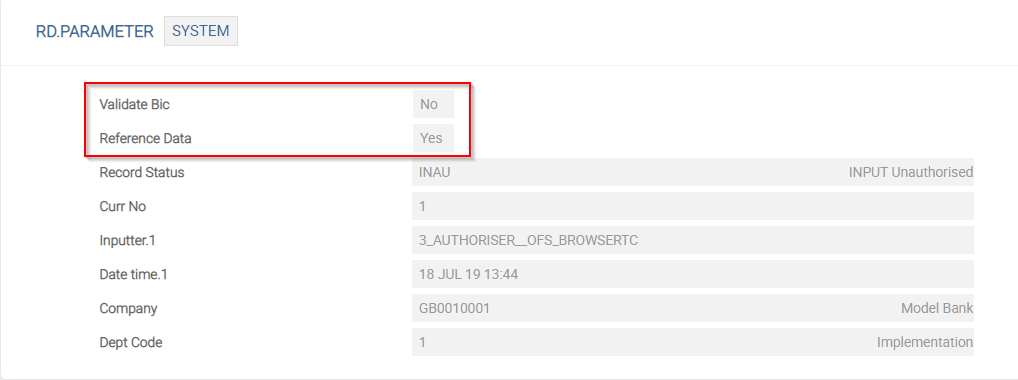
Based on the above setup, the existing BIC APIs refer either to the new centralised bank directory or the legacy BIC directory.
NOTE:
TPH will use the centralised bank directory to refer to BIC and national IDs and therefore is important to have this as the main reference data for other applications as well.
Non-TPH customer, which have local developments that refer directly, DE.BIC can continue to use the legacy directory. Temenos recommends its customers to plan the amendment of the existing local code to refer the BIC reference data through the published APIs to make use of the benefits introduced by the RD module.
Illustrating Model Parameters
This section covers the high-level specifications required for the application.
| S.No. | Parameters | Description |
|---|---|---|
| 1. | RD.PARAMETER
|
This table allows users to get information about the validation of BIC and Reference Data in Central Bank Directory. |
| 2. | RD.BANK.DIR.UPLD.PARAM
|
This screen allows users to upload the files both manually and automatically. |
| 3. | RD.CENTRAL.BANK.DIR
|
This menu allows users to create Central Bank Directory. |
| 4. | RD.CTRY.NAT.SYS.IDENTIFIER
|
This screen allows users to create Country National Identifier. |
| 5. | RD.GPI.UPLD.PARAM
|
GPI Directory Upload Parameter table to parameterise the upload process. |
| 6. | RD.SWIFT.GPI.DIR
|
GPI Directory will be built in Temenos Transact based on the gpi Data File from SWIFT gpi Directory. |
The related parameters available in the Model Bank are listed below:
| S.No. | Parameters | Description |
|---|---|---|
| 1. | IN.IS.LOAD
|
Allows the user to upload the IBAN Structure files of different countries downloaded from the SWIFT directory. |
| 2. | IN.IBAN.PLUS.LOAD
|
Allows the user to upload the IBAN PLUS records from the SWIFTRef IBAN Plus file downloaded or received from the SWIFT directory. |
| 3. | IN.EXCLUSION.LIST.LOAD
|
Allows the user to upload the IBAN PLUS records from the SWIFTRef Exclusion List file downloaded or received from the SWIFT directory. |
| 4. | IN.IS.PARAMETER
|
Allows the user to view the last upload date of IBAN information from the Swift directory. |
Illustrating Model Products
Model products are not applicable for this module.
Add Bookmark
save your best linksView Bookmarks
Visit your best links BACK
BACK


Are you sure you want to log-off?