| Bookmark Name | Actions |
|---|
Introduction
International Banking Account number (IBAN) is an international standard for identifying bank accounts across national borders. It is possible to identify both the country of the bank account and the bank using IBAN.
In Temenos Transact, the IBAN module (IN) –
- Manages the Centralised Reference Data related to IBAN.
- Provides a set of API to access or validate the IBAN-related data against the reference directories, which must be used by all Temenos Business Applications, Country Model Bank layers and local implementations.
Society for Worldwide Interbank Financial Telecommunication (SWIFT) is the formal registrar of IBAN under the current standard ISO 13616-2:2007. The Swift IBAN structure files downloaded from SWIFT are processed and the information is uploaded into relevant tables in Temenos Transact.
The SWIFT regularly releases ‘IBAN Directory Plus’ directory that has the following files:
- The IBAN Structure files – These files contain information related to IBAN formats registered by countries that adopted, or are in the process of adopting IBAN in their payment systems and can be used to validate the format of an IBAN. The file includes information about all SEPA countries as well as non-SEPA countries.
- The IBAN Plus files – These files contain IBAN-related data for financial institutions in SEPA countries and non-SEPA countries that have adopted IBAN and help to derive the BIC from an IBAN.
- The Exclusion List files – These files contain a list of IBAN National IDs that are not allowed in IBANs and can be used to indicate with certainty that the IBAN is not valid. This user guide provides an insight on the setup and usage of IBAN (IN) module. It is relevant to the bank Super-Users and Subject Matter Experts (SMEs) who possess a good knowledge on Retail and Corporate Account Products and Payment Products.
The functional components of the IBAN module supports the following features:
- Generate an IBAN for Temenos Transact accounts.
- Validate a supplied IBAN.
- Return the details of a supplied IBAN.
- Derive BIC code from IBAN.
- Check if IBAN is optional or mandatory for customer payment in a given country.
NOTE:
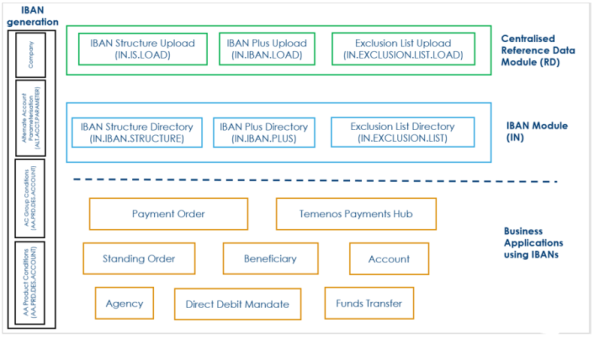
The upload processes for IBAN Structure, IBAN Plus and Exclusion List are part of the Centralised Reference Data module (RD).
The following image shows the Component Structure of IBAN module.
NOTE:
All customers upgrading from an older release to the current and using the IN modules, need to request for the license code for the RD module from their account manager, before starting the upgrade process to enable them to continue using the upload processes for IBAN reference data.
Product Configuration to Generate IBAN
The IBAN module comprises of setup tables and the applications using the IBAN.
The section covers the setup required to generate IBAN for Temenos Transact accounts.
 Parameterising the Bank ID and Branch ID
Iban Bank Id and Iban Branch Id fields in the COMPANY application are used to define the bank identifier and branch identifier for the company and as per the IBAN Structure of the country.
EXAMPLE:
For a Natwest Branch in the UK:
- Iban Bank Id is NWBK for Natwest.
- Iban Branch Id is 601613, that is, branch sort code.
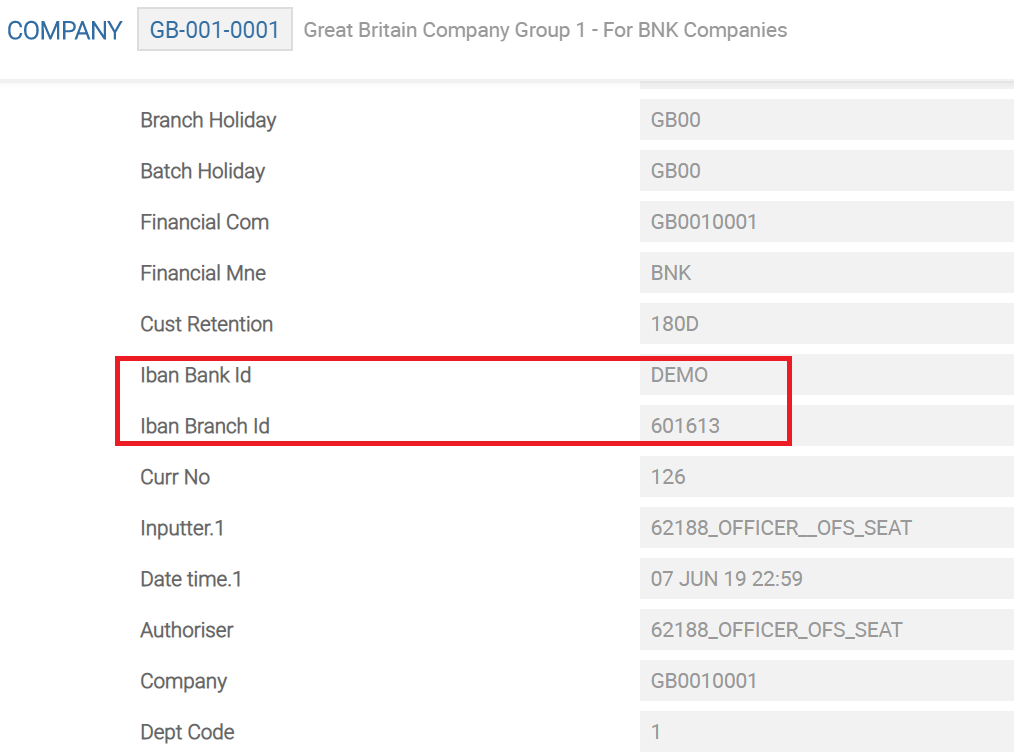
The information from these fields are used for the generation of the IBAN numbers for Temenos Transact accounts for this company.
Enabling IBAN generation
Retail Accounts – AR/AL/AD:
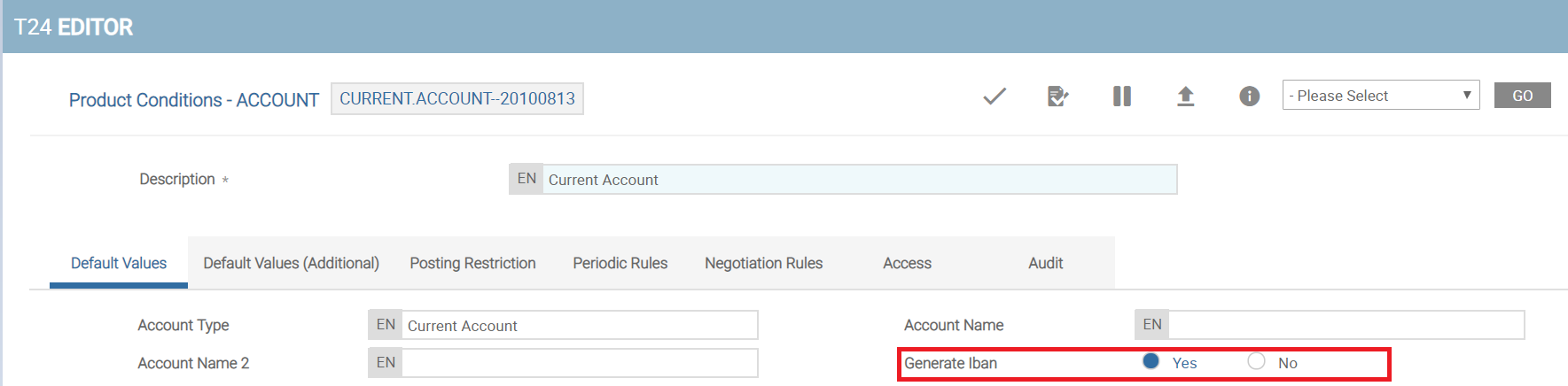
For Retail Accounts (AR), Lending (AL) and Deposit Arrangements (AD), the IBAN generation in Temenos Transact is controlled through the Generate Iban field in AA.PRD.DES.ACCOUNT application.
The Generate Iban field must be set to Yes to generate IBAN for the product.
The simulation process triggers the alternate account number generation, using the appropriate configuration in the COMPANY application and considering the rules defined in the IBAN Structure (IN.IBAN.STRUCTURE) for the country.
The alternate account numbers generated during the simulation process are stored or locked in the ALTERNATE.ACCOUNT table for use in the same simulation until it is converted to an active arrangement contract.
In the event of rejection of the simulation or if the simulation is not materialised into an arrangement contract, the locked alternate account numbers are released during the simulation archival process.
Legacy Accounts (AC):
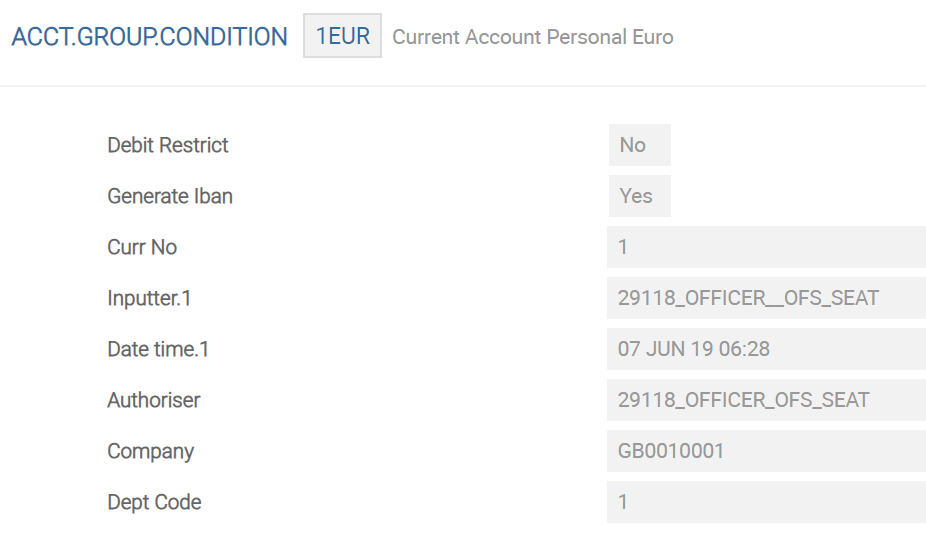
For the legacy account module (AC), it is possible to generate IBANs for group of accounts. This is controlled using the Generate Iban field in the ACCT.GROUP.CONDITION application.
The Generate Iban field must be set to Yes to generate IBAN for the group of accounts.
Customising the generation of the IBAN:
The Alt Acct Gen Api field in the ALT.ACCT.PARAMETER application hooks the client specific API for generating the alternate account number.
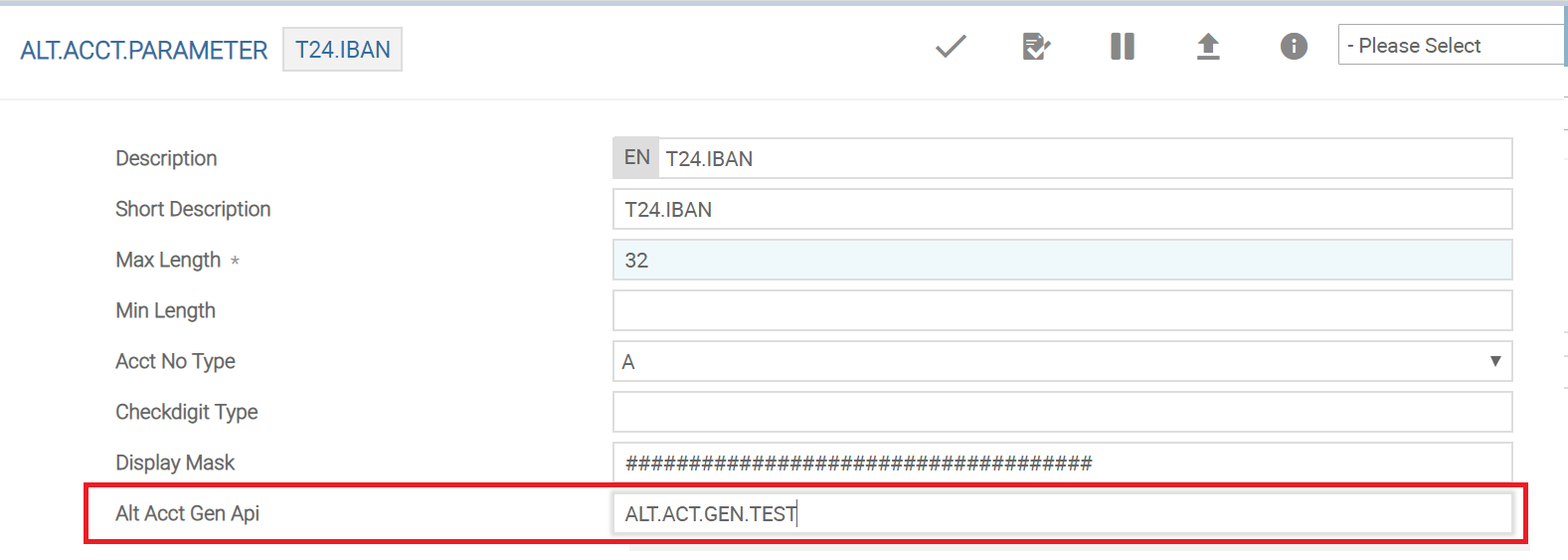
The API, if present, takes precedence during the generation of the alternate account number and therefore, in such a case, the alternate account number generation is done based on the client specific logic. If the API is not present, the IBANs are generated based on the core logic.
Illustrating Model Parameters
The high-level configurations available in the Model Bank are given below:
| S.No. | Parameter | Description |
|---|---|---|
| 1. | IN.IBAN.STRUCTURE
|
Contains the IBAN structure (IS) information downloaded from SWIFT. This parameter holds information such as length of IBAN along with the position identifiers for bank, branch and BIC codes. |
| 2. | IN.IBAN.PLUS
|
Contains the IBAN PLUS data updated from the SWIFT IBAN Plus directory. This parameter holds information such as institution, country, ISO country code, IBAN country code, IBAN BIC, Routing BIC and IBAN National ID. |
| 3. | IN.EXCLUSION.LIST
|
Contains the IBAN PLUS records updated from the SWIFTRef Exclusion directory. |
The related parameters available in the Model Bank are listed below:
| S.No. | Parameter | Description |
|---|---|---|
| 1. | IN.IS.LOAD
|
Contains the IBAN structure (IS) information downloaded from SWIFT. This parameter holds information such as length of IBAN along with the position identifiers for bank, branch and BIC codes. |
| 2. | IN.IBAN.PLUS.LOAD
|
Contains the IBAN PLUS data updated from the SWIFT IBAN Plus directory. This parameter holds information such as institution, country, ISO country code, IBAN country code, IBAN BIC, Routing BIC and IBAN National ID. |
| 3. | IN.EXCLUSION.LIST.LOAD
|
Allows the user to upload the IBAN PLUS records from the SWIFTRef Exclusion List file downloaded or received from the SWIFT directory. |
| 4. | IN.IS.PARAMETER
|
Allows the user to view the last upload date of IBAN information from the Swift directory. |
| 5. | IN.EXCLUSION.LIST
|
The EXCLUSIONLIST file contains the list of IBAN NATIONAL IDs that are not allowed in IBANs. All the IBANs, which consists of IBAN NATIONAL IDs are invalid. This list allows financial institutions to detect invalid IBAN payments before sending them out. |
Illustrating Model Products
Model Products are not applicable for this module.
Add Bookmark
save your best linksView Bookmarks
Visit your best links BACK
BACK


Are you sure you want to log-off?