
| Bookmark Name | Actions |
|---|
Charges
The Charge Property Class is used for all charge type calculations in AA. Its primary purpose is to calculate the amount of a charge.
Product lines
The following Product Lines use the Charge Property Class:
- Accounts
- Agents
- Deposits
- Facility
- Lending
- Rewards
- Safe Deposit Box
Property Class Type
The Charge Property Class uses the following Property Class types:
- Allow Delayed Tracking
- Currency Optional
- Dated
- Enable External
- Enable External Financial
- Forward Dating
- Inheritance
- Multiple
- Tracking
- Variations Supported
Property Type
The Charge Property class is associated with the following Properties that can be user-defined.
- COMMISSION
- CREDIT
- FORWARD.DATED
- INFO
- INHERITANCE.ONLY
- NON CUSTOMER
- PRODUCT.ONLY
- REBATE.UNAMORTISED
- SUSPEND
- VARIATION
 Capitalisation of Credit Charge
The CREDIT option in PROPERTY.TYPE of the AA.PROPERTY is used to raise the credit entry for Bonus Processing and is applicable only for CHARGE Property.
When the user defines CHARGE Property with PAY or CAPITALISE as method in Payment Schedule, either as Activity Charge or Periodic Chargefor bonus payments to their customers (then this CHARGE Property should be defined with PROPERTY.TYPE as CREDIT to raise the Credit entry. The DUE method is not allowed if the Property has been specified as CREDIT in AA.PROPERTY.
Defining future conditions at the arrangement level
The FORWARD.DATED type controls and allows the user to introduce a new definition at the arrangement level, it is dated.
Balance Prefix and Suffix
The Charge Property Class supports the following balance prefix and suffix.
|
Product Line |
Balance Prefix |
Balance Suffix |
|---|---|---|
| Lending | ACCRUED | SUSPEND |
| DUE | SUSPEND | |
| AGED | SUSPEND | |
| DEFERRED | SUSPEND | |
| PAYABLE | ||
| INV | ||
| Deposits | ACCRUED | |
| PAYABLE | ||
| DEFERRED | ||
| DUE | ||
| INV | ||
| Accounts | ACCRUED | SUSPEND |
| DEFERRED | SUSPEND | |
| DUE | SUSPEND | |
| CAPITALISED | SUSPEND | |
| PAYABLE | ||
| INV | ||
| Agent | ACCRUED | |
| DUE | ||
| AGED | ||
| DEFERRED | ||
| PAYABLE | ||
| Rewards | PAYABLE | |
| Safe.Deposit.Box | DUE | |
| DEFERRED | ||
| AGED | ||
| ACCRUED | ||
| INV |
Attributes
The following are the related attributes.
Currency
The Charge Property Class differs from other Currency Specific classes in that it includes the Currency attribute. This defaults to the currency of the record and specifies the currency in which the charge is defined and applied.
Specifying the currency in a separate attribute allows for the following capabilities:
- Charging in a currency different from that of the arrangement (that is, with charges defined in a currency which is different than the record’s currency) For example the product charges may be defined in USD, for arrangements in all currencies, but a different set of charge tariffs may be defined for contracts in different currencies but also in USD. So a GBP contract may attract a charge of 10 USD and a EUR contract may attract a charge of 20 USD.
- Default Currency charging – In this (optional currency) case a currency need not be specified in the ID of the record and the user has to set the currency attribute explicitly. Any arrangement which is in a currency for which a currency specific record has not been defined uses this default record and calculates or applies the charge in the currency specified in the currency attribute.
- The calculated charge should be converted to the arrangement currency at the prevailing mid-rate (stored on the CURRENCY table) when applied.
Charge Type
Charge Type can be further classified as follows:
Fixed Amount Charge
To define a fixed charge amount, user needs to set the value in the Charge Type attribute to FIXED and enter the amount of the charge in Amount. Fixed Amount attribute becomes mandatory when the value is designated as FIXED.
Calculated Charge
For a Calculated charge amount, user needs to set the value in the Charge Type attribute to CALCULATED and define the calculation in the following attributes:
Calculation Threshold
- User can specify that a charge can only be calculated if an amount threshold is surpassed. The threshold amount is of the same base type (that is, Activity Amount, Balance, Activity Count) as the base type for which the charge is being calculated and is defined in Calc Threshold
- Rounding Rule attribute - Allows the user to define the rounding rule for the calculated charge amount. The rule can be, round the charge amount either upwards or downwards or natural. Has to be a valid record in EB.ROUNDING.RULE.
Free Amount
- An amount which is deducted from the total calculated charge subject to any minimum and maximum which may be specified is defined in Free Amount.
- Handoff Charge attribute – Possible values are
- YES - system hands over the charge amount to settlement account
- NO or NULL continues the existing flow.
Single or Multiple Tiers
The Tier Groups attribute allows for either a single charge calculation (select NONE) or for the definition of multiple tiers of charge calculations (select BAND or LEVEL)
- Level - a product can be defined which can calculate a charge differently depending on the amount level. A single charge calculation can be selected and applied based upon the amount.
- An example using the following tiers:
Tier Level Charge (in percentage) 10,000 1 20,000 0.75 Above 20,000 0.50 - A base value of 5,000 attracts a charge of 1 percentage of 5,000 = 50.00
- A base value of 15,000 attracts a charge of .75 percentage of 15,000 = 112.50
- A base value of 25,000 attracts a charge of .5 percentage of 25,000 = 125.00
- Band - It results in a blended charge calculation. This is similar to Level tiers, but allows for the charge calculation of each tier to be applied to the portion of the amount that falls within the tier.
- An example using same tiers as above:
| Tier Level | Charge ( in percentage) |
|---|---|
| 10,000 | 1 |
| 20,000 | 0.75 |
| Above 20,000 | 0.50 |
- A base value of 15,000 attracts a charge of 1 percentage of 10,000 = 100.00
- A base value of 5,000 attracts a charge of 1 percentage of 5,000 = 50.00
- Plus .75 percentage of 5,000 = 37.5
- Total of = 137.5
- A base value of 25,000 attracts a charge of 1percentage of 10,000 = 100.00
- Plus .75 percentage of 10,000 = 75.00
- Plus .5 percentage of 5,000 = 25.00
- Total of = 225.00
- Tier Groups (Bands and Levels) – it is possible to define complex tiers which are mixed groups of Bands and Levels.
- Any number of tier groups is possible. User can define these groups by using a combination of Tier Group and Calc Tier Type. Each Tier Group is treated as a high level tier, if the Tier Group is level, only the detail in Calc Tier Type from the tier group in which the base value falls can be used in the calculation. If the Tier Group is band, the detail from all tier groups that cover the base value is used in the calculation..
- The value of the tiers defined in Tier Amount within each tier group should increase, only the final tier in the final tier group should specify the remainder calculation detail.
Example
Tier Group 1
| Tier Type | Tier Level | Charge (in percentage) |
|---|---|---|
| LEVEL | 10,000 | 1 |
| LEVEL | 20,000 | .75 |
Tier Group 2
| Tier Type | Tier Level | Charge ( in percentage) |
|---|---|---|
| BAND | 30,000 | .25 |
| BAND | 40,000 | .20 |
| BAND | Above 40,000 | .15 |
When the Tier Group structure is LEVEL:
- A base value of 15,000 results in a charge of .75 percentage of 15,000 = 112.50
- A base value of 25,000 results in a charge of .25 percentage of 25,000 = 62.50
- A base value of 50,000 results in a charge of .25 percentage of 30,000 = 75.00
- Plus .20 percentage of 10,000 = 20.00
- Plus .15 percentage of 10,000 = 15.00
- Total = 110.00
When the Tier Group structure is BAND:
- A base value of 15,000 results in a charge of .75 percentage of 15,000 = 112.50
- A base value of 25,000 results in a charge of .75 percentage of 20,000 = 150.00
- Plus .25 percentage of 5,000 = 12.50
- Total = 162.50
- A base value of 50,000 results in a charge of .75 percentage of 20,000 = 150.00
- Plus .25 percentage of 10,000 = 25.00
- Plus .20 percentage of 10,000 = 20.00
- Plus .15 percentage of 10,000 = 15.00
- Total = 210.00
Calculation Type and Charge
Temenos Transact supports the following three calculation types defined in Calc Type for each tier defined.
- Flat Charge – the user specifies an amount that is charged for the tier. This type of charge is only applicable for ‘Level’ tiers.
- Percentage Charge – a percentage of the base value can be calculated.
- Unit Charge – the base value is multiplied by the number of units.
The charge amount entered is expressed either as a flat amount, a percentage, or an amount per unit.
Related attributes are:
- Default Values (Calculation)>Tier Type>Calc Type
- Default Values (Calculation)>Tier Type>Charge>Rate
- Default Values (Calculation)>Tier Type>Charge>Amount
Minimums and Maximums
Charge minimums and maximums can be specified in two ways:
- Tier Level – the user can specify a minimum and/or maximum charge amount for each tier defined. These rates are defined in Tier Min Charge and Tier Max Charge.
- Overall – the user can specify overall minimum and/or maximum charges through the user of two Periodic Attributes. EB.ROUNDING.RULE to override the currency specified method.
Related Attributes are:
- Default Values (Calculation)>Tier Type>Tier>Min Charge
- Default Values (Calculation)>Tier Type>Tier>Max Charge
Tiered Charges
- Tier Amount attribute : allows the user to define the threshold amount for each tier. If more than one tier is defined then values in this attribute have to be in ascending order. This attribute is mandatory except for the last tier.
- Tier Count attribute: When charges are to be calculated based on activity count, this attribute acts as threshold for the number of times an activity is performed. Calculation based on Tier Count is linked to definition in AA.SOURCE.CALC.TYPE file. If the source balance for a charge is linked to a record in AA.SOURCE.CALC.TYPE which has the definition Source Type set to ACTIVITY and Calc Type set to COUNT, then those charges are eligible to be calculated based on activity count.
- Validation Rules
- It is possible to specify either Tier Amount or Tier Count. Both cannot be specified simultaneously.
- Tier Count should be defined in ascending order.
- Last multi value of Tier Count should be blank.
- Tier Exclusive attribute - When this is set to YES, Tier Amount or Count or Term is reduced to its next least number for calculation of Tier Amount.
- Tier Term attribute - This is allowed (set as YES) only for limit managed by AA.(For Example, Accounts Product Line)
- Refer limit can be set only for level tier type, when Refer Limit is set as YES:
- If the transaction amount is less than the limit amount then charge amount specified in the level1 is collected.
- If the transaction amount is greater than the limit amount then the charge amount specified in the level2 is collected.
- Refer limit can be set only for level tier type, when Refer Limit is set as YES:
Default Controls
- Refer Limit attribute - allows the user to designate a value as Day, Week, Month, or Year. The last value in the multi-value set must be null and values should be in ascending order in the multi-value set.
- Min Chg Amount attribute - allows the user to define the minimum charge amount that is compared to the system calculated charge amount. If the charge calculated is less than the minimum amount set, then based on the waive setup attribute, either the minimum charge amount is applied or waived.
- Min Chg Waive attribute - Minimum charge waive depends on the Min Chg Amount attribute value.
- If minimum charge waive is set as YES, then if charge amount is less than minimum charge amount, charge is waived.
- If minimum charge waive is not set then if charge amount is less than minimum charge amount then min charge amount is collected as charge.
- Cancel Period attribute - allows the user to define a period of days within which you can cancel the charge. Value in this attribute is considered as calendar days.
- Accrual Rule attribute - accepts only a valid record from EB.ACCRUAL.PARAM. Determines the amortization start and end dates while creating EB.ACCRUAL record. Input is allowed only when the charge is set to amortize.
- Internal Booking attribute – Income or expense is posted to internal account category specified in accounting condition instead of PL categories.
Charge Adjustments
- Adjust Type attribute - allows the user to specify the type of adjustment being done on charge amount. Allowed values are:
- Adjust – Adjusting the final charge amount.
- Override – Overriding the final charge amount with a different amount.
- Waive – Waiving the charge altogether.
- Adjust Amount attribute - allows the user to specify the discount or mark up amount that need to be applied to the calculated charge amount.
- For example, for a debit charge, if the calculated charge amount is $100 and discount amount is specified as $25 then the final charge amount is $75 i.e. $100 - $25. For a credit charge, the final amount is $125.
- Validation Rules
- Allowed input only when Adjust Type is ADJUST.
- Mutually exclusive with Adjust Percentage.
- If the amount specified is greater than the calculated charge amount, then the entire charge is discounted.
- Adjust Percentage attribute - allows the user to specify the percentage by which the calculated charge amount is to be reduced or increased.
- Validation Rules
- Allowed input only when Adjust Type is ADJUST.
- Mutually exclusive with Adjust Amount.
- Validation Rules
- Adjust Reason attribute- allows the user to specify the reason for adjustment. Must be a valid record from the AA.ADJUSTMENT.REASON virtual table.
- Adjust Expiry Date attribute - allows the user to specify the date on which any discretionary user adjustment is no longer applied, and the arrangement resumes its standard charge processing. This is a relative date, allowing to the user to an expiry such as R_START + 2Y.
Routines
The routines can be further classified as follows:
Charge Routine
- Certain types of charging are more complex than the options available. In such case, a user-defined routine can be specified to determine the charge amount.
- AA.LOCAL.CALC.CHARGE.AMOUNT routine is attached to the Charge Routine attribute to calculate the charge amount for early redemption activity. This attribute is optional and should be a valid record in EB.API.
- This API can be enhanced with different calculation methods as per the requirement of the customer. The sample calculation method to apply charge is calculated as below. Interest is calculated on the amount being withdrawn for the current period and the interest amount is levied as charge amount.
- Sample calculation method:
- Principal Amount – 10000
- Interest Period Start date - 1st June 2010
- Interest Period End date - 15th June 2010
- Current Date - 10th June 2010
- Withdrawal Amount – 4000
- Day basis – E
- Interest Rate - 6%
- Charge Amount = (4000 * 10 * 6%) / 365 = 5.47
- In this case tolerance is set in Activity Restriction then charge is calculated on base amount and not on withdrawal amount. Base amount in this case is the difference of the withdrawal amount and the tolerance percentage.
- Assuming a rule break charge with 15% tolerance for repayment is set, the base amount becomes the difference of (REPAYMENT.AMOUNT - TOLERANCE % AMOUNT) which is (4000-1500) = 2500. In our example, interest can be calculated on the base amount of 2500.
- Tolerance can be set in Activity Restriction.
- Related attribute Default Values (Calculation)>Adjustment Routine
Adjustment Routine
- This attribute enables the user to define a routine to apply adjustment logics on a calculated or fixed charge amount as required by the user. This is an optional attribute and must be a valid record in EB.API.
- New charge amount returned by this routine is considered as the final charge amount.
- The routine attached in this attribute is triggered for all charge calculation and thus if charge adjustment has to happen for specific activities, specific charge type, specific activity date then logic has to be written for those cases based on the incoming values.
- This API is invoked for New Arrangement, Issue Bill, Makedue, and Capitalise Activities for Accrual type of charge and hence the API needs to address it as such.
- If adjustment has to happen at the time of scheduled capitalisation then API should have logic to adjust the charge amount for Issuebill and Capitalise Activities.
- If it returns 0 in the NEW.CHARGE.AMOUNT when calculated during an issue bill, then it results in the bill not being raised at all.
Other Features
Memo Charge
- Where the account has been set as a Memo Account (BALANCE.TREATMENT in ACCOUNT property set to MEMO), any Charge Property in the account is treated as a Memo Charge.
- Accrual or Amortization is not be supported for these types of charges.
- It is still possible to specify capitalization or make due frequencies for such Interest.
- During Make Due processing, it triggers the settlement of such Memo charge between the settlement account and a counter booking account (please see Settlement Property class for more details)
Suspension with Capitalisation
It is possible to allow arrangement to be suspended even if interest is being capitalised. This can be achieved with the PROPERTY.TYPE>SUSPEND.
AA.CHARGE.DETAILS
- This is a central file used to maintain activity or rule based charge details for an arrangement. This file has two purposes.
- Maintains history of charges applied for an arrangement.
- Gives information needed for the system to raise charge bills.
Invoicing Charges that cannot be Captialised due to insufficient funds
- During Charge Capitalisation, if the account has insufficient funds to capitalise the charge, the pending amount is invoiced to the customer. System retries the invoiced charge automatically at regular intervals using Transaction Cycler facility
- Alt Payment Method attribute in AA Payment Type is set as CAP AND INV. This indicates that bill amount has to capitalised for the funds (based on settlement rules) and invoiced for the unrealised balance.
- For Activity Charge, Scheduled Charge, Rule Break Charge when charge is set to Capitalise and Payment Type indicates Alt Payment Method attribute as CAP AND INV, the pending amount for settlement after capitalisation is invoiced to the customer.
- Settlement Condition can be set as Full, Partial or None to indicate if account is fully debited irrespective of the balance available, partially debited for the available amount or not debited at all when full funds are not available respectively. The pending charge amount, which is invoiced, is moved to INV<CHARGE>
- Recycling conditions can be set to retry capitalising the invoiced charges using Rc Type and Rc Condition in Settlement Condition.
Invoicing Failed Charge Capitalisation
- Before we do the proof and publish for that product, user needs to ensure the allocation rule is configured for the below events
- Following is the list of events released from core.
| Event Name | Mvmt Target |
Opp Target |
|---|---|---|
| CHARGE-CAPITALISE-DUE-INV.WAIVE.AMORT | TXN | TXN |
| CHARGE-CAPITALISE-DUE-INV.ACCRUE | TXN | TXN |
| CHARGE-CAPITALISE-DUE-INV.AMORT | TXN | TXN |
| CHARGE-CAPITALISE-DUE-INV | TXN | TXN |
| CHARGE-CAPITALISE-DUE-INV.WAIVE | TXN | TXN |
| CHARGE-CAPITALISE-DUE-INV.DR.DUE | TXN | TXN |
| CHARGE-CAPITALISE-DUE-INV.CR.PL | TXN | TXN |
| CHARGE-ACT.CAPITALISE-DUE-INV.CR.CUR | TXN | TXN |
| CHARGE-ACT.CAPITALISE-DUE-INV.DR.CUR | TXN | TXN |
| CHARGE-ACT.CAPITALISE-DUE-INV.CR.PL | TXN | TXN |
| CHARGE-ACT.CAPITALISE-DUE-INV | TXN | TXN |
| CHARGE-ACT.CAPITALISE-DUE-INV.AMORT | TXN | TXN |
| CHARGE-ACT.CAPITALISE-DUE-INV.WAIVE | TXN | TXN |
| CHARGE-ACT.CAPITALISE-DUE-INV.DR.PL | TXN | TXN |
| CHARGE-ADJUST.BILL-DUE-INV.DEF.OS.ADJ | TXN | TXN |
| CHARGE-ADJUST.BILL-DUE-INV.OS.ADJ | TXN | INT*U-AACAPTURE |
| CHARGE-ADJUST.BILL-DUE-INV.OS.WOF | TXN | INT*U-AAWOF |
| CHARGE-CAPTURE.BILL-DUE-INV | TXN | INT*U-AACAPTURE |
| CHARGE-CAPTURE.BILL-DUE-INV.AMORT | TXN | TXN |
| CHARGE-ADJUST.BILL-DUE-INV.OS.ADJ.SP | TXN | INT*U-AACAPTURE |
| CHARGE-ADJUST.BILL-DUE-INV.OS.WOF.SP | TXN | INT*U-AAWOF |
| CHARGE-CAPTURE.BILL-DUE-INV.SP | TXN | INT*U-AACAPTURE |
| CHARGE-ADJUST.BILL-DUE-INV.OS.TOL.WOF | TXN | INT*U-AAWOF |
| CHARGE-ADJUST.BILL-DUE-INV.OS.TOL.WOF.SP | TXN | INT*U-AAWOF |
| CHARGE-REPAY-DUE-INV.ACC | TXN | TXN |
| CHARGE-REPAY-DUE-INV | TXN | INT*SUSPENSE |
| CHARGE-REPAY-DUE-INV.OS | TXN | TXN |
| TAX-CAPITALISE-DUE-INV.NET | TXN | TXN |
| TAX-CAPITALISE-DUE-INV.ADJ.DUE | TXN | TXN |
| TAX-CAPITALISE-DUE-INV.ADJ.NET | TXN | TXN |
| TAX-CAPITALISE-DUE-INV | TXN | TXN |
| TAX-REPAY-DUE-INV.OS | TXN | TXN |
| TAX-REPAY-DUE-INV.ACC | TXN | |
| PERIODIC.CHARGES-CAPITALISE-DUE-INV.CR.PL | TXN | TXN |
| PERIODIC.CHARGES-CAPITALISE-DUE-INV | TXN | TXN |
| PERIODIC.CHARGES-CAPITALISE-DUE-INV.DR.CUR | TXN | TXN |
| PERIODIC.CHARGES-CAPITALISE-DUE-INV.AMORT | TXN | TXN |
| PERIODIC.CHARGES-ADJUST.BILL-DUE-INV.OS.ADJ | TXN | INT*U-AACAPTURE |
| PERIODIC.CHARGES-ADJUST.BILL-DUE-INV.OS.ADJ.SP | TXN | INT*U-AACAPTURE |
| PERIODIC.CHARGES-ADJUST.BILL-DUE-INV.OS.WOF | TXN | INT*U-AACAPTURE |
| PERIODIC.CHARGES-ADJUST.BILL-DUE-INV.OS.WOF.SP | TXN | INT*U-AAWOF |
| PERIODIC.CHARGES-REPAY-DUE-INV.OS | TXN | TXN |
Overdue Processing of CAP.AND.INV
- CAP.AND.INV is allowed for aging similar to other DUE Bills.
- When an Arrangement is suspended then balances are moved to INVSP.
- Balances are cleared as part of RESUME INVSP.
NOTE:
- INV type is not allowed in Current option in payment rules we have an option called CURRENT in APPL.TYPE.
- SPEC entry is raised for INV Charge.
- As a part of WRITE.OFF.BILL, WRITE.OFF system clears INV balance.
- Adjust balance is not allowed for INV as its belongs to bill balances
- Settlement Account is not mandatory only for RC to be set when CAP.AND.INV option is chosen.
Non Customer Facing Charges
The AA application allows the user to calculate, apply and amortize charges which are settled by or to the customer. The Non Customer Facing Charge(NCFC) functionality allows the user to raise internal or non-customer facing charges at contract or arrangement level. However, these NCFC need to be amortised.
To define a fee or cost as a NCFC property, the charge Property Type should be set as NON CUSTOMER.
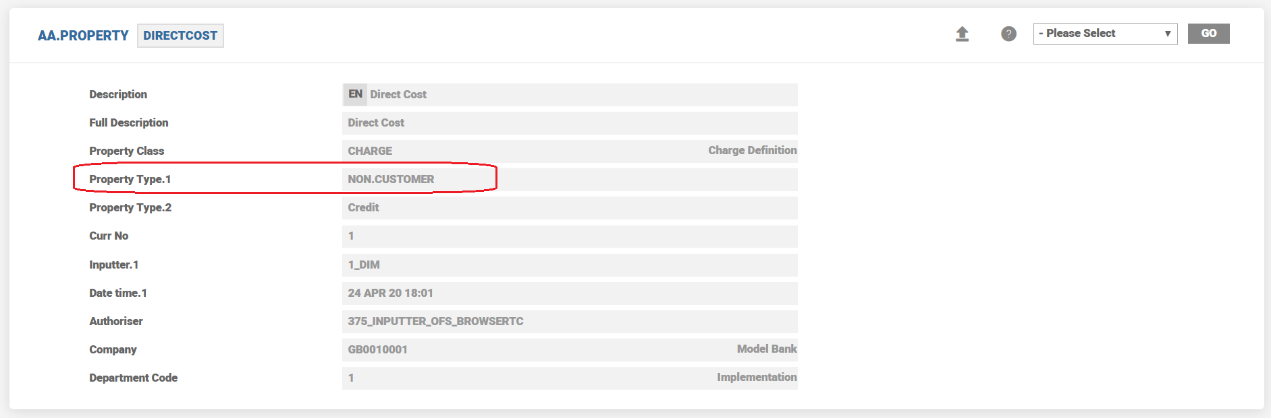
- As NCFC are internal to the bank,
- They cannot be set to capitalise or deferred.
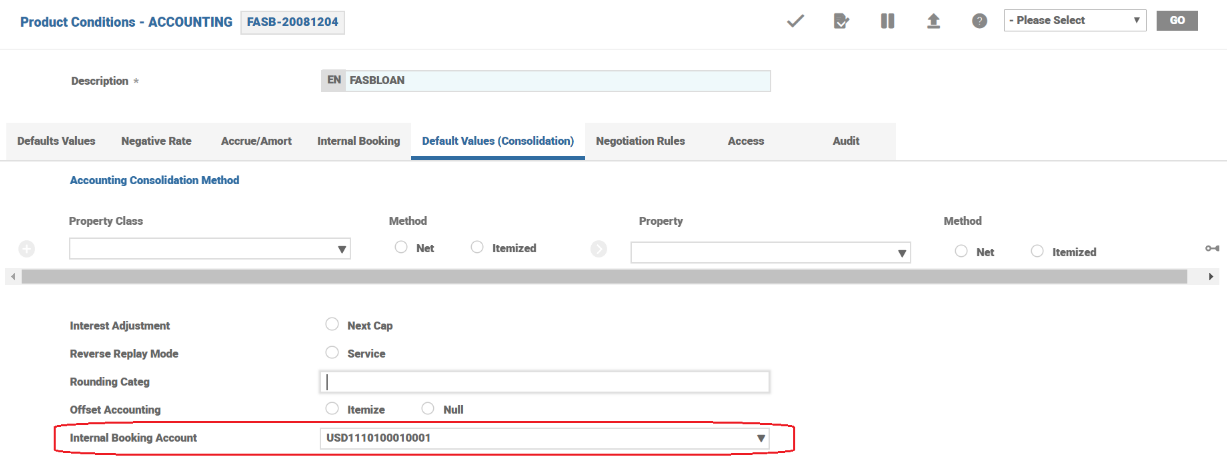
- An internal account or internal PL accounting head needs to be specified in the Accounting condition of the product.
- The type of bill raised is, Internal
- NCFC can be either made due or set as payable.
- The Internal Booking Account attribute allows the user to define the Internal Account/Account Class/PL category against which the due/pay type NCFC need to be settled. This step is mandatory if the product involves a NCFC property.
NOTE: The following are the limitations
- NCFC can be setup only through Activity Charge and Payment Schedule framework.
- NCFC is not permitted through Activity Restriction or Periodic Charge Property Classes.
- NCFC needs to account for only through amortisation route.
- Accrue option or immediate realisation to the PL is not possible.
Example
A loan is created and fully disbursed. There are two customer facing and three non customer facing charges associated with the loan product and linked to the disbursement activity.
In the arrangement overview, the NCFC are showcased separately. The user can modify the composite screen to hide this overview if necessary.
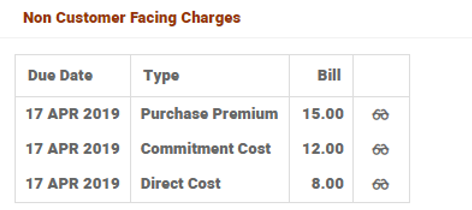
- For NCFC, the bills generated are of the type Internal.
- Account balance is impacted only by the customer facing charges which are capitalised. There is no impact due on account balance due to NCFC.
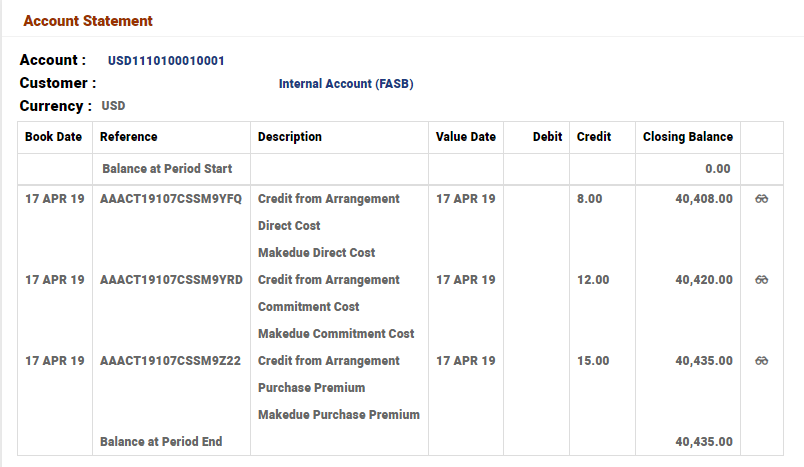
- NCFC are settled from the internal booking account. The statement of the internal booking account is shown below.

Rebates Processing
A rebate is the ability to create and credit the customer a payable charge. This rebate (as a credit to the customer) could happen at the point of arrangement creation or during the life of the arrangement.
Rebate could be paid out to the customer by using PAYOUT.RULES Property.
For credit charges (rebates), PROPERTY.TYPE is kept as Credit in AA.PROPERTY. This indicates that this property is a payable charge to the customer and not a due charge from the customer.
As it is possible to credit the charge or rebate to the customer, PAY balance type is available for Loan Products.
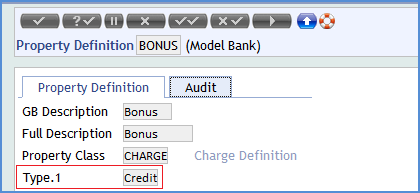
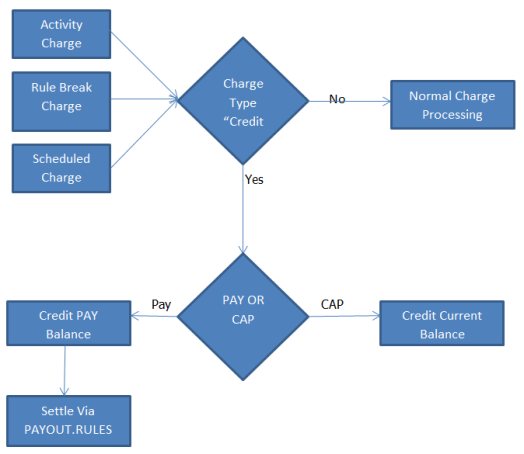
Once this is set, a bank could calculate the credit charge in the same way as a debit charge. It could be configured as follows:
- As an Activity Charge, credit is to be given when a certain activity occurs.
- In Payment Schedule, on a pre-defined frequency or on a certain date.
- Using Rules defined in Activity Restriction.
Rebates could be applied to the customer with the following options:
- Capitalised – In this method, the amount is credited to customer's current balance and thus reducing the outstanding amount.
- Pay (Made Due) – In this method, the amount is credited to a pay balance that could be settled either automatically or manually.
- Deferred – In this method, the activity is deferred to a later stage and eventually made due or capitalized from the payment.
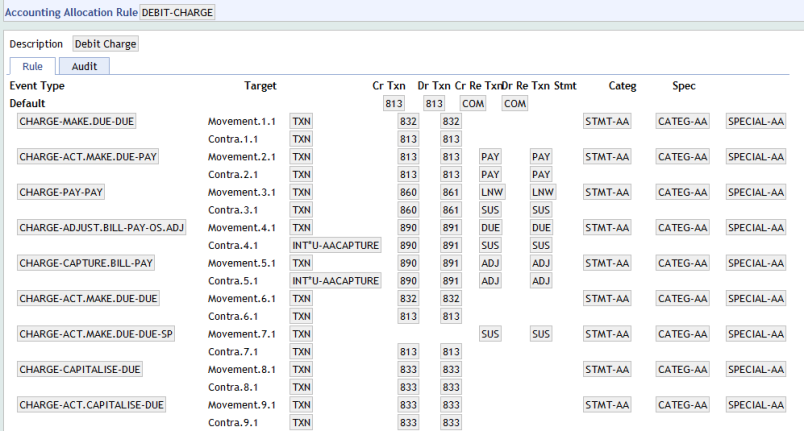
- The following accounting events are added to the existing allocation rules used for charges and settlement in Loan products.
- CHARGE-ACT.MAKE.DUE-PAY
- CHARGE-ACT.CAPITALISE-DUE
- CHARGE-PAY-PAY
- CHARGE-ADJUST.BILL-PAY-OS.ADJ
- CHARGE-CAPTURE.BILL-PAY
- SETTLEMENT-SETTLE-PAY

SETTLEMENT-SETTLE-PAY in LOAN-SETTLE
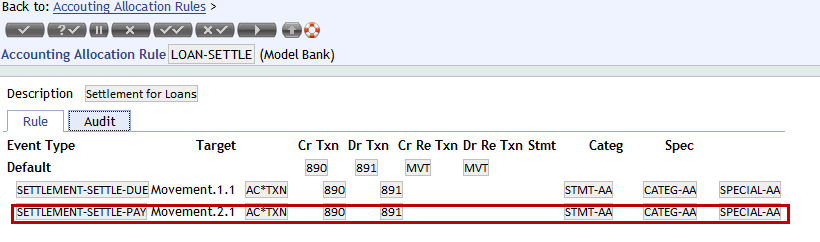
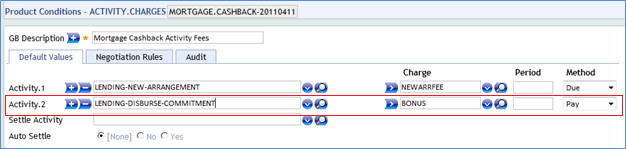
Activity Charges Property class:
Activity Charges defines the charges that needs to be applied when an activity is triggered on the arrangement. The event which has to trigger the rebate charge can be defined at the product level. On triggering this event, the rebate is credited to the customer.
Payout Property Class
Rebate could be paid to the customer by using Payout Rules definition. In the following screenshot, LENDING.PAYOUT Payout Rules record for lending is illustrated.
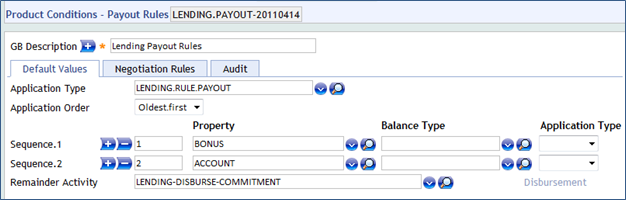
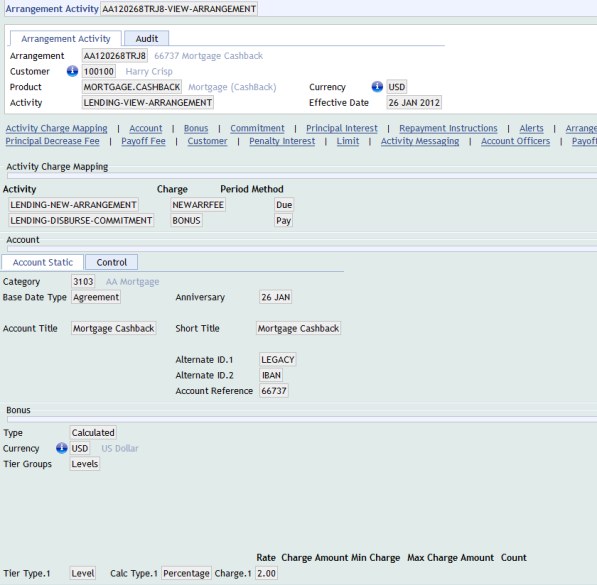
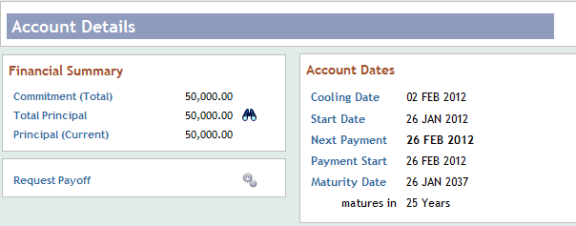
In this illustration, an arrangement is created with rebate facility. View the Arrangement created for USD 50000 with values set in Settlement Instructions for Payout Account


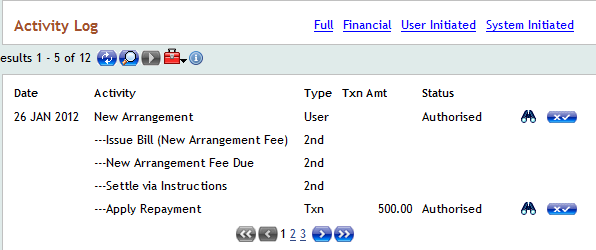
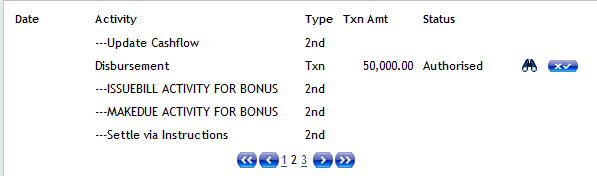
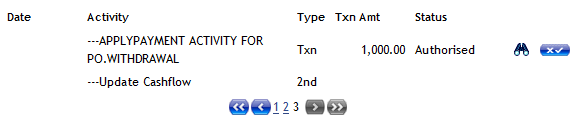
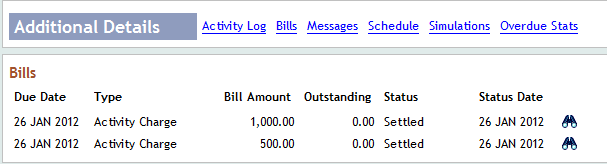
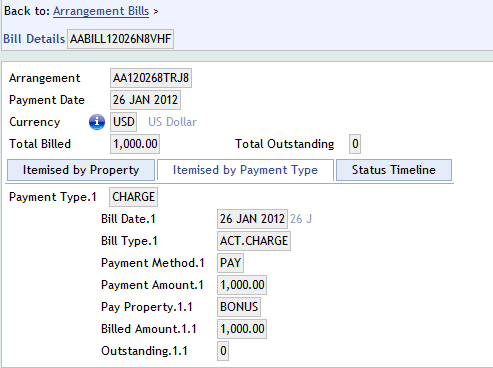
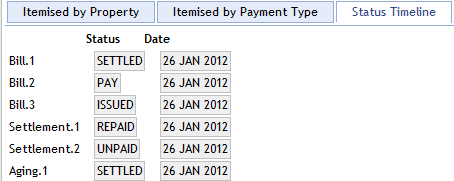
The illustration below displays the activity log and bill generated for Rebate(Pay Charges) in Bill Details.
Bill Details
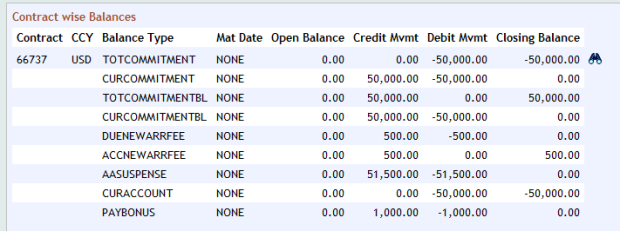
Contract wise Balances of the arrangement showing the Pay balances (Rebates)
Amortisation of Charges
Amortisation is available for charges and rebates to realize PL from charge over a period.
During charge-make-due or capitalise, the payable charge details is passed to AA.ACCRUAL.DETAILS.HANDOFF routine such that it updates EB.ACCRUAL record with negative sign for pay charge.
Amortization of Rebate (Pay charge)
- During charge-make-due or capitalise, the payable charge details are passed to AA.ACCRUAL.DETAILS.HANDOFF routine such that it updates EB.ACCRUAL record with negative sign for pay charge.
- Accounting entry generated is as follows
- During due activity
- Dr ACC<CHARGE>
- Cr PAY<CHARGE>
- During capitalise activity
- Dr ACC<CHARGE>
- Cr CUR<CHARGE>
- During due activity
The ACC balance is amortized by the core accounting during COB.
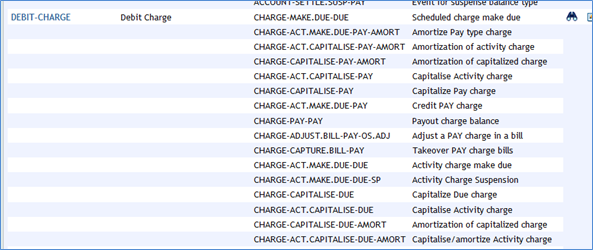
To support rebate amortisation, the following AC.EVENT record is created and attached to the AC.ALLOCATION.RULE for charges.
- CHARGE-MAKE.DUE-PAY-AMORT
- CHARGE-ACT.MAKE.DUE-PAY-AMORT
- CHARGE-ACT.CAPITALISE-PAY-AMORT
- CHARGE-CAPITALISE-PAY-AMORT
- CHARGE-ACT.CAPITALISE -PAY
- CHARGE-CAPITALISE-PAY
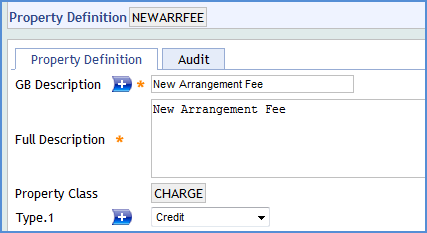
Property Type field is set as CREDIT for NEWARRFEE charge property to support rebate processing.
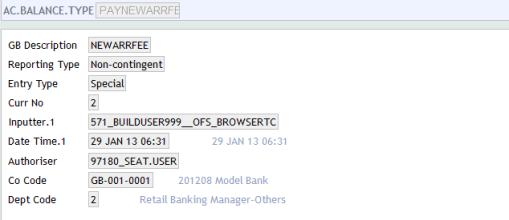
View the AC Balance Type. PAYNEWARRFEE (Payable Charge) created for NEWARRFEE Charge Property
Accounting Property class
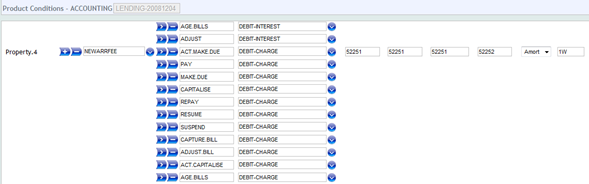
The Accounting Property Class defines the links between external transactions and the action(s) to be performed on an arrangement. The PAY action has been defined under the DEBIT.CHARGE Allocation Rule and the Amortization period is set. The Accrue field is set as AMORT and Amort Period as 1W for NEWARRFEE Charge Property.
Reporting Property Class
The Reporting Property Class is used for reporting definition in IFRS. This primarily controls the IFRS cash flows applicable for the arrangement. This Property is added to the product in order to generate the EB.CASHFLOW record.
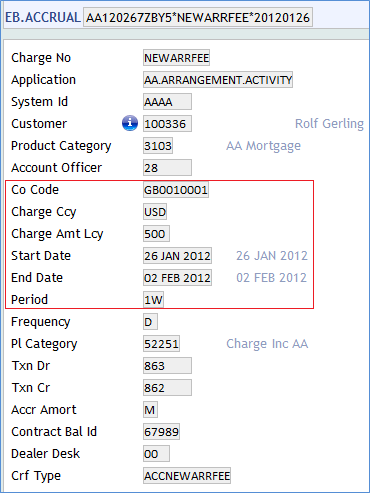
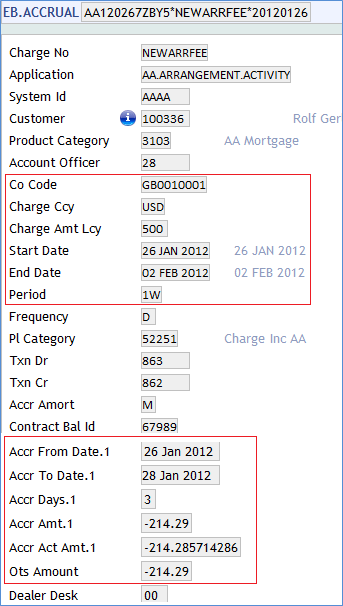
Once an arrangement has been created an EB.ACCRUAL record is created as per definition set for the amortisation process. Each record shows certain information like the daily accrual to date and the start and end date of accrual.
View the EB.ACCRUAL record after COB Process.
Periodic Attribute Classes
The Charge Property Class provides the following Periodic Attribute Classes from which users may define Periodic Attributes.
- MAXIMUM.CHARGE
- MINIMUM.CHARGE
Actions
Individual AA.PROPERTY.CLASS.ACTION records control which Product Line it is associated to. The CHARGE Property supports the following actions:
| Action Name | Description |
|---|---|
| ACCRUE | The ACCRUE action can be initiated by the system or manually as part of the ACCRUE-INTEREST activity. This results in calculation of the accrued interest amount to the requested effective date and generation of accounting entries. |
| ACT.CAPITALISE | To pass the required accounting entries information during capitalise for the payable charges by passing the information to handoff routine. |
| ACT.MAKE.DUE | To pass the required accounting entries information during make-due for the payable charges by passing the information to handoff routine. |
| ADJUST | To adjust the applicable charges - type attribute, amount attribute, percentage attribute, reason attribute, expiry date attribute. |
| ADJUST.BILL | Used to adjust the bills for the applicable charges. |
| ADJUST.INFO.BILL | Used to adjust the bills for the applicable charges. |
| AGE.BILLS | Used to age the applicable charges that are overdue. |
| ALLOCATE | It updates the bills when the underlying activity is triggered. Based on the charge amount the outstanding bill amounts and status would be updated. |
| ALTERNATE | The accrual is suppressed for the Property for which it is set and the accrual happens for the alternate property which is set in Activity Restriction. |
| APPLY.PAY | The charge amount is credited to a pay balance that could be settled either automatically or manually. |
| BILL.UPDATE | To update the bill with the relevant info on the applicable charges. |
| CANCEL | This action routine deletes the Charge Bill reference from AA.BILL.DETAILS and AA.ACCOUNT.DETAILS. This can be triggered as a scheduled Activity or user-defined Activity. |
| CAPITALISE | This can be initiated by the system. This results in calculation of the accrued charges to requested effective date and generation of accounting entries. |
| CAPTURE.BILL | Used to capture the Charges details on the bills. |
| CHANGE | The CHANGE activity is initiated manually by the user in order to change any of the CHARGE attributes. As a result a recalculation of the Payment Schedule may be performed. |
| CHARGEOFF | Chargeoff action for Charge Property. |
| CHECK.SETTLE | Check settle action for Charge Property. |
| CREDIT | This applies the unallocated amount from a credit to the arrangement to the unallocated credit balance of the arrangement |
| DATA.CAPTURE | Used in capturing the details while migrating from Legacy to AA. |
| DEBIT | This applies the unallocated amount from a debit to the arrangement to the unallocated debit balance of the arrangement. |
| DEFER.CAPITALISE | To defer the capitalisation of the payable charges from being passed to the Handoff routine. |
| DEFER.MAKEDUE | To defer the charge-make-due from being passed to the Handoff routine. |
| HANDOFF.ISSUE.BILL | Action to issue the bills to the financial arrangement based on the handoff. |
| ISSUE.BILL | Riases the interest component of the bill based on the accured interest and other applicable factors. |
| MAKE.DUE | This applies the amount of interest due to be repaid to the DUE interest property. The amount to be made due is determined from the associated BILL that is being made due. |
| MOVE.BALANCE | Action routine to move the PAY charge balance to an internal account. |
| PAY | To apply the rebate the amount is credited to a pay balance that could be settled either automatically or manually. |
| PAYOFF.CAPITALISE | To capitalise the charges payoff. |
| REBATE | To create and credit the customer a payable charge. This rebate (as a credit to the customer) could happen at the point of arrangement creation or during the life of the arrangement. |
| REPAY | This allocates the amount of interest to be repaid to the appropriate account balance. Depending on the PAYMENT.RULE applied the interest is made against billed or current amounts. |
| RESUME | To re-instate the arrangement and continue with the charge capitalisation. Balances are cleared as part of RESUME INVSP. |
| SUSPEND | It allows arrangement to be suspended even if charge is being capitalised. When an Arrangement is suspended then balances are moved to INVSP. |
| UPDATE | This is initiated manually and allows the User to change any of the INTEREST attributes. This action is initiated as part of the NEW-ARRANGEMENT and UPDATE- INTEREST activities. |
Accounting Events
The following actions generate Accounting events as defined in Accounting attribute.
- ACT.CAPITALISE
- ACT.MAKE.DUE
- ADJUST.BILL
- ADJUST.INFO.BILL
- AGE.BILLS
- CAPITALISE
- CAPTURE.BILL
- CREDIT
- DEBIT
- DEFER.CAPITALISE
- DEFER.MAKEDUE
- MAKE.DUE
- PAY
- PAYOFF.CAPITALISE
- REPAY
- RESUME
- SUSPEND
Limits Interaction
The feature of linking arrangement to LIMIT, for calculation of charge, is available for arrangements under the Accounts Product Line. It can be achieved by setting the Refer Limit attribute in the CHARGE Property Condition to YES. Charges are calculated according to the setup made in the tiers defined, considering the LIMIT amount. This functionality can be enabled only if the LIMIT is managed by AA.
Add Bookmark
save your best linksView Bookmarks
Visit your best links BACK
BACK


Are you sure you want to log-off?