| Bookmark Name | Actions |
|---|
Working with Interest Capitalisation
This section covers the Interest Capitalisation for specific and groups of accounts, account interim capitalisation and value date of interest capitalisation.
Interest Capitalisation for Group of Accounts
GROUP.CAPITALISATION application specifies the next date and subsequent frequency of application of debit and credit interest, for a group of accounts.
The following screenshot shows the GROUP.CAPITALISATION application.
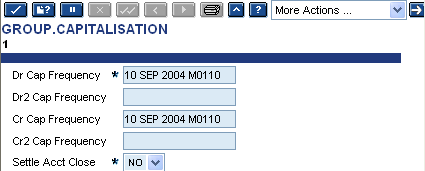
Interest can be applied on any day of the month. Cycles may be different for debit and credit interest, (For example, debit interest may be charged monthly and credit interest may be paid quarterly) unless credit interest is only to be calculated as an offset to debit interest.
The date of debit interest application is also used as the date of application of interest related charges in DEBIT.INT.ADDON, GOVERNMENT.MARGIN, HIGHEST.DEBIT and INTEREST.STATEMENT applications).
In the ACCOUNT.ACCRUAL application,
- If the Last Day Inclusive field is Y, interest is calculated on balances with value up to and including the capitalisation date. The value date of the interest entry booked is the day after the capitalisation date.
- If Last Day Inclusive field is N, only the balances up to and including the previous working day are included. The value date of the interest entry booked is the day after the last balance included.
Interest entries are booked to the account on the day they are calculated, or on the next working day, depending on the application posting day specified in the ACCOUNT.ACCRUAL record.
If the capitalisation date falls on a non‑working day, the application is processed on the previous working day, unless a month-end accrual day falls before the capitalisation date. If a month-end accrual day falls before the capitalisation date, the application is processed on the next working day. In either of the cases, the calculation is up to the capitalisation date and the entries generated have the same value date as they would have had, if they had been processed on that date.
Interest Capitalisation for Specific Account
ACCT.CAPITALISATION application allows interest capitalisation dates to be specified for individual accounts, overriding the dates specified for the associated group in the GROUP.CAPITALISATION application. The details included in this application are exactly the same as the GROUP.CAPITALISATION application.
The following screenshot shows the ACCT.CAPITALISATION application.

Account Interim Capitalisation
ACCT.INTERIM.CAP application used to request interim interest applications on particular account records, without affecting the normal application cycles. The interim applications requested are processed during the Close of Business (COB) run on the day specified.

Value Date of Interest Capitalisation
The Int Post Period field in ACCT.GROUP.CONDITION allows the user to define the value date of interest capitalisation. The actual posting date(which should not be confused with the value date) of the capitalised interest is governed by the input in the four frequency fields (Dr Cap Frequency, Dr2 Cap Frequency, Cr Cap Frequency, Cr2 Cap Frequency) in GROUP.CAPITALISATION. The Last Day Inclusive setting in ACCOUNT.ACCRUAL application determines if the interest calculations are inclusive or exclusive of the capitalisation date.
EXAMPLE:
If Q (Quarterly) is input in Int Post Period and Last Day Inclusvie is set to Y (Yes), then interest is posted to the account with the value date of the first working day of the next quarter. If Last Day Inclusvie is set to N (No), and the Int Post Period remains the same, then the value date of the posting is the last working date of the current quarter period.
NOTE:
Once a customer account has been opened in the company, the Last Day Inclusive field setting cannot be changed.
If the system date is 1st of July.
| Last day Inclusive setting | Interest Post Period | Calculation Period end date | Value date of interest posting |
|---|---|---|---|
| N | M | 30th July | 31st July |
| Y | M | 31st July | 1st August |
| N | Q | 29th September | 30th September |
| Y | Q | 30th September | 1st October |
Add Bookmark
save your best linksView Bookmarks
Visit your best links BACK
BACK


Are you sure you want to log-off?