

| Bookmark Name | Actions |
|---|
Address Interface Installation Guide
This document aims at explaining the installation procedures required to install this package successfully in Temenos Transact. The scope of the document is to cover the release mechanism of the package.
NOTE: When transferring the pack via FTP the transport method must be set to binary.
System Requirements
The following are the pre-requisites for installing this package.
- Relevant Temenos Transact TAFJ/TAFC/jBase environment.
- Relevant /Address Interface jar.
Contents of the Package
The pack contains the following:
- AddrInteface Jar.
Steps for Installing the Package
Follow the steps below to install the package.
 Pre-Installation Steps
- Once the area is ready, take the zip file from the stream.
- On unzip of this compressed folder from stream.
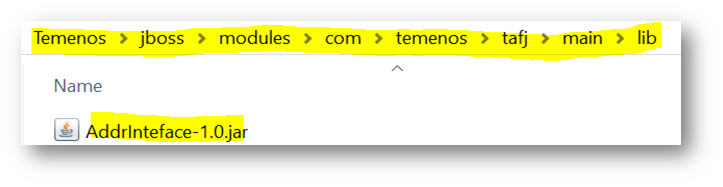
- Take the AddrInteface jar file and place it in below location and make an entry for that jar in corresponding module.xml location.
…\Temenos\jboss\modules\com\temenos\tafj\main\lib


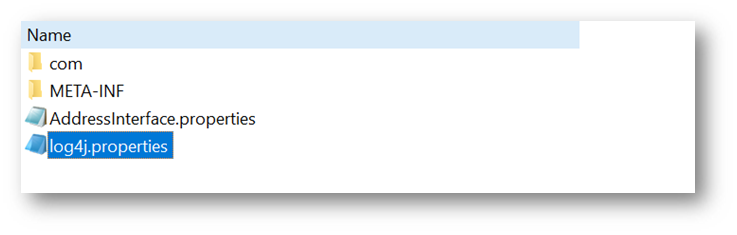
- And inside AddrInteface jar the log location can be modified in key value –“log4j.appender.tpm.File” with desired location in log4j.properties file.


- Start jBoss and test.
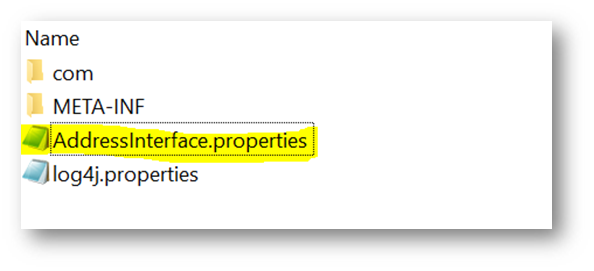
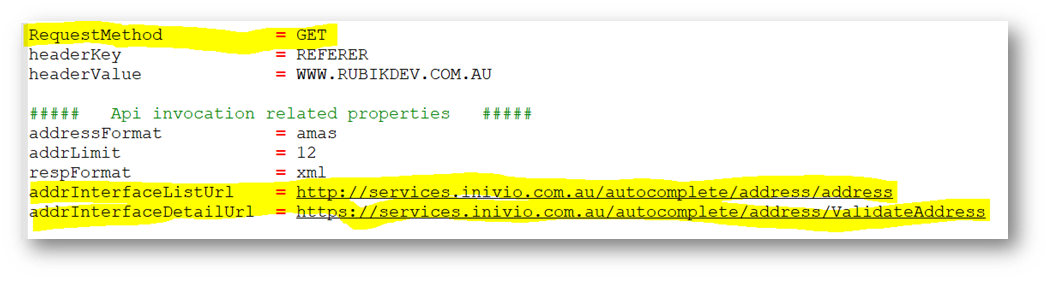
- AddrInterface APIs url information get it from AddressInterface.properties in AddrInteface-1.0.jar.
- AddrInteface-1.0.jar:

- AddressInterface.Properties.

Add Bookmark
save your best linksView Bookmark
Visit your best links BACK
BACK


Are you sure you want to log-off?