| Bookmark Name | Actions |
|---|
Deploy Receipting Microservice in AWS Container
The Receipting microservice is provisioned for deployment in an AWS container.
Deployment Artifacts
The Receipt Microservice for AWS deployment is available as a single release bundle. For example ms-receipt-package-aws-<RELEASE_NUMBER>.zip.
On extracting this file, folder ms-receipt-AWS will be found, which contains the scripts and jar required used for deploying into AWS.

AWS script files (install-aws.sh & destroy-aws.sh) is used for creating and maintaining the services and ms-receipt-package-aws-<release.no>.jar file can be found in the app folder which has all the java code written for implementation of services.
- The install-aws.sh script is used to deploy the Receipt microservice in the AWS environment using AWS services.
- Use the destroy-aws.sh script to stop and remove the setup.

Installation steps for AWS
Follow the steps below to install the Receipt microservice:
- Copy and paste the generated zip file (from target folder) in the installation directory. Unzip it.
- AWS CLI is required in the machine for running AWS commands. Follow instructions at AWS DOC.
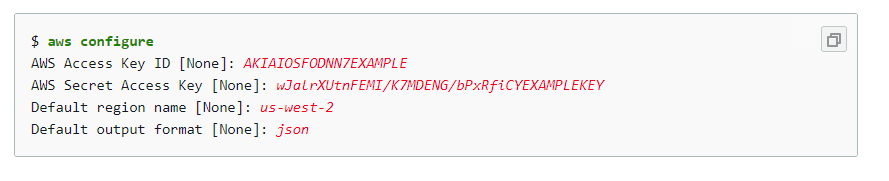
- Once the CLI is installed, now configure the AWS key, AWS secret and default region of the account the services have to deployed. Use following command.
- Open bash terminal at the installed location where install-aws.sh can be found.
- To execute install-aws.sh shell file, use command ./install-aws.sh. This command will create services in the AWS environment by the AWS CLI commands written in the install shell file.
- On the bash terminal, you will find the base path for the services, which will look like below.
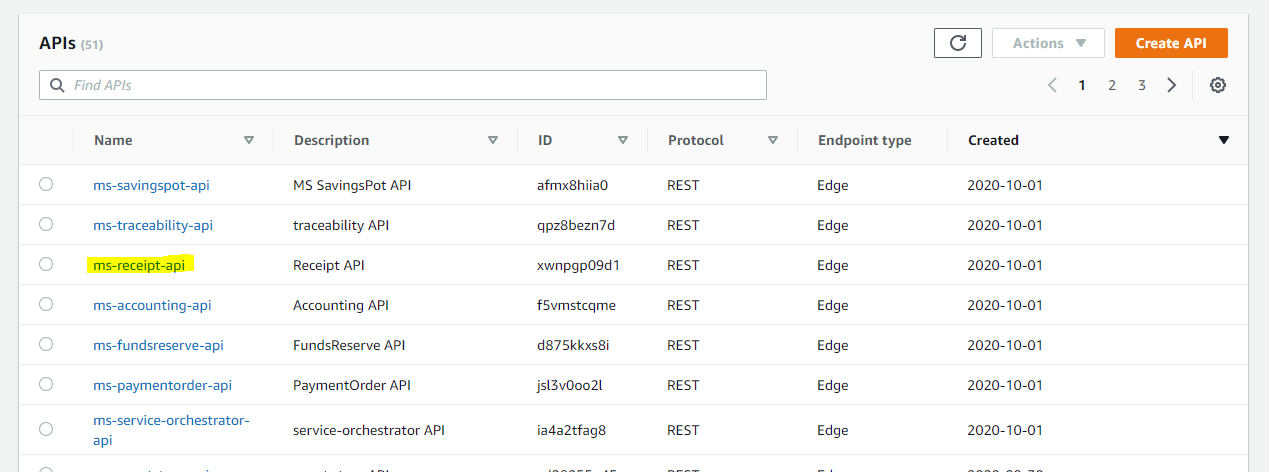
- Once installation has completed, verify the services at https://console.aws.amazon.com/console/home in the API Gateway Services.
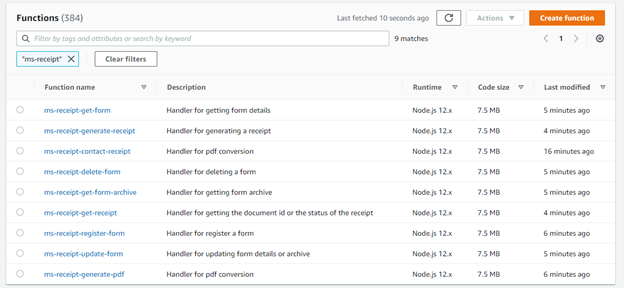
- Check the AWS Lambda function in the Lambda Services section
- For removing all the installed services run destroy-aws.sh file.



NOTE: Pre-Installation check if Python-2x and Jq framework is installed in the system.
Add Bookmark
save your best linksView Bookmarks
Visit your best links BACK
BACK


Are you sure you want to log-off?