| Bookmark Name | Actions |
|---|
Deploying Service Request Microservice on AWS
This section explains how to deploy the Service Request microservice on the AWS cloud. To do so, you need to perform the following tasks:
Deployment Artefacts
The Service Request microservice for AWS deployment is available as a single release bundle. For example, ms-servicerequest-package-aws-<release_number>.zip.
This bundle contains the following files:
ms-servicerequest-package-aws-<release_number>.jar-
AWS Script files:
- install-aws-ms.sh: This script used to deploy the Service Request microservice on the AWS cloud.
- destroy-aws-ms.sh: This script is used to undeploy and deletes the resources.
Deploying Service Request Microservice on AWS
Prerequisites
Before deploying Service Request microservice on AWS, ensure that you meet the following prerequisites:
- Install the Python framework.
- Install the Jq framework.
To deploy the Service Request microservice on AWS, follow these steps.
- Download the generated zip file from the target folder to the installation folder.
- Extract the zip file.
- In the AWS Command Line, go to the installation directory.
- For the microservice to be up and running, set up the AWS environment by executing the install-aws.sh shell file.
- Modify the region information that is specific to your installation in the
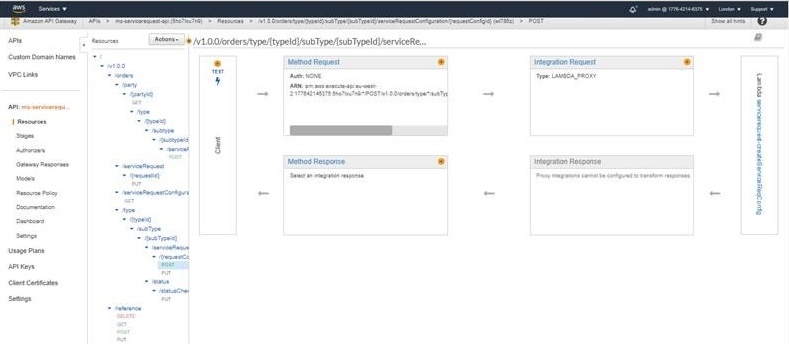
install-aws.shscript. For example, --region us-west-2, --event-source-arn arn:aws:kinesis:us-west-2, and --uri arn:aws:apigateway:us-west-2:lambda:path/2015-03-31/functions/arn:aws:lambda:us-west-2. - After the deployment is completed, to test the API, you will receive a Base URL. After successful deployment, sign-in to the AWS portal and verify whether the Lambda functions and API Gateways are created correctly.
- API Gateway
- API Gateway
Add Bookmark
save your best linksView Bookmarks
Visit your best links BACK
BACK


Are you sure you want to log-off?