| Bookmark Name | Actions |
|---|
Health Check
Health Check provides the ability to monitor the health of the party application. It is useful to test the internal health of an application and external dependencies such as a third-party API. The Party application relies on the external dependencies for proper functionality.
Configuration
To configure health check for the Party microservice in party.yml, follow these steps.
- To enable health check, set the environment variable named className_getHealthCheck in the API Container.
api: ports: - "8000:8080" - "8001:40500" environment: #--- API Health Check --- className_getHealthCheck: com.temenos.microservice.framework.core.health.GetHealthCheckImpl - Enable a port for the health check API as follows.
ingester: build: context: ${INGESTER_CONTEXT} dockerfile: Dockerfile args: BASE_IMAGE: ${INGESTER_APP_BASE_IMAGE} artifactid: ${ingester_artifactid} java_options: ${java_options} ${REMOTE_DEBUG} image: ${INGESTER_IMAGE} depends_on: - db-service1 - db-service2 - db-service3 ports: - "12000:8080" - "12001:40500" - Set the environment variable named healthcheck.base.path in the Ingester Container.
ingester:
  .
  .
  ports:
    - "12000:8080"
    - "12001:40500"
  environment:
    healthcheck.base.path: ms-party-data-ingester
API Health Check
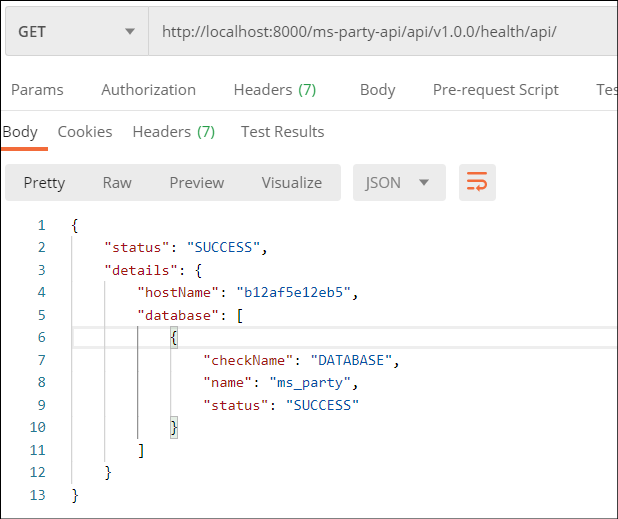
Party microservice exposes the API health check endpoint to monitor the health of microservice APIs.
Pattern: http://<host>:<port>/<context-root>/api/health
Sample: http://localhost:8000/ms-party-api/api/v1.0.0/health/api/
Docker:
Ingester Health Check:
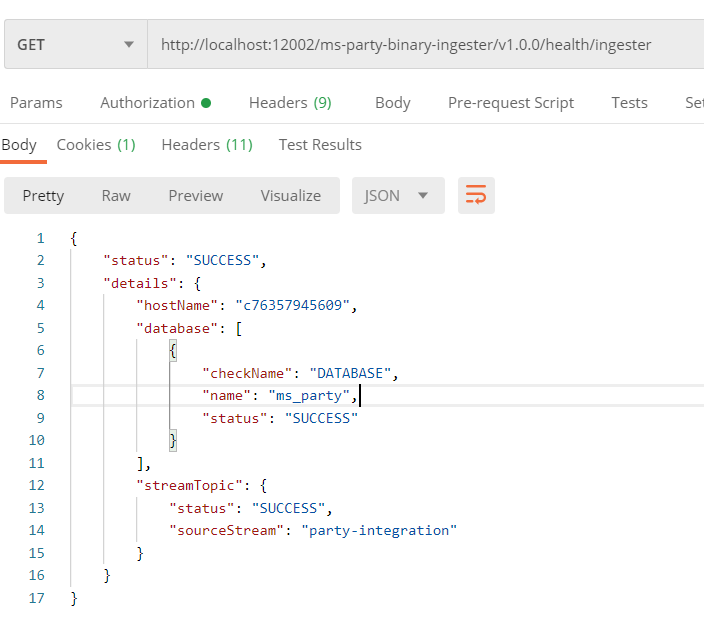
Party microservice exposes the Ingester health check endpoint to monitor the health of ingester. The Ingester health check endpoint consumes and processes the incoming messages from the Kafka/kinesis topic.
Pattern: http://<host>:<port>/<Ingester-base-path>/api/health
Sample: http://localhost:12002/ms-party-binary-ingester/v1.0.0/health/ingester
Docker:
Add Bookmark
save your best linksView Bookmarks
Visit your best links BACK
BACK


Are you sure you want to log-off?