
| Bookmark Name | Actions |
|---|
Installing Due Diligence Microservices in Docker
This section helps you to install the Due Diligence Microservice in Docker (On-Premise).
Procedure:
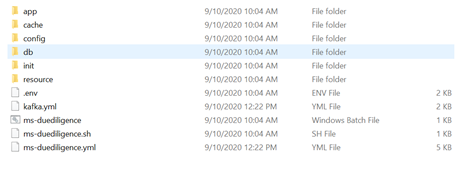
- Unzip the ms-duediligence-package-docker-<release_number>.zip.

- Extracted package contains the configuration files for the docker and the respective bat and sh files.
- Enable JWT Authentication in ms-duediligence.yml.
- Navigate from the command prompt to the directory where the .bat and .sh files are available and execute the following command, which creates an image and docker container for that image.
- For Windows : ms-duediligence.bat up --build -d
- For Linux : ms-duediligence.sh up --build -d
After the successful deployment database, collections and the reference data(master data) are loaded into the mongo database for Due Diligence microservice.
- Once the Due Diligence microservice is up and running in docker, check the APIs in the package.
NOTE:
The format of API's URL is given below:
- Base Path
http://<IP_ADDRESS>:<PORT>/<context-root>/api/<version>/
For Example: http://localhost:8004/ms-duediligence-api/api/v1.0.0/
- Resource path of the endpoint can be found in the APIs document. A sample endpoint of Due Diligence is http://localhost:8004/ms-duediligence-api/api/v1.0.0/party/parties/{partyId}/assessmentEvents.
Undeploying Microservices
To stop and remove the existing container, execute the following command from the location where the Due Diligence docker is started.
- For Windows : ms-duediligence.bat down
- For Linux : ms-duediligence.sh down
Add Bookmark
save your best linksView Bookmarks
Visit your best links BACK
BACK


Are you sure you want to log-off?